Page 23
Ph: 804.227.3023
10511 Old Ridge Rd. Ashland, VA 23005
v 2.0
Powertrain Control Solutions
The Timing Beacon function allows for a timing beacon to be connected to the assigned input. The Timing beacon has
two modes Lap Mode in which each signal received is counted as a lap and Segment mode where the user sets the
number of times the signal needs to be received to be considered a lap. The user can also set whether or not the screen
switches to the lap screen when the beacon is triggered. The amount of time the lap timer will freeze on the current lap
can also be set.
6.5 Speed Inputs
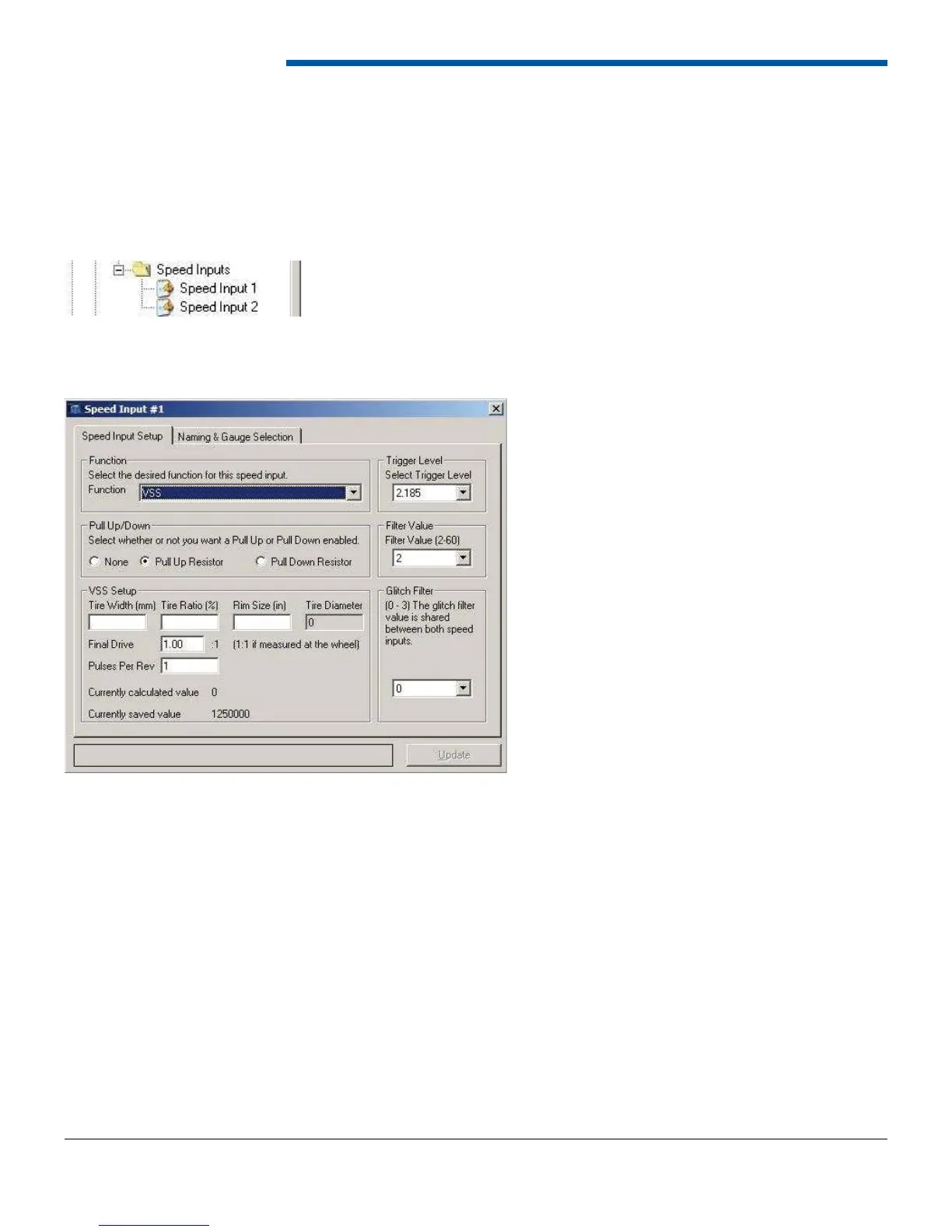
The speed input form contains two tabs; Speed Input Setup, and Naming and Gauge Selection. Function defi nition and
general input setup parameters are on the Speed Input Setup tab while naming are on the second tab.
The trigger level, fi lter value, glitch fi lter, and pull up/down resistor are independent of function. The trigger and fi lter
values specify the settings to determine if a signal should be counted or ignored as noise. The trigger level is the voltage
above which the signal is considered high. Any voltage below the trigger level is considered low. The trigger level and
fi lter value are specifi c to each speed input while the glitch fi lter is shared between both speed input 1 and 2. A 1000-ohm
pull-up or pull-down resistor is available for each speed input. The resistor is enabled by selecting the appropriate option
on the speed input form.
The Naming and Gauge Selection tab allows the user to assign a 20-character name, a 4-character label, and a gauge
to the speed input. The 20-character input description is used in data logs while the 4-character label is used when the
channel is displayed on the dash. The user can choose several different gauges, either speed or RPM depending on
function, depending on the operating range of the input.
The available functions for the speed inputs are listed below.
• Raw Frequency
• RPM
• Vehicle Speed
• Custom Speed Input


 To Next Page