Page 5
Ph: 804.227.3023
10511 Old Ridge Rd. Ashland, VA 23005
v 2.0
Powertrain Control Solutions
The speed inputs, pins 16 and 17, can be connected to a magnetic or hall-effect sensor. The speed inputs have
programmable 1000-ohm pull-up and pull-down resistors in the dash to accommodate a wide range of sensors.
2.2.3 On-Board Outputs
The D200 Dash Logger has 2 PWM outputs. These are high side (+12V) outputs capable of driving a constant current
of 6-amps each or a peak current of 30- amps. The power connection must be able to source the required power for the
outputs.
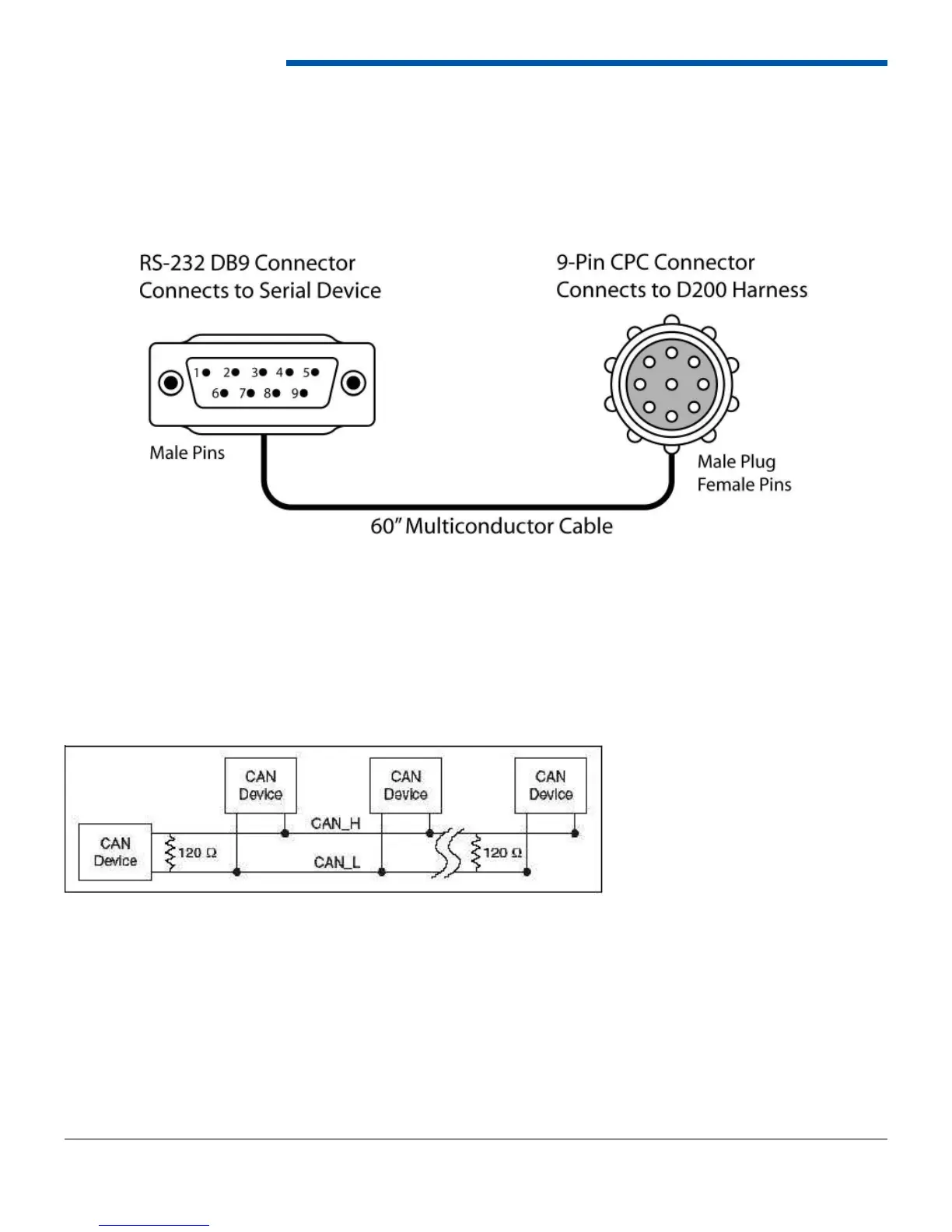
The D200 Dash Logger has one RS-232 serial connection typically used for connecting to an aftermarket engine controller
or GPS receiver. The RS-232 connection is on the back 28-pin circular connector and comes out of the harness on a 9-pin
circular connector. For connecting to a device with the normal 9-pin DB9 connector, the purchase of the ECU connection
kit is required. The 9-pin DB9 connector on the side of the dash is only used for pass-through communication and can not
be used to connect an RS-232 device to the dash.
2.2.5 Controller Area Network (CAN)
The D200 Dash Logger has two CAN interfaces, CAN A and CAN B. Both receive CAN information, but only CAN A
can be used to tune the PCS Transmission Controller. CAN A is a two wire (White/Red and White/Black) twisted pair
connected to a 2-pin Deutsch connector on the dash harness. For CAN communication, both wires must be connected
to the device and a terminating resistor must be at each ends of the harness. Multiple devices can be connected on the
same CAN network if the devices communicate at the same speed.


 To Next Page