SGM700 Digitizer
Configuration Menu -dAC- -continue-
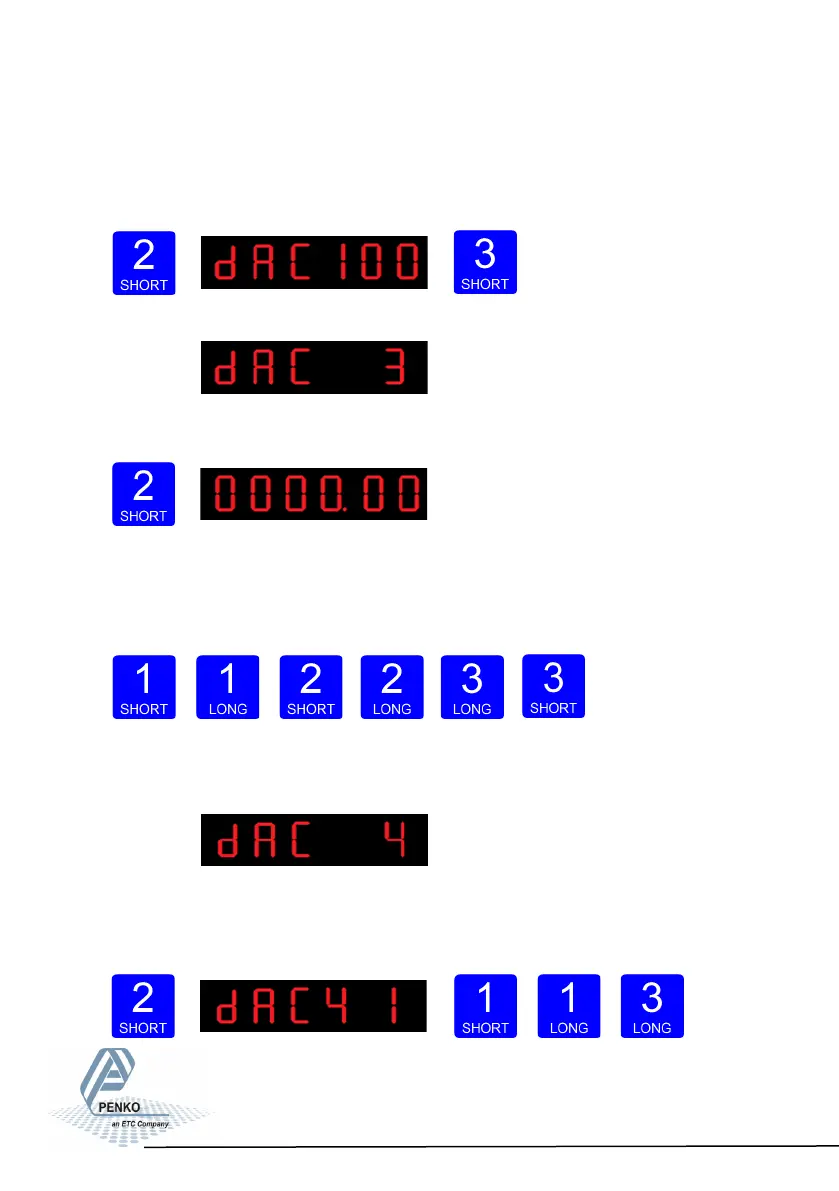
In dAC 2 you can set the analog output to its maximum level for testing purpo-
se.Press key 2 <2 sec to set the analog output to maximum. Press key 3 <2 sec
to go back.
The following screen is vissable:
In dAC 3 you can set the analog output to a level
you want for testing purpose.
Press key 2 <2 sec.
Fill in the wanted percentage (0000,00-0100,00 using key 1 and key 2. Key 1 is
for changing the number (1-9), key 2 is for changing the position of the cursor.
Confirm by pressing key 3 >2 sec. Press key 3 <2 sec. to go back and reset the
analog output.
Increase Decrease
Left Right Confirm Go back
The following screen is vissable:
In dAC 4 you set the weigher mode that the analog output is based on. Press key
2 < 2sec. to enter dAC 4. Scroll thru the weigher function options pressing key 1
and select
which weigher
mode is nee-
ded by pres-
sing key 3 >2sec. (options are: 1-19)
37



 To Next Page