1Installation Operating the Monitor
6
Operating the Monitor
To complete installation you will need to operate the monitor to check basic functionality. Here is a
quick introduction to the monitor.
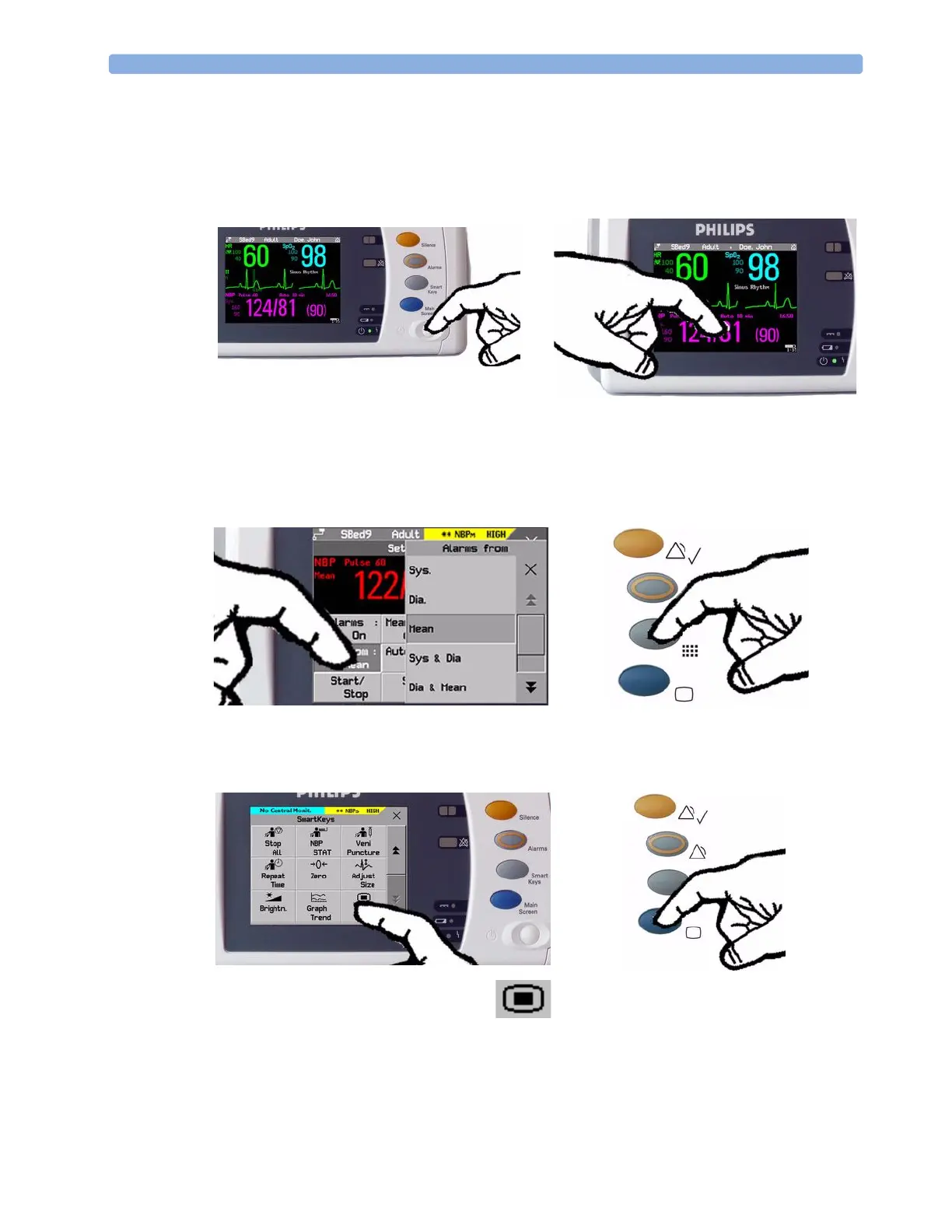
1 Switch on the monitor. After start-up the
monitor display will become active. You operate
the monitor using the touch screen.
2 To u c h s o m e t h i n g o n th e s c r e e n ( n u m e r i c s,
waves, other screen items) to enter the
corresponding menu. Touching the NBP
numeric, for example, brings you to the
Setup NBP menu.
3 To u c h ag ai n to se le ct an it em o n t h e m e n u a nd
work through the menu activities.
4 To a c c e ss Sm a r t K e ys , pre s s t h e Sm a r t K e y s
key. Main Setup is one of the
SmartKeys.
5 If you cannot find a menu by
touching the screen you can always
use the Main Setup SmartKey
which will get you to all menus on the monitor.
6 Press the Main Screen key to close all open
menus/windows and return to the main
screen. Press again to enter the Change
Screen window, where you can choose
from a number of pre-configured screens.



 To Next Page
 Loading...



