HyperSync Setup
57
Style 300RX Digital 1200RX or Digital
2400RX
with Digital S Head
Ranger RX
with Ranger S Head
Style 600RX Digital 1200RX or Digital
2400RX
with Digital SE Head
Ranger RX
with Ranger A Head
Style 1200RX Digital 1200RX or Digital
2400RX
with Mini A Head
Ranger RX Speed
with Ranger S Head
Digital 1200RX or Digital
2400RX
with Mini S Head
Ranger RX Speed
with Ranger A Head
Digital 1200RX or Digital
2400RX
with A3000 Head
Ranger RX Speed
A/s
with Ranger S Head
Digital 1200RX or Digital
2400RX
with A6000 Head
Ranger RX Speed
A/s
with Ranger A Head
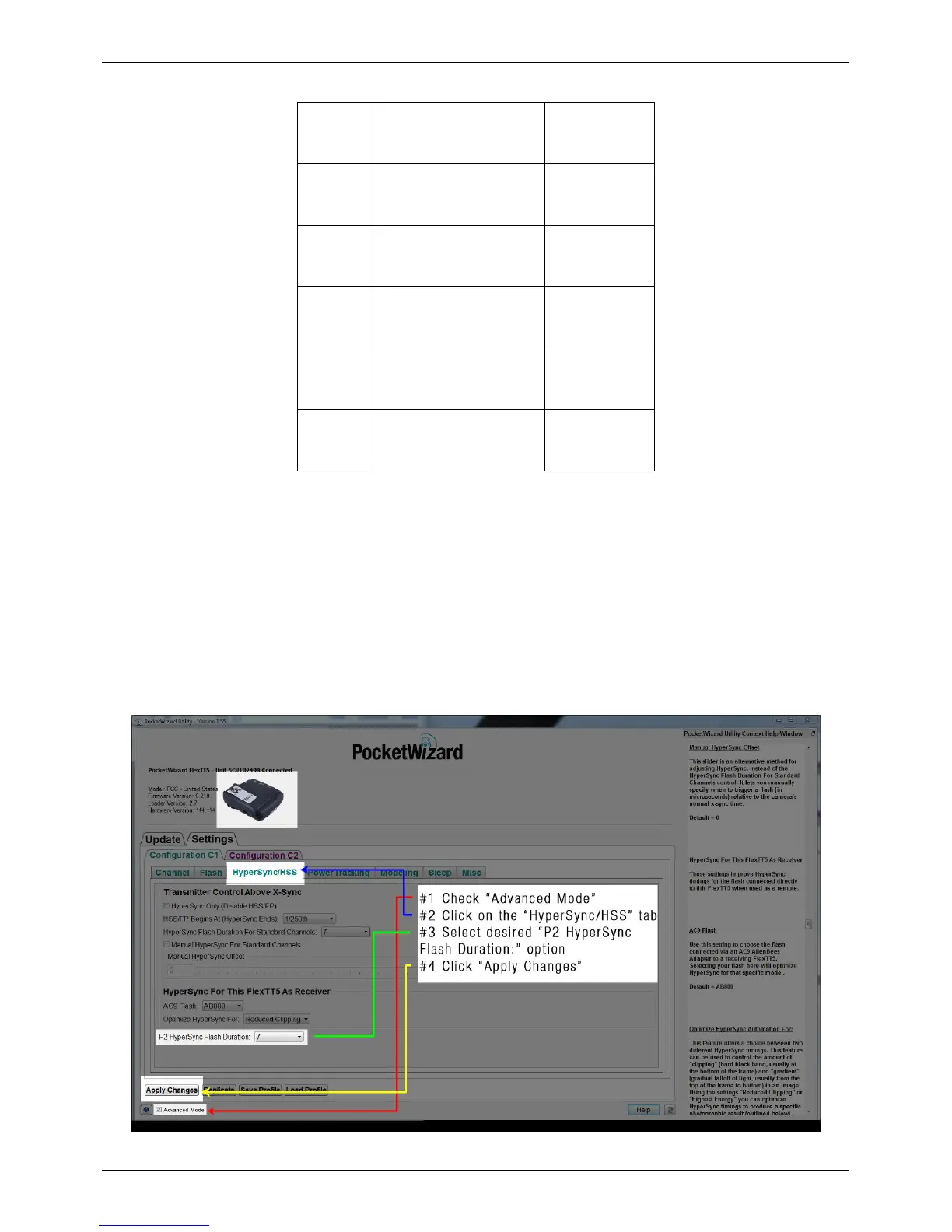
How to Configure the Receiving FlexTT5 P2 Port
When using a FlexTT5 as your receiver connected to a flash via the P2 port, follow these steps to configure your
radio:
1. Connect your receiving FlexTT5 to the PocketWizard Utility via USB, and make sure that the “Advanced Mode”
box is checked
2. Navigate to the “HyperSync/HSS” tab; use the “ P2 HyperSync Flash Duration” drop-down to select a timing
setting – 10 is often a good starting-point
3. Click "Apply Changes"
4. Connect the FlexTT5 to the flash or pack via the P2 port and appropriate cable



 To Next Page