126
Polyend Play Manual Rev 1
NOTES
7.3 Playing & Chaining Patterns
Patterns can be played individually or chained to play in sequence as a
complete set or as a selected series of patterns. The play functions are
applied in any mode, but chaining patterns is performed in the pattern
mode view. It is useful to create chained sections and then to manually
change playback between them for live improvisation.
Fill
Delete
Reverb Send
Delay Send
Note
Microtune
Master Volume
Limiter
Save
Reset
Overdrive
Bit Depth
Volume
Panning
Tempo
Swing
View
Master FX
Repeat Type
Repeat Grid
Filter Cutoff
Resonance
Track Length
Play Mode
Patterns
Audio/MIDI
Chance
Action
Sample
Folder
Copy
Paste
Randomize
Randomize Type
Sample Start
Sample End
ShiftMove
Micromove
Mute
16
Solo
32
Variation
48
Sample Attack
Sample Decay
Select
64
Fill
Delete
Reverb Send
Delay Send
Note
Microtune
Master Volume
Limiter
Save
Reset
Overdrive
Bit Depth
Volume
Panning
Tempo
Swing
View
Master FX
Repeat Type
Repeat Grid
Filter Cutoff
Resonance
Track Length
Play Mode
Patterns
Audio/MIDI
Chance
Action
Sample
Folder
Copy
Paste
Randomize
Randomize Type
Sample Start
Sample End
ShiftMove
Micromove
Mute
16
Solo
32
Variation
48
Sample Attack
Sample Decay
Select
64
Fill
Delete
Reverb Send
Delay Send
Note
Microtune
Master Volume
Limiter
Save
Reset
Overdrive
Bit Depth
Volume
Panning
Tempo
Swing
View
Master FX
Repeat Type
Repeat Grid
Filter Cutoff
Resonance
Track Length
Play Mode
Patterns
Audio/MIDI
Chance
Action
Sample
Folder
Copy
Paste
Randomize
Randomize Type
Sample Start
Sample End
ShiftMove
Micromove
Mute
16
Solo
32
Variation
48
Sample Attack
Sample Decay
Select
64
Fill
Delete
Reverb Send
Delay Send
Note
Microtune
Master Volume
Limiter
Save
Reset
Overdrive
Bit Depth
Volume
Panning
Tempo
Swing
View
Master FX
Repeat Type
Repeat Grid
Filter Cutoff
Resonance
Track Length
Play Mode
Patterns
Audio/MIDI
Chance
Action
Sample
Folder
Copy
Paste
Randomize
Randomize Type
Sample Start
Sample End
ShiftMove
Micromove
Mute
16
Solo
32
Variation
48
Sample Attack
Sample Decay
Select
64
Fill
Delete
Reverb Send
Delay Send
Note
Microtune
Master Volume
Limiter
Save
Reset
Overdrive
Bit Depth
Volume
Panning
Tempo
Swing
View
Master FX
Repeat Type
Repeat Grid
Filter Cutoff
Resonance
Track Length
Play Mode
Patterns
Audio/MIDI
Chance
Action
Sample
Folder
Copy
Paste
Randomize
Randomize Type
Sample Start
Sample End
ShiftMove
Micromove
Mute
16
Solo
32
Variation
48
Sample Attack
Sample Decay
Select
64
Pattern 1
Pattern 1 Pattern 3Pattern 2 Pattern 4
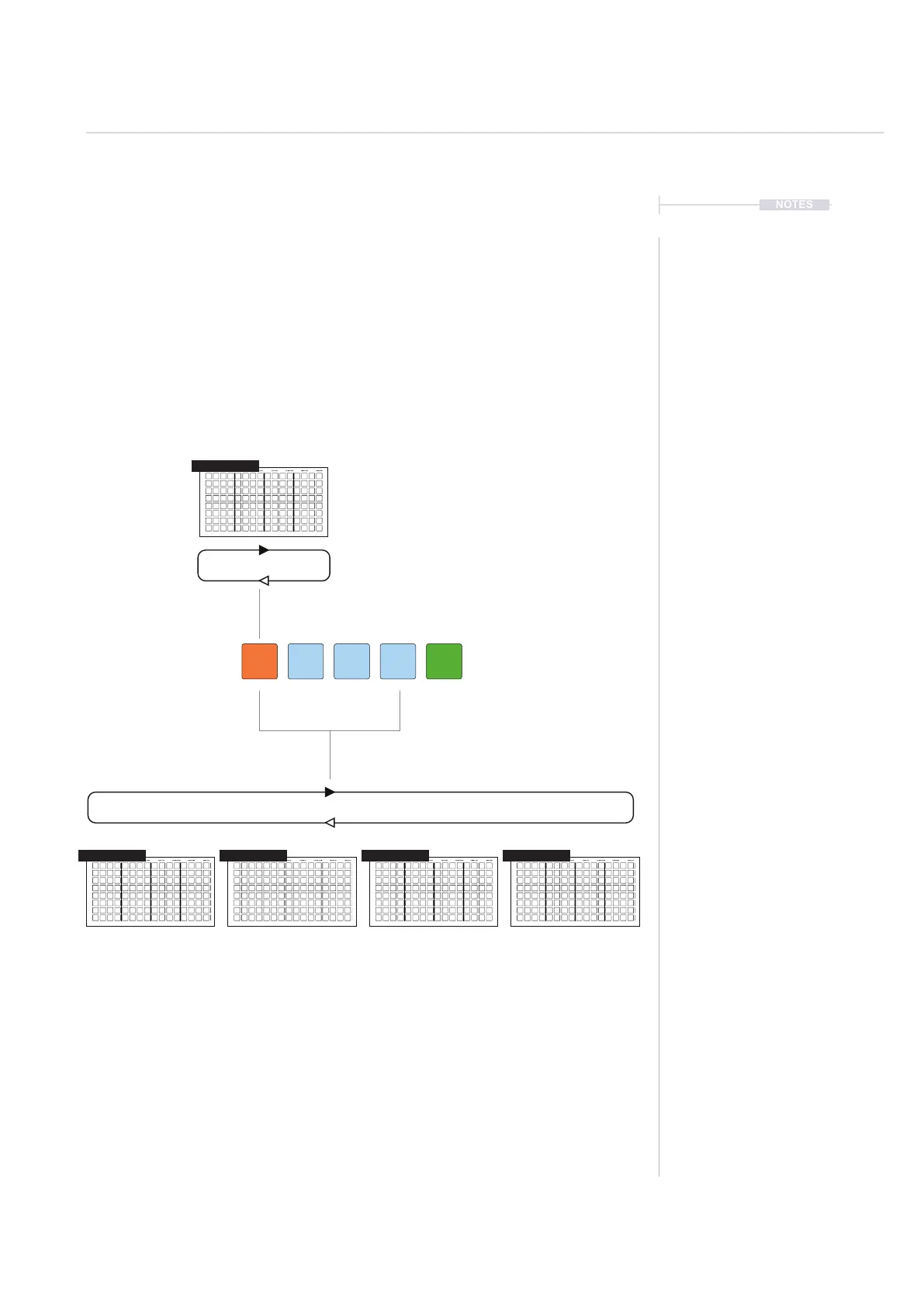
Press [Play]
Press [Shift] + [Play]
Press [Play] to play and loop only the current
pattern. Press [Play] again to stop playback.
A chained sequence plays until
an empty pad is reached and
then loops playback from start.
Press [Shift] + [Play] to play and loop all the chained patterns in
sequence until an empty pad is reached. Press [Play] to stop playback.
When a sequence is playing, other sequences or patterns can be manually triggered by pressing
the [Pad]. This will switch between patterns on the y. Patterns cued to play next will ash its pad
orange and light blue.
Cue a pattern to play after the completion of the current pattern: Press [Pad] for next pattern.
Immediately switch playback to another pattern: Press [Shift] + [Pad] for next pattern.
Press [Patterns] to access the Pattern Mode.
1 32 4 5
Arrangements & Variations
7



 To Next Page