128
Polyend Play Manual Rev 1
NOTES
7.4 Track Variations
While patterns in themselves cover all 8 tracks, it is also possible to create
and store variations of each track. This is useful in creating arrangements
but also a great performance tool. Up to 16 variation slots are available for
each track.
A variation is an alternative version of a track that can be created and then
selected manually either to change an arrangement or used to add variety
during on-the-y and live performances.
Fill
Delete
Reverb Send
Delay Send
Note
Microtune
Master Volume
Limiter
Save
Reset
Overdrive
Bit Depth
Volume
Panning
Tempo
Swing
View
Master FX
Repeat Type
Repeat Grid
Filter Cutoff
Resonance
Track Length
Play Mode
Patterns
Audio/MIDI
Chance
Action
Sample
Folder
Copy
Paste
Randomize
Randomize Type
Sample Start
Sample End
ShiftMove
Micromove
Mute
16
Solo
32
Variation
48
Sample Attack
Sample Decay
Select
64
Fill
Delete
Reverb Send
Delay Send
Note
Microtune
Master Volume
Limiter
Save
Reset
Overdrive
Bit Depth
Volume
Panning
Tempo
Swing
View
Master FX
Repeat Type
Repeat Grid
Filter Cutoff
Resonance
Track Length
Play Mode
Patterns
Audio/MIDI
Chance
Action
Sample
Folder
Copy
Paste
Randomize
Randomize Type
Sample Start
Sample End
ShiftMove
Micromove
Mute
16
Solo
32
Variation
48
Sample Attack
Sample Decay
Select
64
Fill
Delete
Reverb Send
Delay Send
Note
Microtune
Master Volume
Limiter
Save
Reset
Overdrive
Bit Depth
Volume
Panning
Tempo
Swing
View
Master FX
Repeat Type
Repeat Grid
Filter Cutoff
Resonance
Track Length
Play Mode
Patterns
Audio/MIDI
Chance
Action
Sample
Folder
Copy
Paste
Randomize
Randomize Type
Sample Start
Sample End
ShiftMove
Micromove
Mute
16
Solo
32
Variation
48
Sample Attack
Sample Decay
Select
64
16
17
113
97
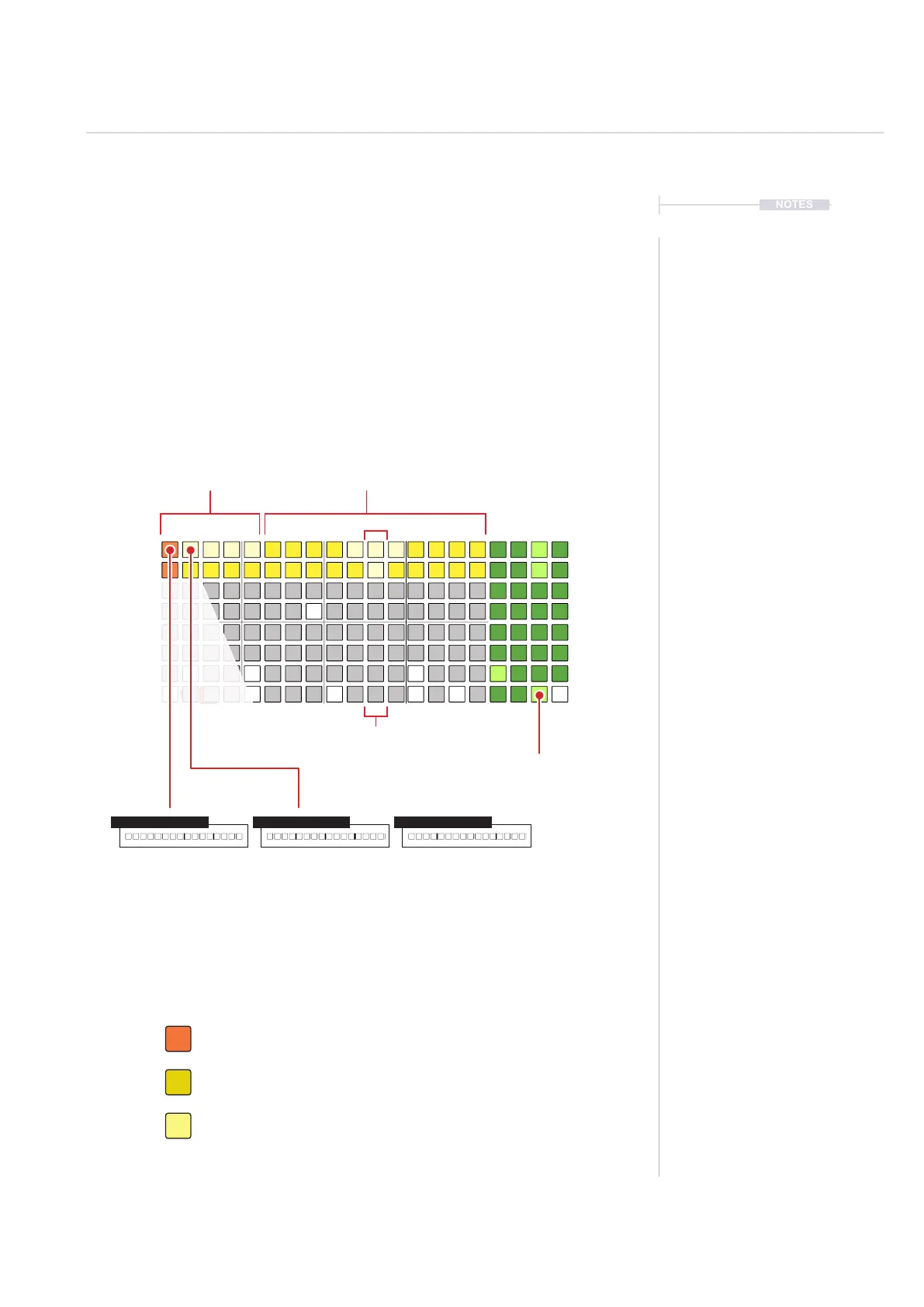
Track Variation Selection
Available Variations Free Variation Slots
Press [Pad] to select a
variation
Hold (Screen) + [Pad] to
launch all column variations
Variations operate at track level. They can be selected manually but it is not possible to
automatically select or chain track variations together.
Track 1 Variation 1 Track 1 Variation 2 Track 1 Variation 3
Press [Variation] pad for the desired track row to access one of 16 variations.
Orange. Currently active / loaded track variation.
Variation Mode - 8x16 Grid Pad Colours
Yellow. Empty Variation Slot.
Bright Yellow. Available Variations.
Arrangements & Variations
7



 To Next Page