96
Polyend Play Manual Rev 1
NOTES
6.8 Live Recording
Step recording allows manual placement of notes in the sequencer.
Alternatively, live recording operates in real-time allowing notes and
parameter adjustments to be recorded into the pattern as they are played.
Knob Change
View Mode Keyboard
Record into Note Steps
Sequencing Patterns
6
1
2
3
4
5
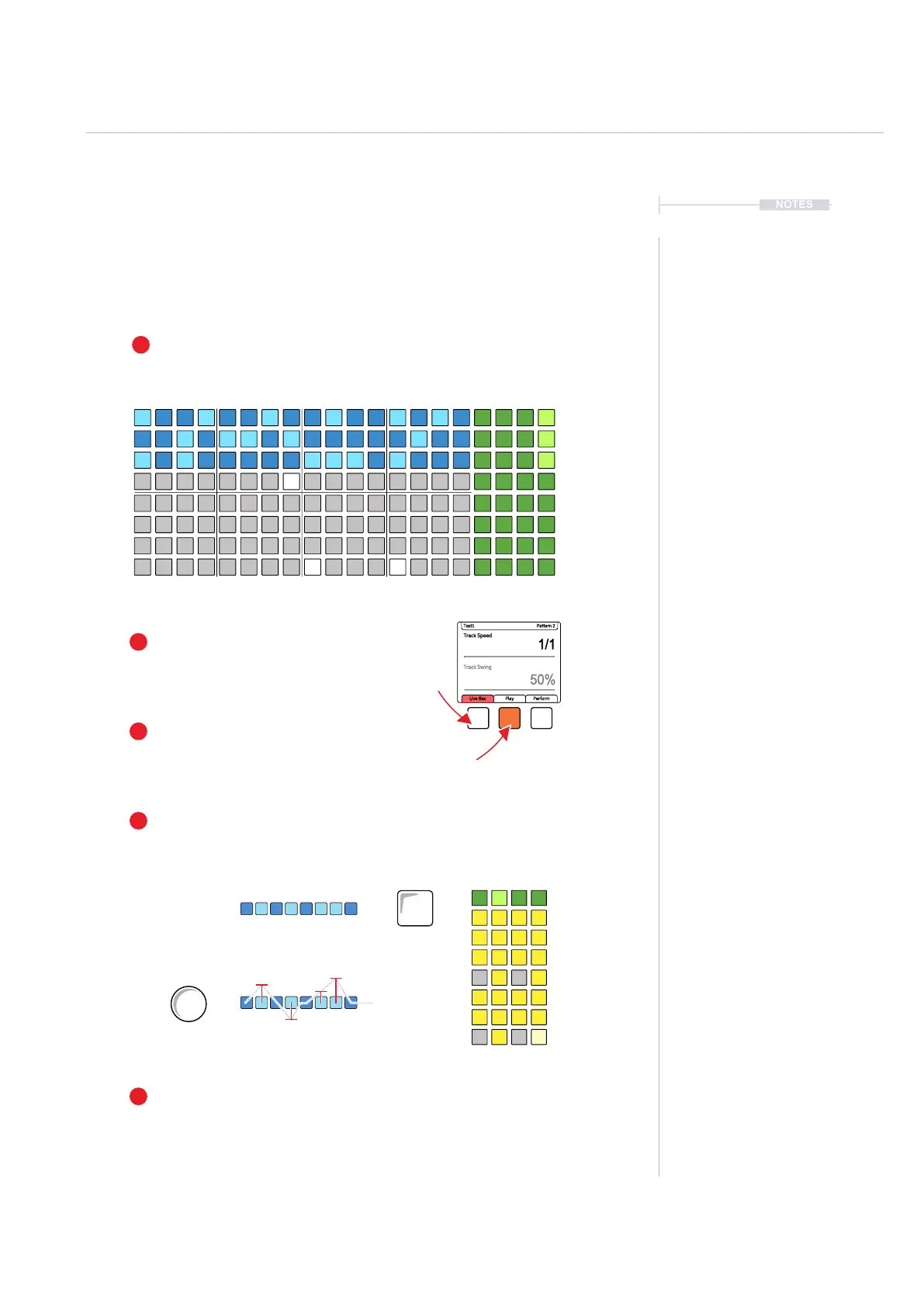
Select Live Rec
Press [Live Rec] Screen button to engage live
recording mode. Screen button is lit red.
Play the Pattern
Press [Play] Screen button to play the pattern.
Screen button shows playback progress bar.
To Add Notes
Press [View] to select the view controller. The right side 4 columns convert to
an onboard MIDI keyboard. Play notes in. Alternatively use and external MIDI
controller to play notes in.
Record Parameter Changes
Turn (Parameter) knob to record in any parameter variations into the
sequence time with the pattern steps. The (Screen) knob can also be used.
Select Tracks to Edit
Press [Select] function pad for the track to select.
Selected tracks illuminate light green and grid blue.
Track Speed
1/1
50%
Test1 Pattern 2
Track Swing
Live Rec Play Perform
C E
G G
Filter Cutoff
Resonance
View
Master FX



 To Next Page