170
Polyend Play Manual Rev 1
NOTES
10.6 MIDI Mode
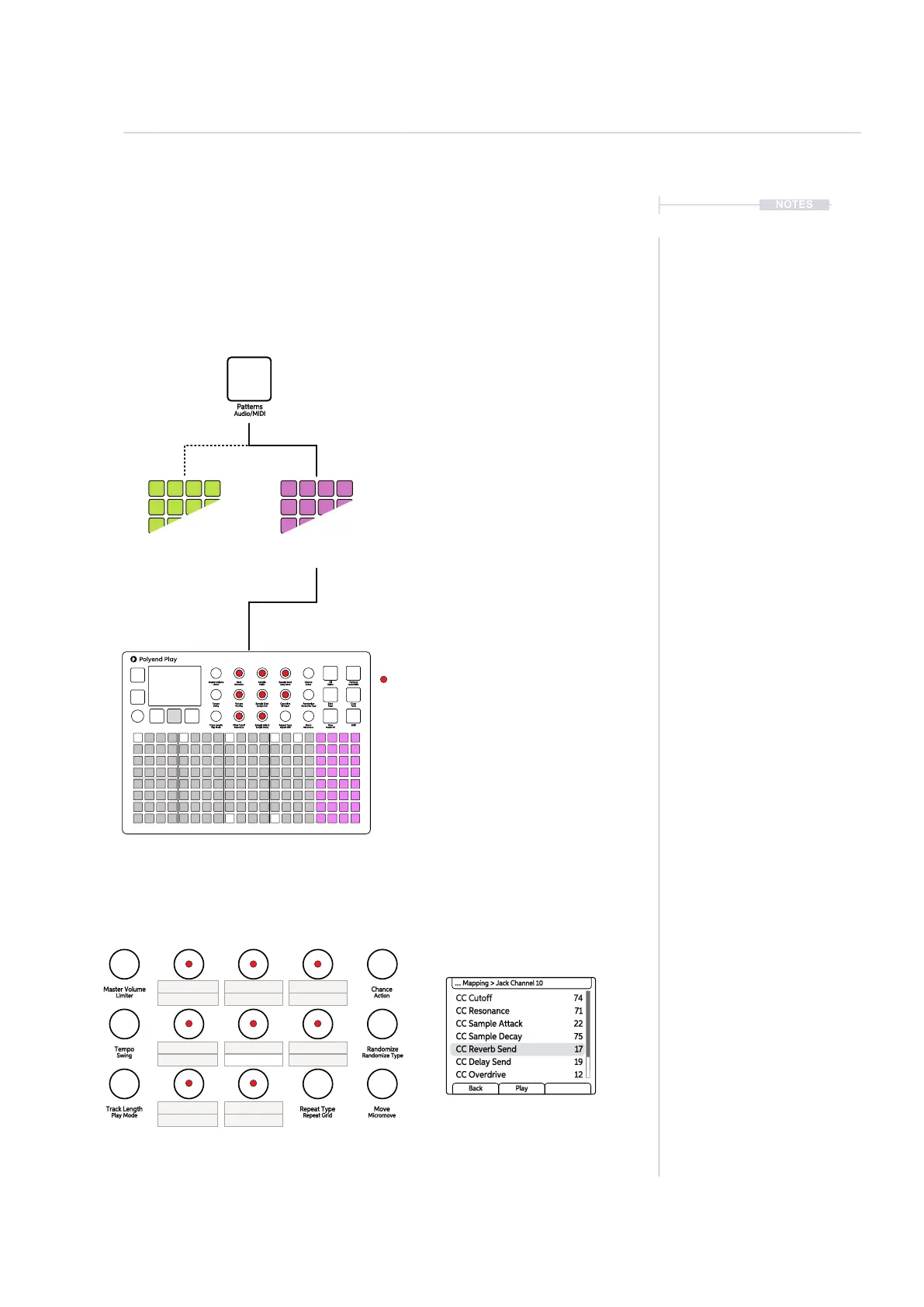
Play must be in MIDI Mode to program steps and send MIDI data out. The
parameter options change when in MIDI mode where the knobs represent
MIDI orientated functions. These are not labelled and some can be
congured specically in the MIDI menu.
CC Cutoff 74
CC Sample Attack 22
CC Reverb Send 17
CC Resonance 71
CC Sample Decay 75
CC Delay Send 19
CC Overdrive 12
.... Mapping > Jack Channel 10
Back Play
Hold [Shift] + Press [Audio/MIDI]
To toggle between the Audio track mode and
MIDI sequencing mode.
Audio tracks are indicated by the function
button colour. This is the last four right side
columns. In Audio mode these are illuminated
green and in MIDI Mode will be lit violet.
Some parameters take on the role of MIDI
functions. These are not labelled with MIDI
functions.
MIDI Mode, MIDI Specic parameters are not labelled in the
list by it’s MIDI function but will refer to the Audio Mode
labels. The conguration can be set in the MIDI settings.
MIDI Mode Parameters
Tracks can be sequenced with the Pads as
per the same process as audio tracks.
Green
Audio Mode
Violet
MIDI Mode
Function Pads
Fill
Delete
Reverb Send
Delay Send
Note
Microtune
Master Volume
Limiter
Save
Reset
Overdrive
Bit Depth
Volume
Panning
Tempo
Swing
View
Master FX
Repeat Type
Repeat Grid
Filter Cutoff
Resonance
Track Length
Play Mode
Patterns
Audio/MIDI
Chance
Action
Sample
Folder
Copy
Paste
Randomize
Randomize Type
Sample Start
Sample End
ShiftMove
Micromove
Sample Attack
Sample Decay
Reverb Send
Delay Send
Note
Microtune
Master Volume
Limiter
Overdrive
Bit Depth
Volume
Panning
Tempo
Swing
Repeat Type
Repeat Grid
Filter Cutoff
Resonance
Track Length
Play Mode
Chance
Action
Sample
Folder
Randomize
Randomize Type
Sample Start
Sample End
Move
Micromove
Sample Attack
Sample Decay
Pitch Bend
Note Tune
Velocity Chord
Channel
CC# CC#
CC#
CC#
Note Length Not Used
Program
CC# CC#
CC#
CC#
MIDI
10



 To Next Page