99
Polyend Play Manual Rev 1
NOTES
Sequencing Patterns
6
6.9 View Mode
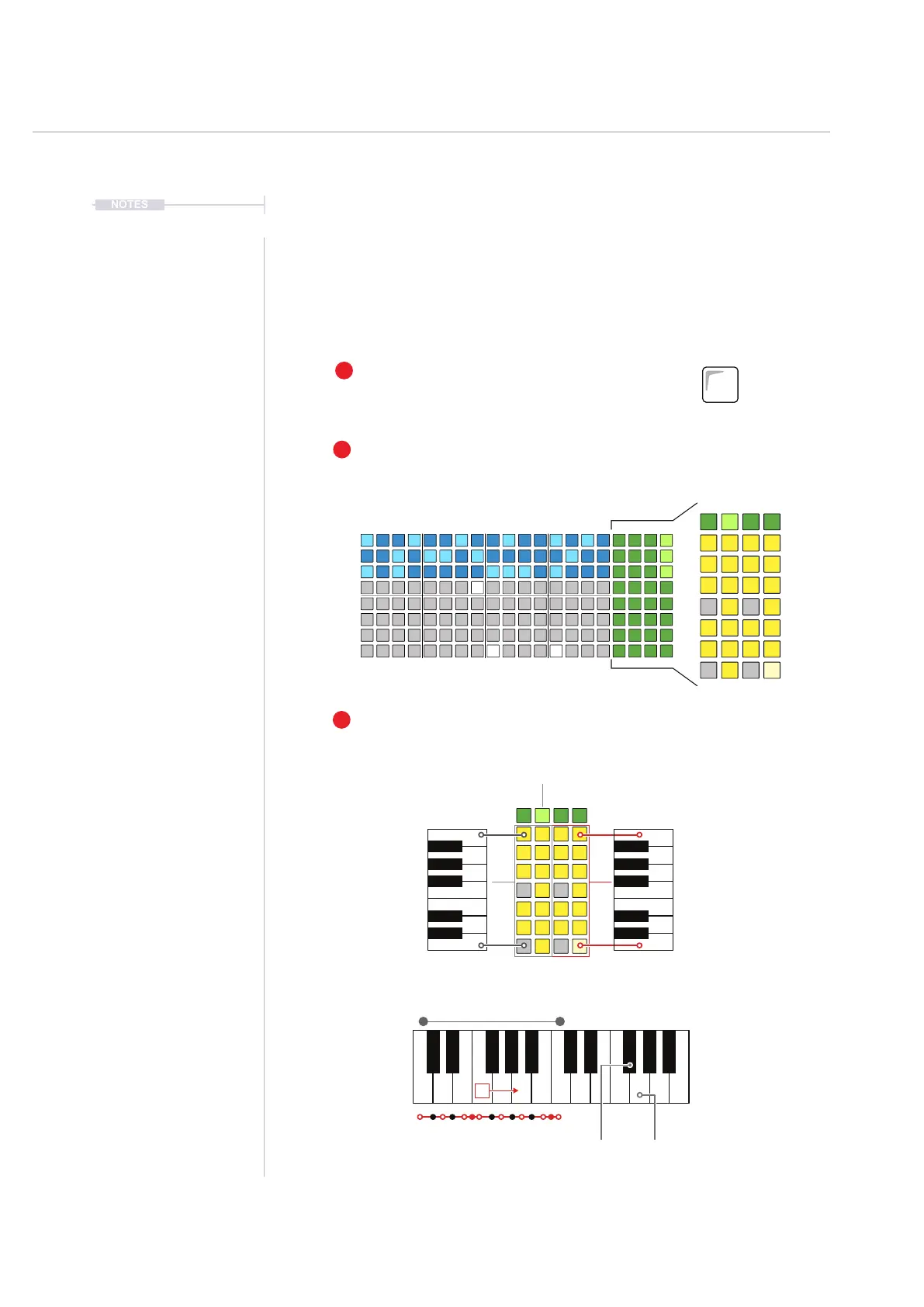
View mode presents an internal / virtual MIDI keyboard controller using the
last four function pad rows. The keyboard can be changed to pad style in
main menu congurations. The keyboard is laid out in two rows of keys to
allow note entry in live recording mode. The notes applied are inuenced by
Play’s scale setting.
1
2
3
To Add Notes
Use the view pads to play and record notes in live mode. Green pads change
the octave range for the keyboard.
Select View Mode
Press [View] to select the view controller.
View Mode Keyboard
The right side 4 columns convert to an onboard MIDI
keyboard to play notes in. Scale setting inuences the
view mode keyboard.
View
Master FX
C
C4C3
B4
F#4F#4 F#4F#3
B3
CA
+4
F B B
1 Semitone Steps
(Half steps)
100
Cents per Semitone
1 Octave
(12 Semitones)
C3-B4
C5-B6
C1-B2 C7-B8



 To Next Page