168
Polyend Play Manual Rev 1
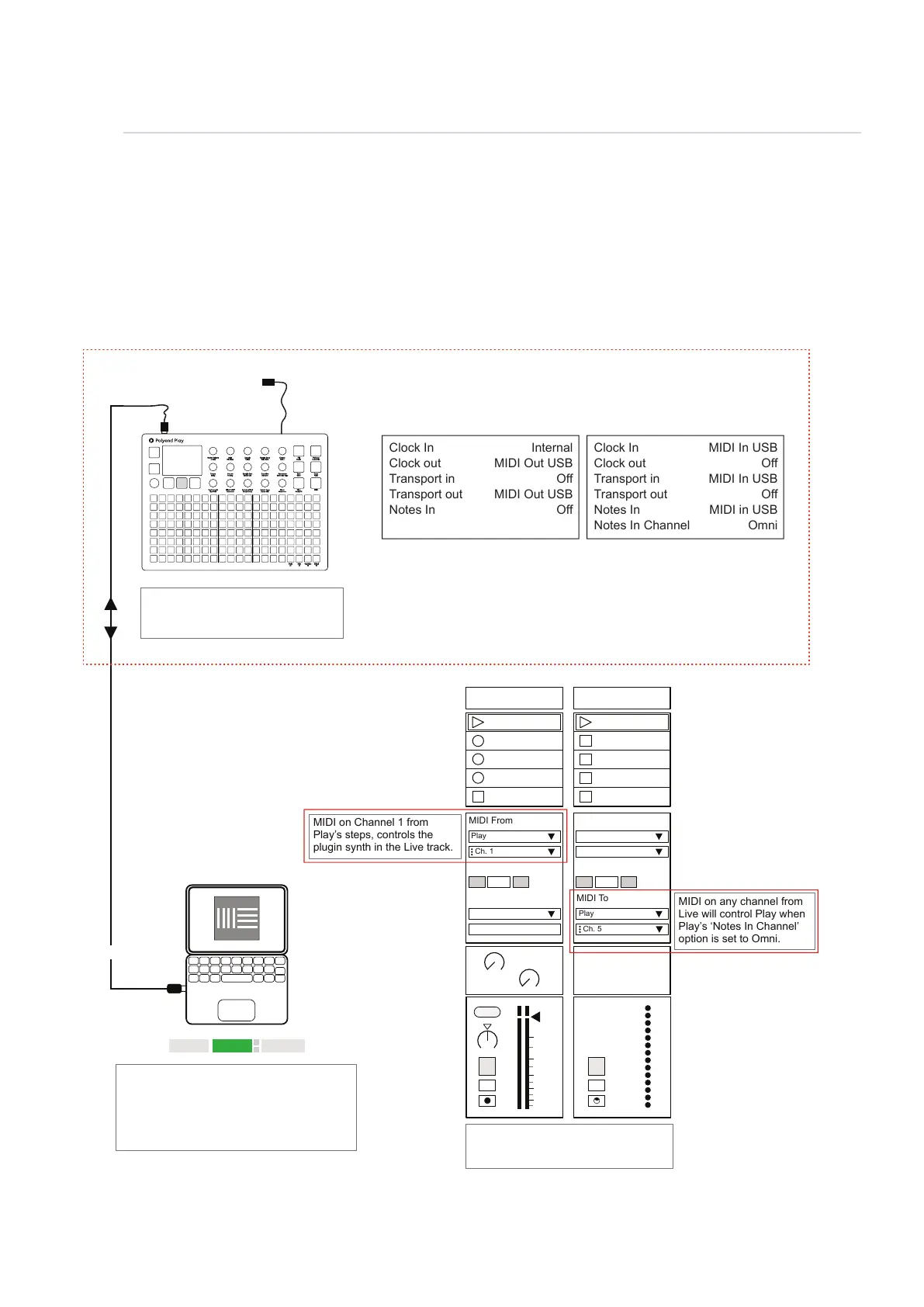
The ability to connect to a PC or Mac via a MIDI connection is possible, which can allow software
synths and plug-ins to be controlled by Play. Play will need a hub or will need to be powered by the
PC / Mac as the USB connection is also the source of power for Play.
Link EXT TAP
102.00
1 Plugin A 2 MIDI
MIDI From MIDI From
Play
Master Play
Ch. 1
In In
2
1
s
s
Auto Auto
Monitor Monitor
Audio To MIDI To
A
Sends
B
1.53
0
12
24
36
48
60
Play: Menu > MIDI
Control DAW from Play Control Play from DAW
USB MIDI
While in this example Play will predominately control the DAW, Notes can be
received and recorded from the DAW into Play tracks. When recording into Play
ensure alignment of the track length and ‘select’ the tracks to record into.
Clock In
Clock out
Transport in
Transport out
Notes In
Clock In
Clock out
Transport in
Transport out
Notes In
Notes In Channel
Internal
MIDI Out USB
Off
MIDI Out USB
Off
MIDI In USB
Off
MIDI In USB
Off
MIDI in USB
Omni
Transport control e.g. Play, Stop can be
set by DAW or Play. It is advised to
dened which device controls the clock.
MIDI settings in the Live preferences page will
need to be set ‘On’ for MIDI Ports, Input &
Output. When controlling to/from Play.
The ‘Ext’ function, in Live should be on to use
external sync settings and for tempo to be
synchronised from Play.
MIDI on Channel 1 from
Play’s steps, controls the
plugin synth in the Live track.
MIDI on any channel from
Live will control Play when
Play’s ‘Notes In Channel’
option is set to Omni.
Ensure receiving track is armed for
recording to preview the audio also to
recording incoming MIDI notes.
Example Conguration 2: Play in / out with Ableton Live.
USB
MIDI OUT
Fill
Delete
Reverb Send
Delay Send
Note
Microtune
Master Volume
Limiter
Save
Reset
Overdrive
Bit Depth
Volume
Panning
Tempo
Swing
View
Master FX
Repeat Type
Repeat Grid
Filter Cutoff
Resonance
Track Length
Play Mode
Patterns
Audio/MIDI
Chance
Action
Sample
Folder
Copy
Paste
Randomize
Randomize Type
Sample Start
Sample End
ShiftMove
Micromove
Mute
16
Solo
32
Variation
48
Sample Attack
Sample Decay
Select
64
Ch. 5
Off
Off
MIDI
10



 To Next Page