8
Polyend Play Manual Rev 1
Overview
1
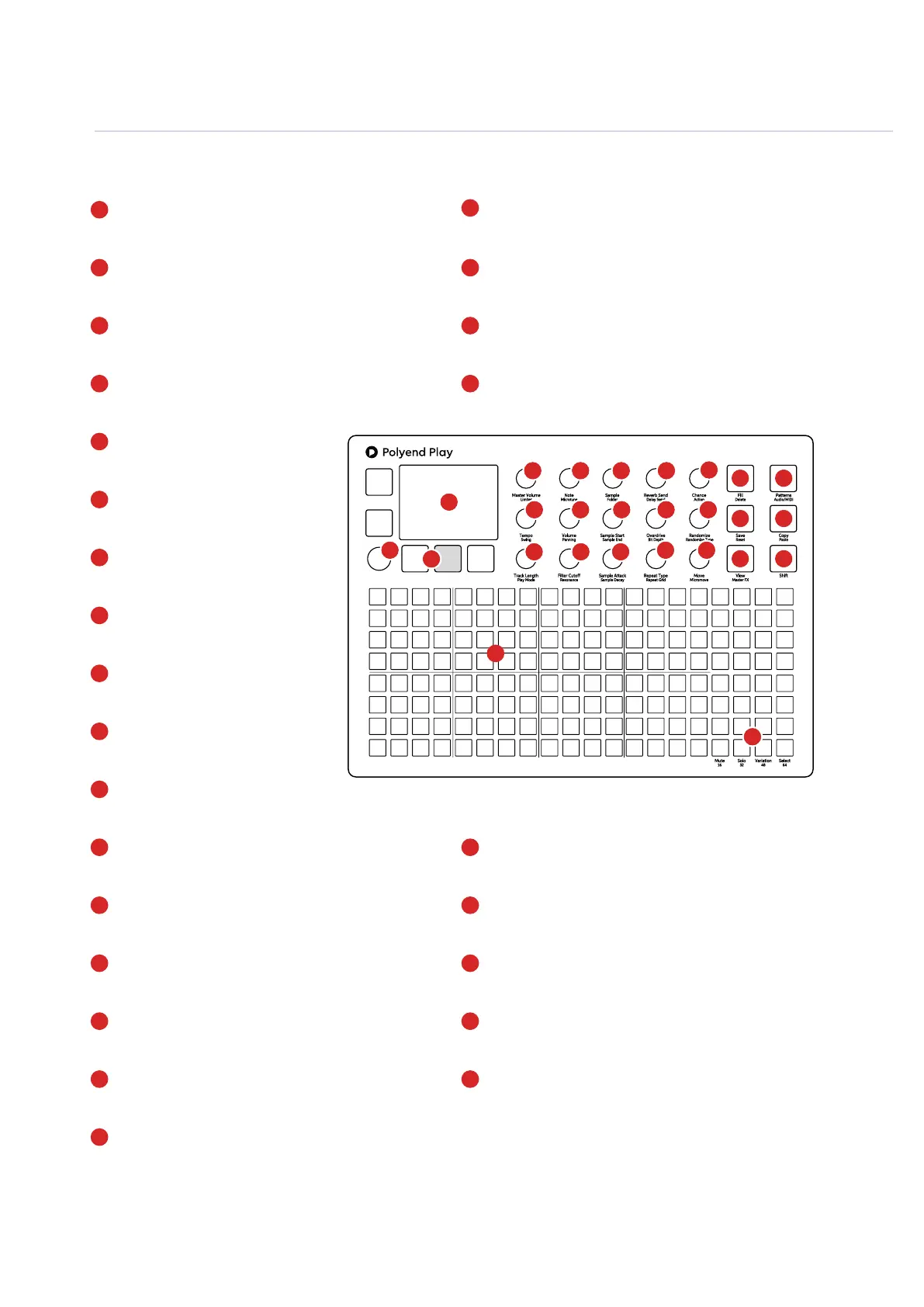
LCD Display
Hi Resolution Display.
Screen Buttons
5 Dynamic [Screen buttons]. Dependant on the
function displayed for each button.
Multi-Functional Screen Knob
Clickable encoder.
Function Pads
8 x 4 Silicone Pads. Multifunction columns used for
Mute, Solo, Variation, Select and chromatic mode.
Track Sequencer Pads
8 x 16 Silicone Pads. Track step columns used for
sequencing, performing and arranging.
Master Volume & Limiter
Control of primary master volume dB level and the
secondary limiter threshold option.
Note & Microtune
Note pitch adjustments relative to a C4 note sample and
micro tuning -100 to +100 cents
Randomize & Randomize Type
Percentage randomization and type determines
which step parameters are affected.
Sample Attack & Decay
Sample start attack, fade-in time and the end of
sample fade-out time
Move & Micromove
Move a step placement on the grid left or right
and in smaller adjustments with micro move.
Patterns & Audio/MIDI Button
Pattern selection mode. Toggle between MIDI and
Audio tracks
Copy & Paste Button
Copy and Paste various functions.
Shift Button
Hold shift plus another knob or button to access it’s
secondary function.
Reverb & Delay Sends
Reverb and Send levels to adjust the
effect intensity.
Chance & Action
Determines if / when an action
occurs. Special action after a step.
Tempo & Swing
Adjusts global or track BPM Tempo
and swing value.
Sample Volume & Panning
Sample volume level deviation from
0dB original sample. Pan Left/Right.
Sample Start & End
Trims the start and the end point of
the sample.
Overdrive & Bit Depth
Overdrive grit and amplication or
reduces bit resolution.
Sample & Folder
Sample selection from current sample pool. Select or
change sample folder.
Track Length & Play Mode
Track length in steps between 1-64. Selects one
of 35 play modes
Filter Cutoff & Resonance
Adjusts the DJ style lter cutoff or resonance
Repeat Type & Grid
Selects the step repeat type from the list of options.
Step repeat density is selected with grid.
Fill & Delete Button
Fill utility for generating and populating sequences.
Delete option for various functions.
Save & Reset Button
Save current state of pattern and also recall using shift to
restore the saved state.
View & Master FX Button
Changes the function pads to a chromatic input
controller. Access audio processors using shift.
The 8 x 20 gird pads are not velocity sensitive.
Fill
Delete
Reverb Send
Delay Send
Note
Microtune
Master Volume
Limiter
Save
Reset
Overdrive
Bit Depth
Volume
Panning
Tempo
Swing
View
Master FX
Repeat Type
Repeat Grid
Filter Cutoff
Resonance
Track Length
Play Mode
Patterns
Audio/MIDI
Chance
Action
Sample
Folder
Copy
Paste
Randomize
Randomize Type
Sample Start
Sample End
ShiftMove
Micromove
Mute
16
Solo
32
Variation
48
Sample Attack
Sample Decay
Select
64
1
4
5
10
15
20
24
5
7
15
16
18
20
24
22
26
9
10
11
12
13
14
6
11
16
21
25
7
12
17
22
8
13
18
26
9
14
19
23
8
17
19
21
23
25
6
4
2
2
3
3
1



 To Next Page