THE ART OF WELDING
P6
PN-0509076 Rev. 16 69-92
Transfert of Log-fi les6. 2. 5.
To fi nd out the best solution in case of problems the so-called Log-fi les must be copied from the power source
and sent to the Polysoude After Sales Service. Logs fi les should be recovered as soon as possible after the onset
of the problem.
Necessary equipment :
1 empty Polysoude USB fl ash drive without any stored directories or fi les.
Copying of the Log-fi les :
To avoid loss of important fi les the pow-
er source must not be switched off when
the problem occurs.
If it had been switched off by mistake anyhow the following instructions shall be carried out to save the remai-
ning fi les.
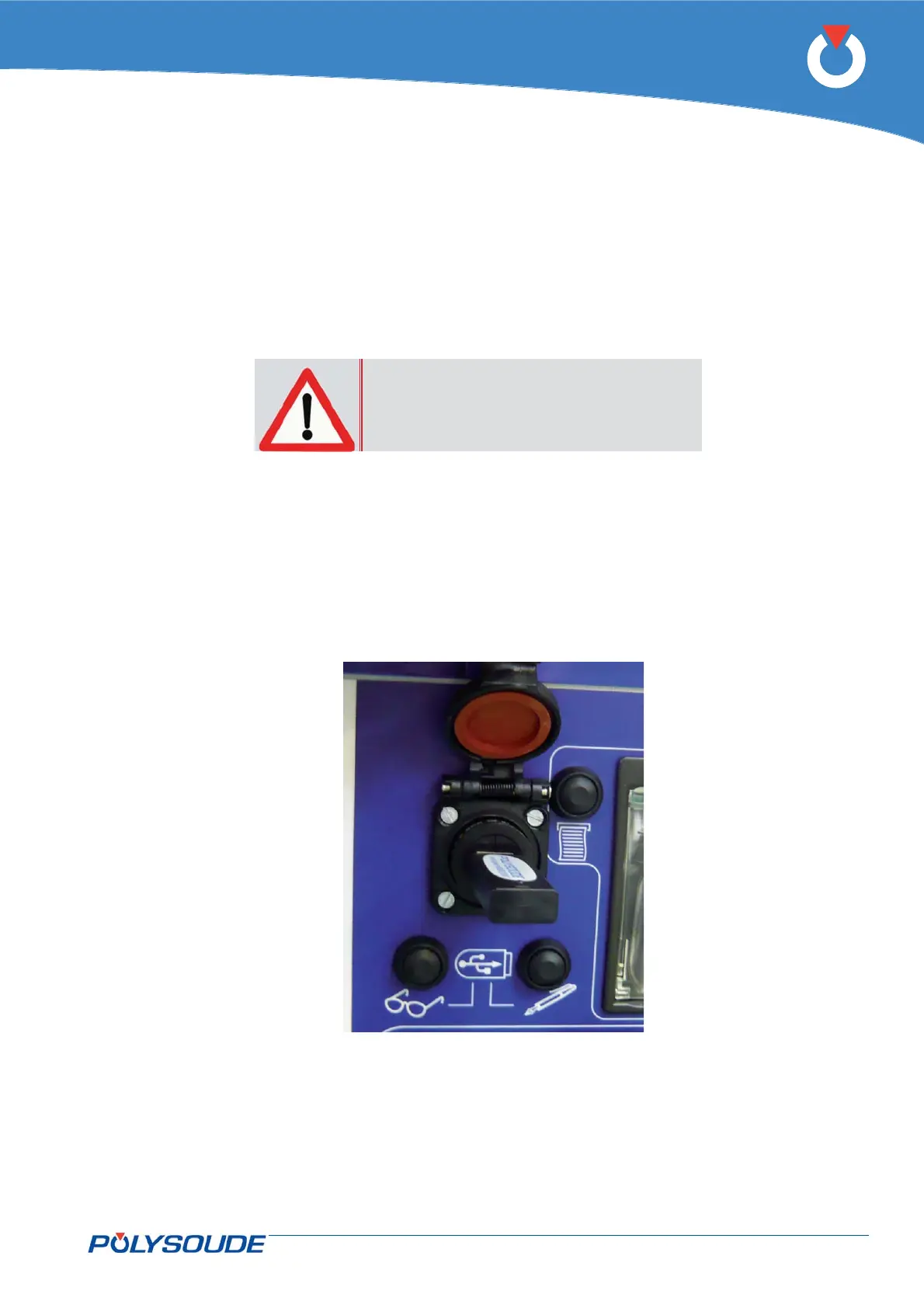
Connect the USB fl ash drive to the appropriate USB port.•
Push the button “Write on USB fl ash drive” at the front side of the power source, which is marked by a •
pencil symbol.
The fi le transfer from the power source to the USB fl ash drive is indicated by a fl ashing red LED.•
The red LED stops fl ashing when the fi le transfer has been fi nished (transfer time about 30 seconds).•
Disconnect the USB fl ash drive.•
Copy the directory named “Polysoude” with the transmitted fi les and send it per e-mail to the Polysoude •
After Sales Service.
Fig. 6.9 - Connector for USB-key



 To Next Page