62
6 The Fat Channel
6.8 Fat Channel Screens
StudioLive™ Series III
Owner’s Manual
5. Gain. Sets Make-up Gain for the Compressor.
6. Release. Sets the Release time for the Compressor.
7. Input Meter. Displays the pre-Compressor signal level.
8. Graph. Displays current compression curve.
9. Gain Reduction Meter. Displays the amount of Gain Reduction applied by the
Compressor to the channel.
10. Output Meter. Displays the post-Compressor signal level.
11. Soft. Enables Soft knee compression.
12. Auto. Enables Auto Mode.
13. Key Listen. Touch to enable the Key Listen function.
14. Key Filter. Sets the Key Filter frequency.
15. Key Source (Input Channels only). Sets the Key Source for the Compressor.
Note: Because the StudioLive 64S employs the quad-core FLEX DSP engine, any of the first
32 channels can be used a Key Source for channels 1-32 while any of the second 32
channels can be used as a Key Source for channels 33-64.
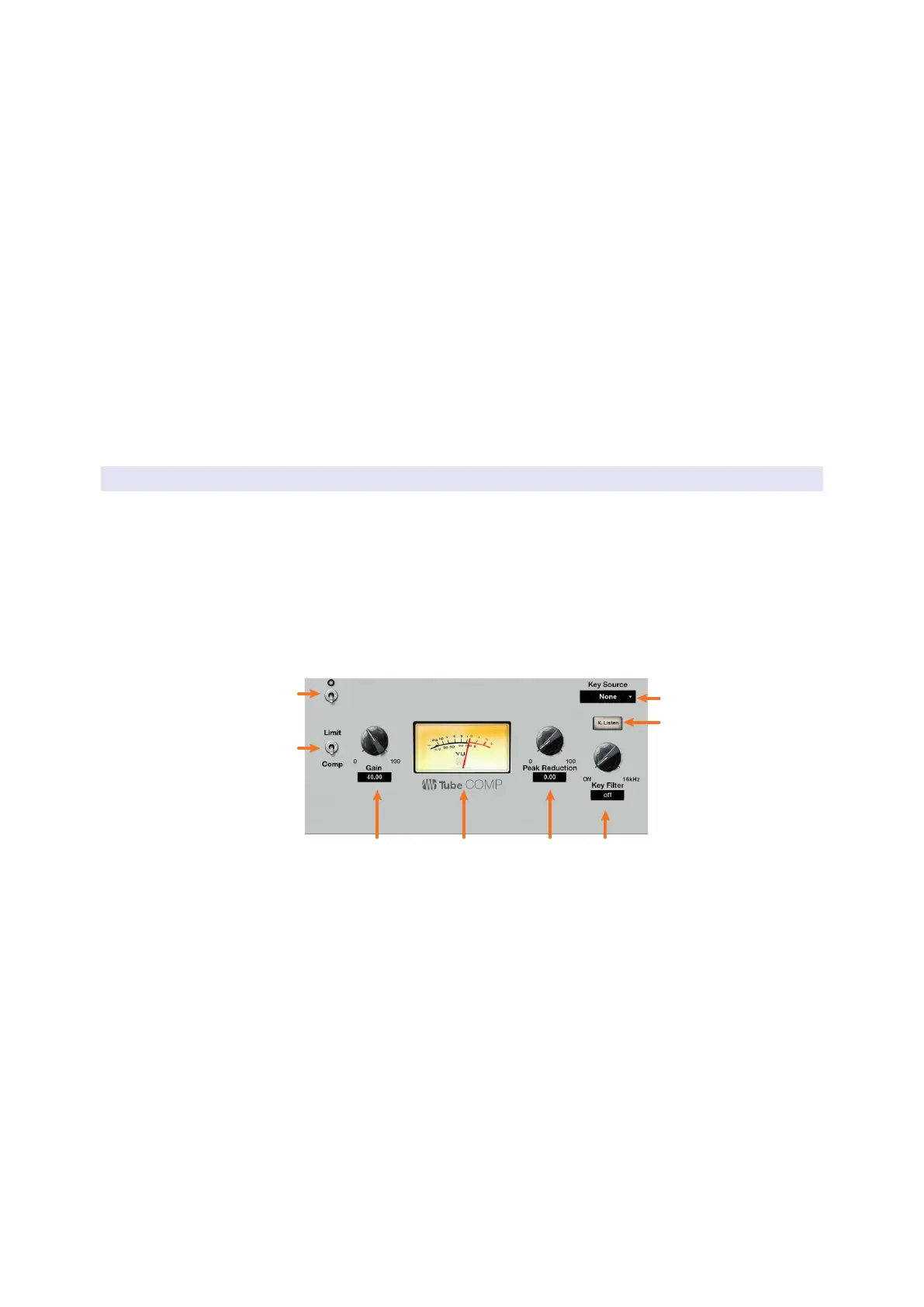
6.8.4.2 Tube Leveling Amplifier Overview Screen
When the Fat Channel is in Tube Compressor mode, the Touch Display shows an
overview screen that displays the relevant parameters. Touching any onscreen knob
allows you to use the Master Control encoder to set the selected parameter. Touching
a drop-down selector (such as Key Source) lets you select from a list of relevant
choices. Use the Master Control encoder to scroll through choices. Touching onscreen
buttons toggles the related parameter on or off.
Power User Tip: For StudioLive models with dynamic Fat Channel displays, many of these
parameters can also be controlled from the encoders and buttons in the Fat Channel. See
Section 6.5.2 for details.
2
1
7
8
1. Processor On/Off. Enables or disables the Compressor.
2. Comp / Limiter. Switches between the compressor and limiter modes.
3. Gain. Sets the input gain to the compressor.
4. VU Meter. Displays the post-Compressor signal level.
5. Peak Reduction. Sets the amount of peak reduction to apply to the signal.
6. Key Filter. Sets the Key Filter frequency.
7. Key Listen. Touch to enable the Key Listen function.
8. Key Source (Input Channels only). Sets the Key Source for the Compressor.
Note: Because the StudioLive 64S employs the quad-core FLEX DSP engine, any of the first
32 channels can be used a Key Source for channels 1-32 while any of the second 32
channels can be used as a Key Source for channels 33-64.










 To Next Page