- 304 -
5
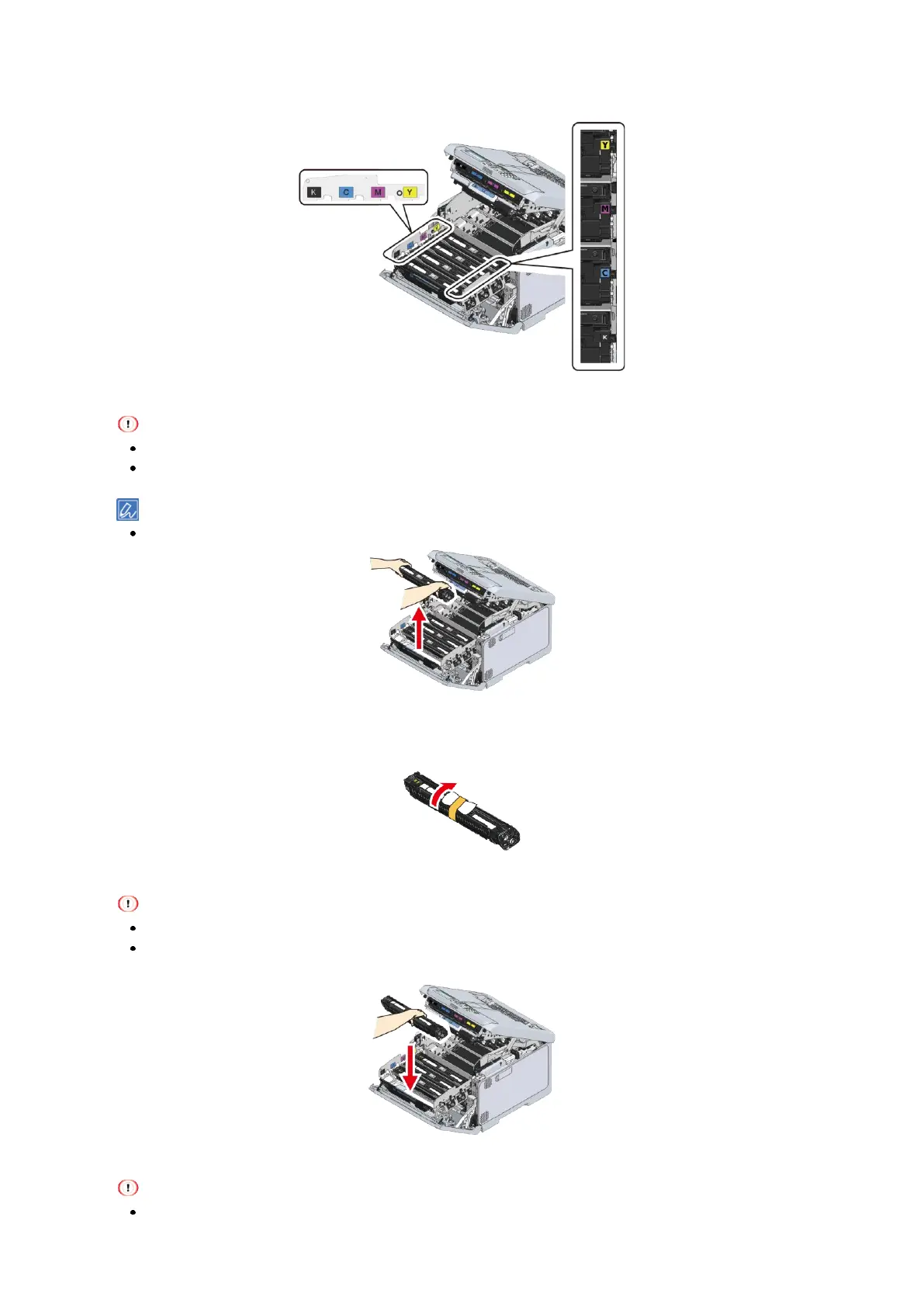
Check the image drum to be replaced by the label color.
6
Remove the image drum of the color to be replaced.
Because image drums (green parts) can easily get damaged, handle with adequate care.
Do not expose the image drum to direct sunlight or strong light (About 1,500 lux or above). Do not leave it
uncovered for more than 5 minutes even under room lighting.
The image drum is not fixed in the main unit. You can just lift to remove it.
7
Take the new image drum of the color to be replaced out of its box.
8
Take out the desiccant of the new image drum.
9
Install the new image drum in this machine by holding it with the color label on the right.
Because image drums (green parts) can easily get damaged, handle with adequate care.
Do not expose the image drum to direct sunlight or strong light (About 1,500 lux or above). Do not leave it
uncovered for more than 5 minutes even under room lighting.
10
Hold the L3 handle and push the image drum basket all the way in.
If the image drum is not installed correctly, the image drum basket cannot be pushed all the way in.















 To Next Page