PG-FP5 CHAPTER 8 USAGE COMMUNICATION COMMANDS
R20UT0008EJ0400 Rev. 4.00 Page 138 of 240
Jul 15, 2010
(3) Start HyperTerminal
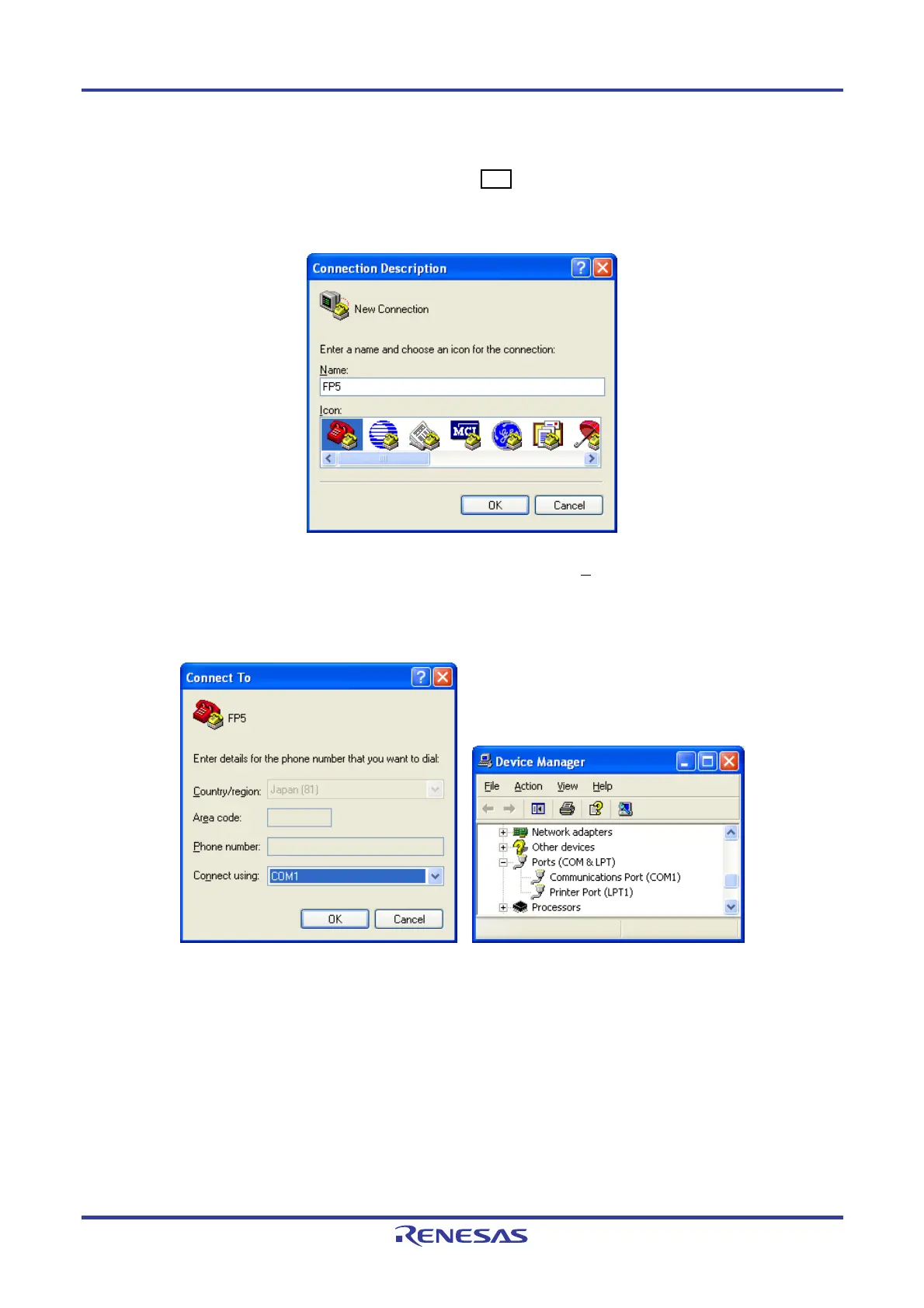
Click the Start menu “All Programs” -> “Accessories” -> “Communications” -> “HyperTerminal” to start it. The dialog
box shown below will open. Input a name, then click the OK button.
Figure 8-2. Connection Settings
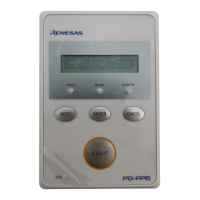
Next, the dialog box below will be displayed. From the “Connect using(N
):” pull-down menu select the COM port
which is in use. Check the COM port number with Device Manager.
Figure 8-3. Checking the COM Port Number Settings
Next, the dialog box in Figure 8-4 will be displayed, so select the data transfer conditions listed below.
Data transfer rate: 9600 bps, 19200 bps, 38400 bps, 57600 bps, 115200 bps
Data bits: 8 bit
Parity: None
Stop bit: 1 bit
Flow control: Hardware


 To Next Page