When You Cannot Use the Machine As You Want
155
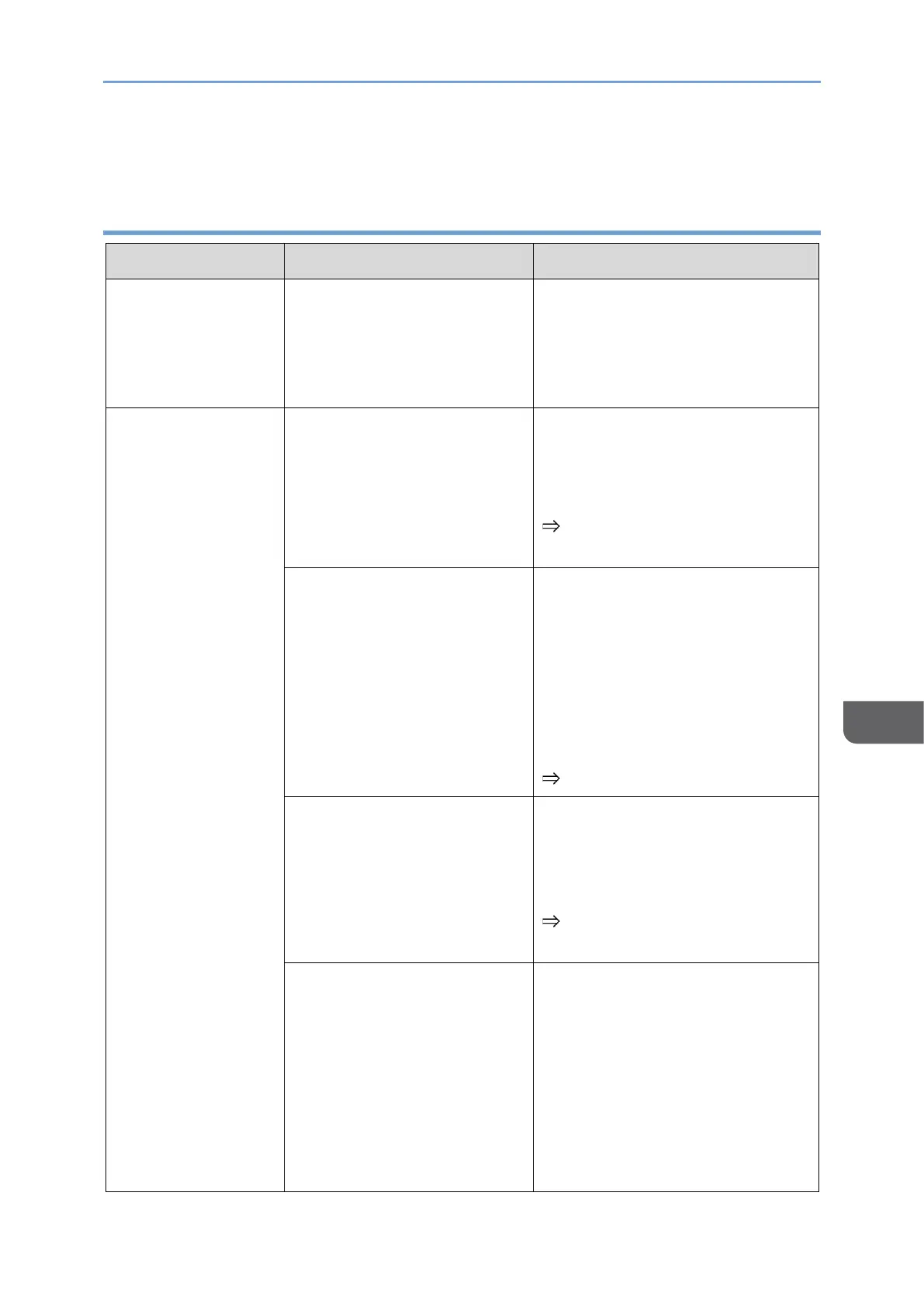
Unable to change to
wireless connection
via Switching Input
It is connected to a power
source with an output of less
than 20 W, and the
remaining battery power is
less than 2%.
Connect this machine to a USB
PD charger with an output of 20
W or more.
• Cannot
connect
wirelessly to a
device
• Cannot
connect
wirelessly to a
second device
This machine is turned OFF.
Turn this machine ON and wait
for the Waiting to Connect screen
to display before making a
connection.
page 29 "Turning On and Off
the Power"
When connecting from a
device, the device name of
this machine is not selected.
Check if the device name of this
machine, which is displayed in
"Dev.Info/Setting" on the
Settings screen or in the upper
right corner of the Waiting to
Connect screen, is displayed in
the Connection list on the device
side, and then select it.
page 97 "Dev.Info/Setting"
This model does not support
wireless connection.
Check the model name of this
machine.
The model that supports wireless
connection is "150BW".
page 3 "About the Model
Names of this Machine"
The network signal condition
is poor.
• Check the network status
and reconnect.
• Check that there are no
devices in the surroundings
that generate radio waves
that could interrupt wireless
communication, and then try
the wireless connection
again.










 To Next Page