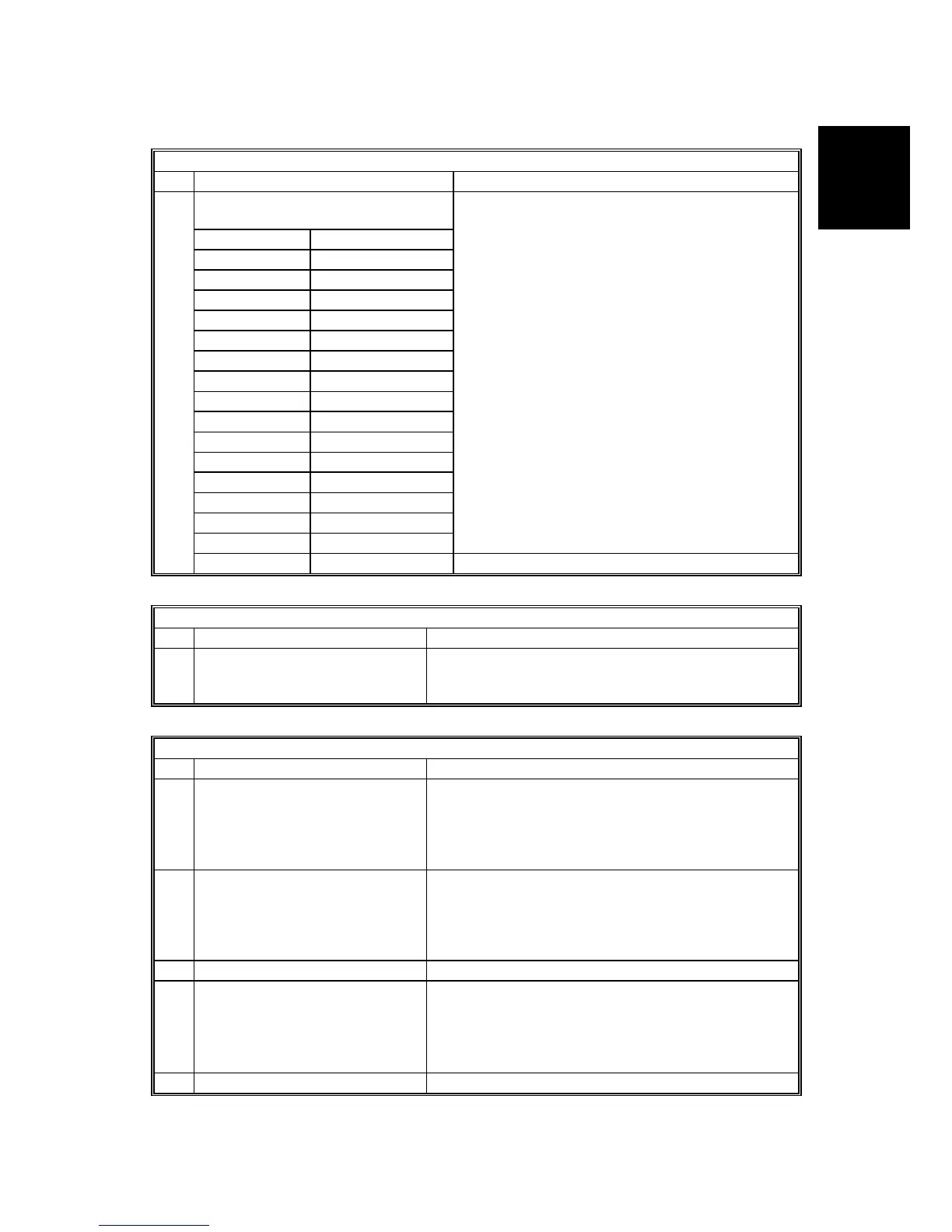
BIT SWITCHES
SM 43 B779
Fax Option
B779
System Switch 0F SP No. 1-101-016
No FUNCTION COMMENTS
Country/area code for functional
settings (Hex)
00: France 11: USA
01: Germany 12: Asia
02: UK 13: Japan
03: Italy 14: Hong Kong
04: Austria 15: South Africa
05: Belgium 16: Australia
06: Denmark 17: New Zealand
07: Finland 18: Singapore
08: Ireland 19: Malaysia
09: Norway 1A: China
0A: Sweden 1B: Taiwan
0B: Switz. 1C: Korea
0C: Portugal 20: Turkey
0D: Holland 21: Greece
0E: Spain 22: Hungary
0F: Israel 23: Czech
This country/area code determines the factory
settings of bit switches and RAM addresses.
However, it has no effect on the NCU parameter
settings and communication parameter RAM
addresses.
Cross reference
NCU country code:
SP No. 2-103-001 for G3-1
SP No. 2-104-001 for G3-2
SP No. 2-105-001 for G3-3
0
to
7
10: --- 24: Poland
System Switch 10 SP No. 1-101-017
No FUNCTION COMMENTS
0
to
7
Threshold memory level for
parallel memory transmission
Threshold = N x 128 KB + 256 KB
N can be between 00 - FF(H)
Default setting: 02(H) = 512 KB
System Switch 11 SP No. 1-101-018
No FUNCTION COMMENTS
0
TTI printing position
0: Superimposed on the page
data
1: Printed before the data
leading edge
Change this bit to 1 if the TTI overprints information
that the customer considers to be important (G3
transmissions).
1
TSI (G3) printing position
0: Superimposed on the page
data
1: Printed before the data
leading edge
Change this bit to 1 if the TSI (G3) overprints
information that the customer considers to be
important.
2 Not used Do not change the factory settings.
3 TTI used for broadcasting
0: The TTIs selected for each
Quick/Speed dial are used
1: The same TTI is used for all
destinations
1: The TTI (TTI_1 or TTI_2) which is selected for all
destinations during broadcasting.
4-7 Not used Do not change the factory settings.












 To Next Page