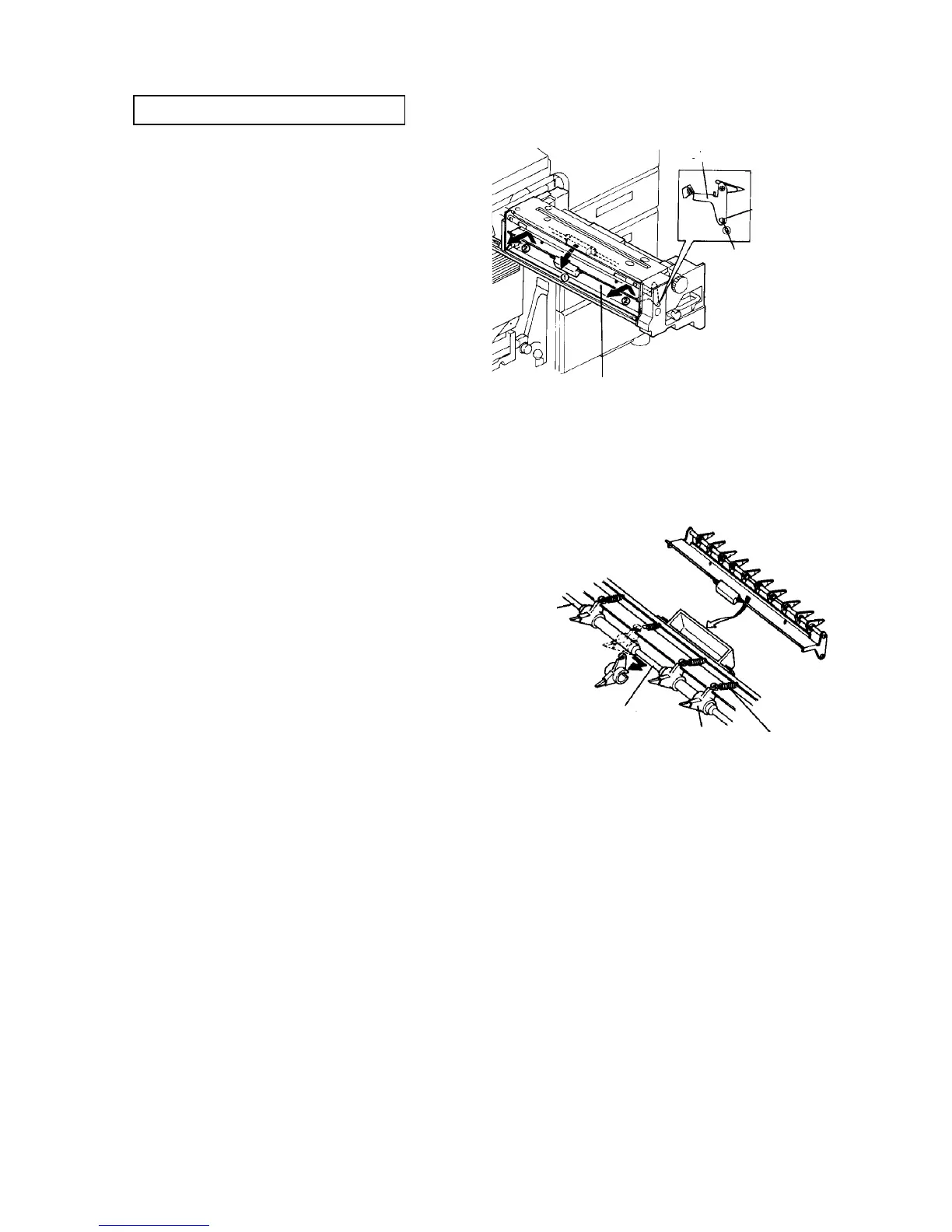
2.9.7 Replacing the fusing pick-off pawls
PM cycle: Clean every 200K
1. Turn off the main switch, and open the front door.
2. Slide out the fusing unit.
3. Remove the upper two plated screws from the left
side of the unit. Turn the heat insulating cover with
the oil supply unit to left.
4. Slightly turn the pick-off pawl unit to the left.
CAUTION
The unit is fixed by magnets. Be careful not to
damage the fusing roller by the pawls when
removing the pawl unit.
5. Pull out the pick-off pawl unit when the slit of the
fulcrum hole, of the pick-off pawl unit, is aligned
with the milled surface of the fulcrum pin.
6. Remove the pick-off pawl pressure springs.
CAUTION
When removing or installing the pressure
springs, do not damage the springs. They are
very weak.
7. Move the pawls to the small diameter part of the
pick-off pawl shaft, and remove the pawls.
8. Replace all the pick-off pawls as a set.
9. Reassemble in the reverse order.
NOTE
• Replace the pick-off pawls only when they are
damaged or oil marks appear on copies.
• Clean the pick-off pawls with toluene.
Pick-off guide plate
Fulcrum
hole
Fulcrum pin
Pick-off guide plate
Pick-off pawl shaft
Small diameter part
Pick-off pawl
Pick-off pawl
spring













 To Next Page