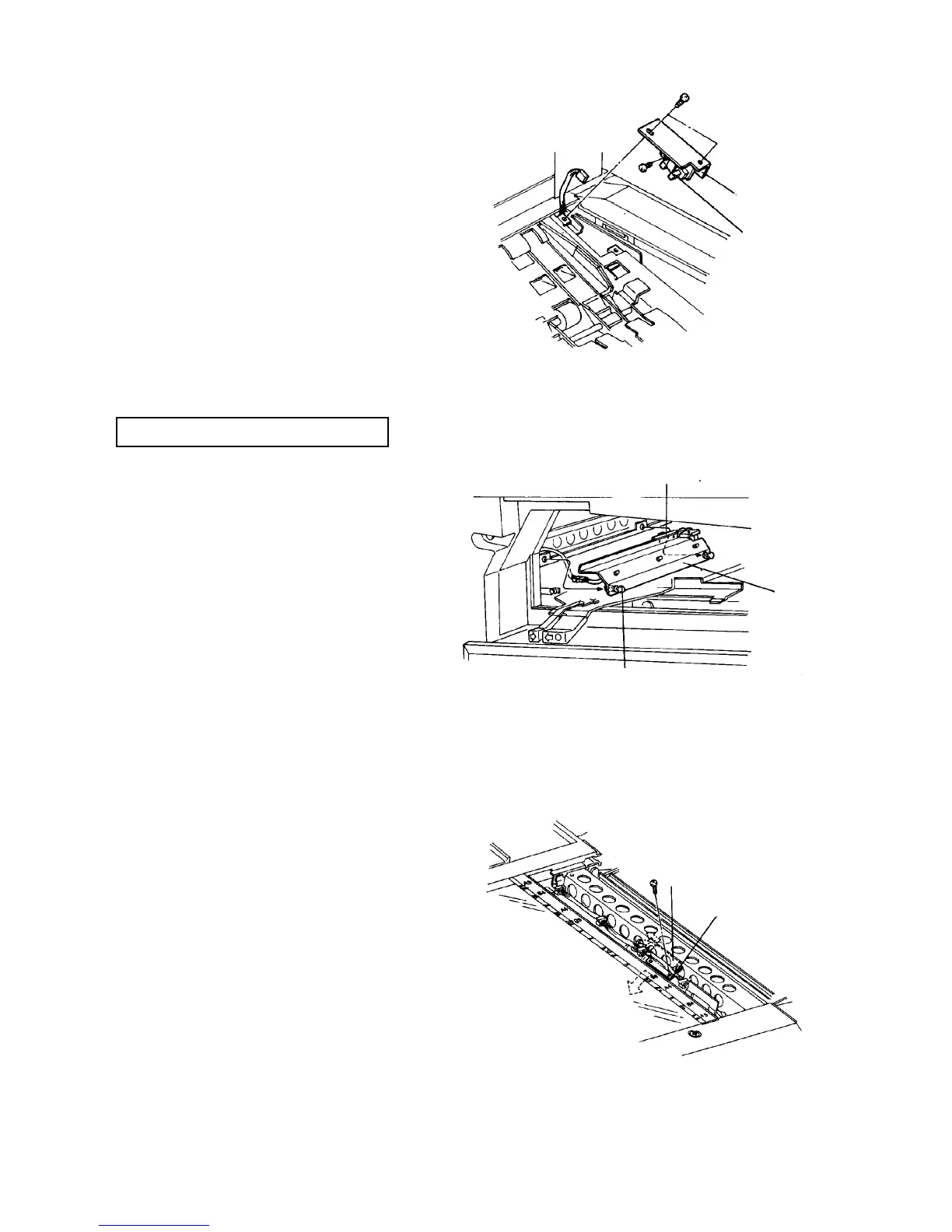
2.10.2 Replacing the copy tray sensor
1. Turn off the main switch, and open the copy tray.
2. Remove the sensor bracket at the rear left corner
of the paper exit unit (2 screws).
3. Remove and replace the sensor.
4. Reassemble in the reverse order.
2.10.3 Replacing the duplex exit sensor
PM cycle: Clean every 400K
1. Turn off the main switch.
2. Open the upper right door.
3. Pull out the two knobs, and remove the sensor
with its bracket. Disconnect the connector.
4. Clean or replace the sensor.
5. Reassemble in the reverse order.
WARNING
Be careful of the sharp edges around the bracket
and bracket fixing stay.
2.10.4 Replacing the fusing exit sensor
1. Turn off the main switch.
2. Open the front door and remove the fusing unit.
3. Remove the SADF transport plate (one stepped
screw on the rear and one plated screw on the
front).
4. Remove the two screws of the fusing exit sensor
bracket from the upper side. You can catch it in the
space where the fusing unit was.
5. Clean or replace the sensor.
6. Reassemble in the reverse order.
[Rear left corner of
the duplex/exit unit]
Sensor bracket
Copy tray
sensor
Duplex exit sensor
Knob
Duplex exit
sensor bracket
Fusing exit sensor
Fusing exit sensor













 To Next Page