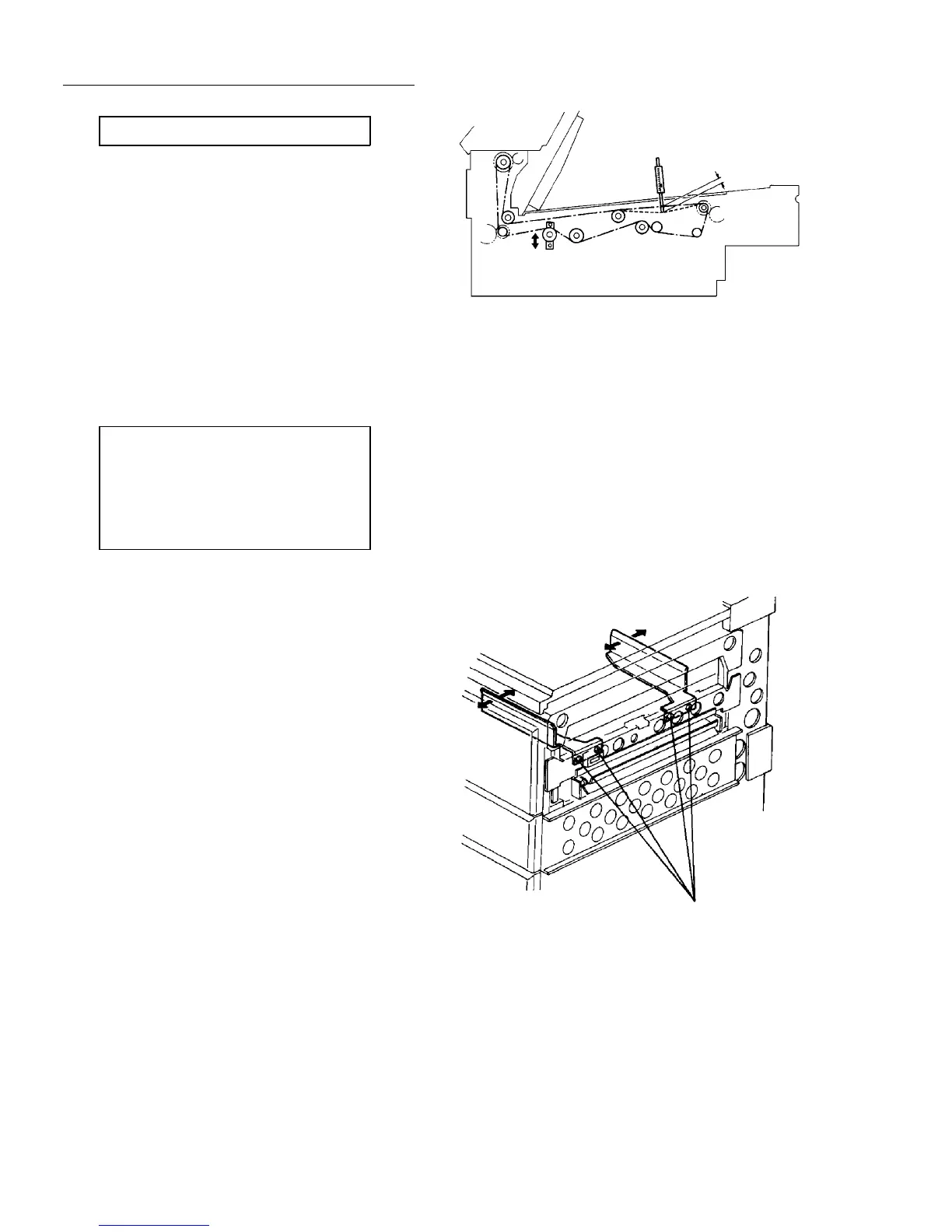
Belt tension standard
2.8 mm deflection at 227 ± 35 g pressure.
2.10.21 Adjusting the side-to-side registration in the back side copy
Adjustment standard:
Within 0 ± 2 mm in the platen cover
mode.
Within 0 ± 5 mm (the difference between
the front and back side must be within 5
mm) in the ADF/SADF modes.
NOTE
Before this adjustment, you should finish the
adjustments of the side-to-side registrations in the
front side copy for all paper trays. (Refer to
Adjusting the side-to-side registration of Paper feed
unit section.)
1. Place a test chart on the exposure glass properly.
2. Make copies in the duplex mode (without the ADF
or SADF mode).
3. Measure the side-to-side registration on the back
side of the copy. It should be within 0 ± 2 mm.
4. If not, follow the steps below:
1) Turn off the main switch, and remove the right
cover.
2) Loosen the four screws securing the duplex side
fences position.
3) Loosen the cam fixing screws, turn the eccentric
cams and move the front and rear side fences
separately.
4) Turn on the main switch, and make more than
10 continuous copies.
5) Be sure that all copies are in the standard. If
not, repeat step 1 to 4.
6) Adjust the side fences width using service tool
[5-02].
227 ± 35 g
2.8 mm
Side fence fixing screws (gold screws)




 To Next Page