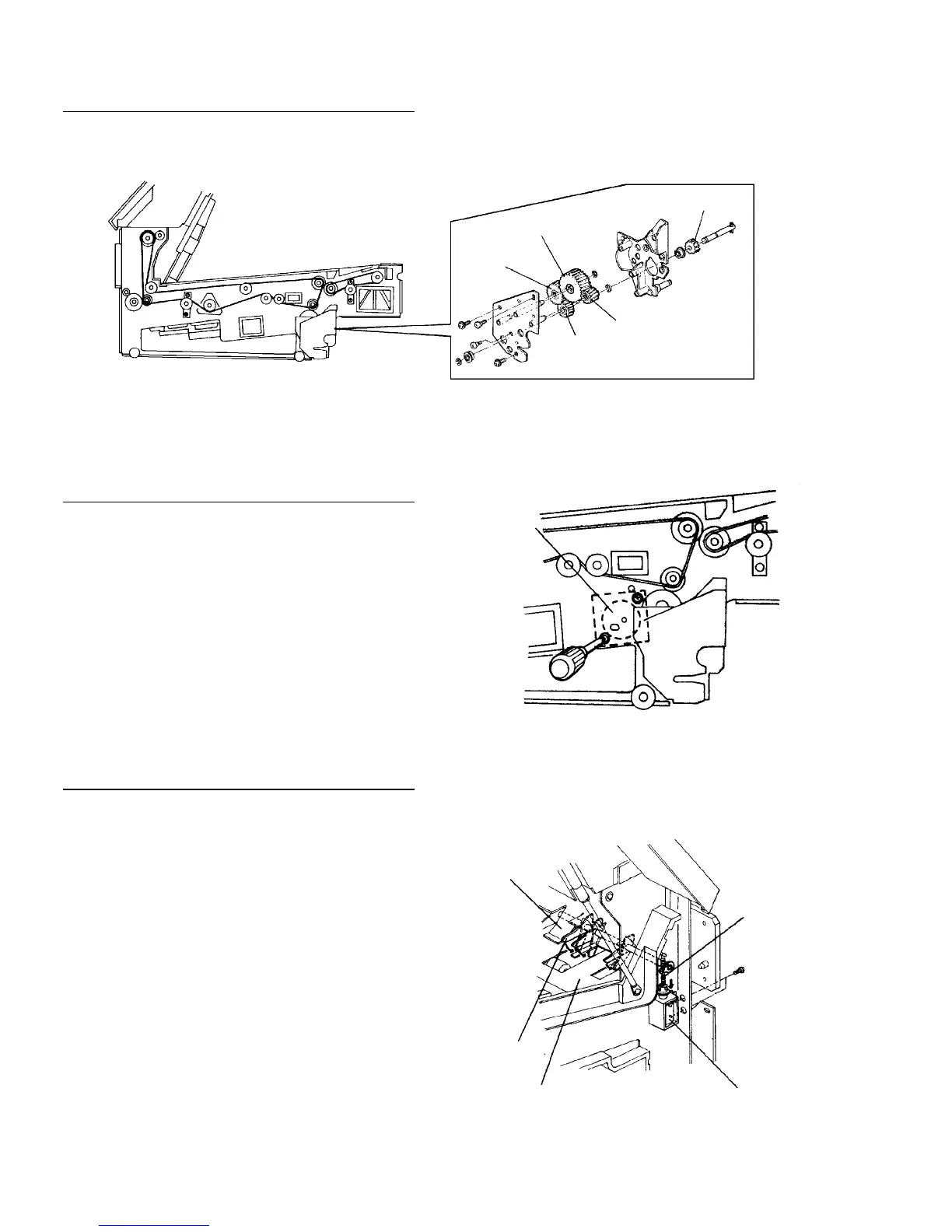
2.10.20 Replacing parts in the duplex/exit unit
Replacing the drive gears
Replace gears referring the illustration below.
Replacing the paper feed motor
1. Put a screwdriver through the holes and loosen
two screws.
2. Disconnect the connector and replace the motor.
Replacing the eject junction solenoid
NOTE
You do not have to remove the duplex/exit unit from
the main body to remove the eject junction solenoid.
You just slide the unit to the right until the solenoid
appears, then you can replace it.
1. Put a screwdriver through the holes on the right
side frame of the unit and remove two screws.
2. Remove the junction spring and replace the
solenoid.
3. Adjust the position of the solenoid to meet these
two conditions:
• When the solenoid is energized, the eject
junction pawls end should be under the flat guide
plate.
• When the solenoid is de-energized, the pawls hit
the edges of the turn guide plate.
Large
relay gear
Duplex transport
drive gear
Horizontal transport
drive gear
Main body
connecting gear
Small relay gear
Paper feed
motor
Turn guide
plate
Junction
spring
Eject
junction
solenoid
Flat guide
plate
Eject junction
pawl
Solenoid
fixing
screws













 To Next Page