2.11.3 Replacing parts under the original table
Follow this procedure to replace these items:
• Vacuum belts
• Original size sensor
• Original set sensor
• Recycle arm sensor
• 1st transport sensor
Removing the original table and vacuum belt unit
CAUTION
You must adjust the side-to-side registration for
the ADF mode after removing and reinstalling
the original table. (For the adjustment, refer to
Adjusting the side-to-side registration in the
ADF/SADF modes section.) Mark off the original
table position to make the adjustment easier
before removing it.
1. Turn off the main switch, and raise the ADF.
2. Remove the ADF front cover (3 plated screws on
the top and 4 on the bottom).
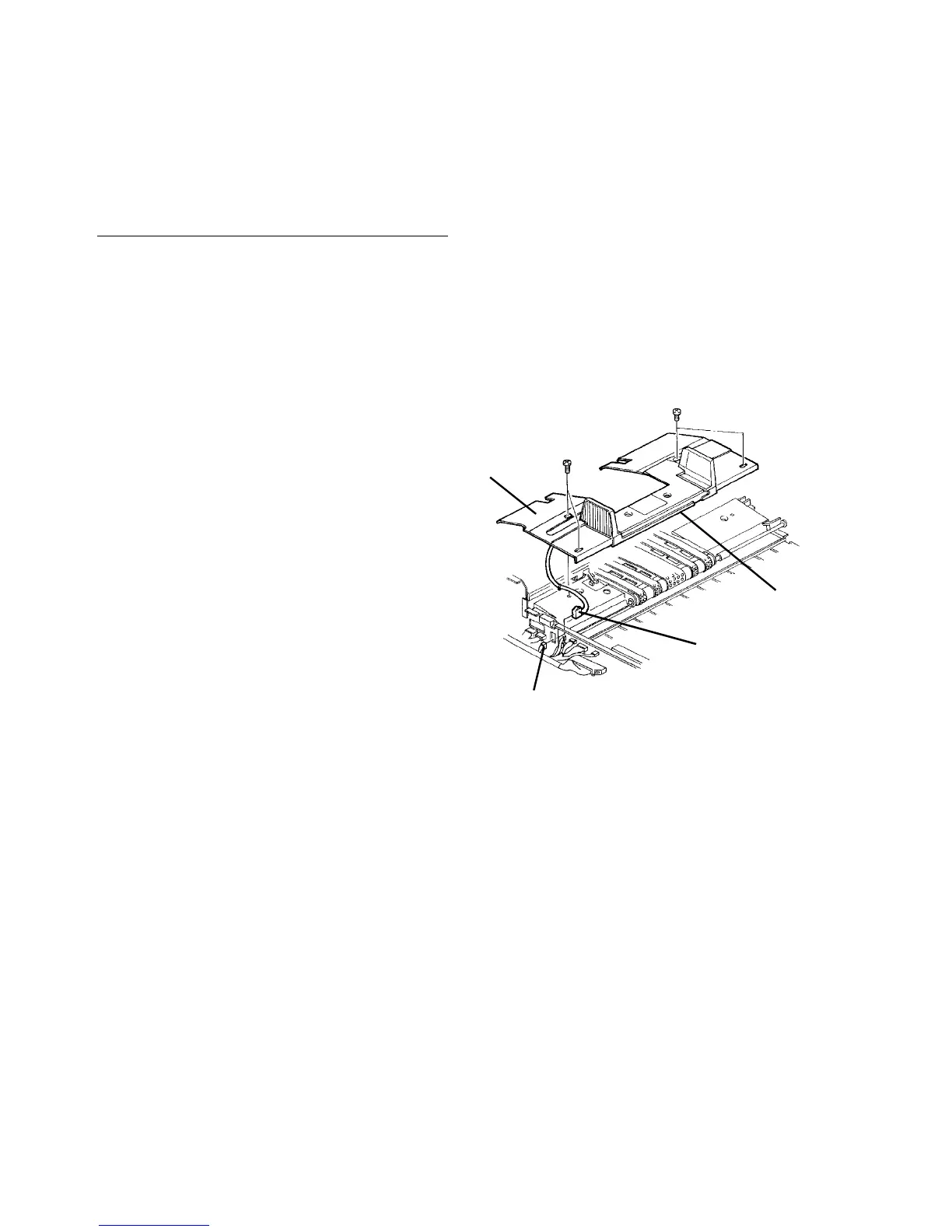
3. Disconnect the connector for the original size
sensor (red 3-pin connector). Remove its female
side on the frame and bring it beyond the frame.
(This is because the original size sensor fixed in
the original table cannot be disconnected from
under the original table.)
4. Remove the original table (4 flat head screws).
CAUTION
• Mark off the original table position.
• The original size sensor is fitted to the back
of the original table. Do not cut harness by
pulling the original table if you have not
followed the above steps.
5. Remove four screws from the vacuum belt unit.
6. Loosen two Allen screws of the belt drive joint and
slide the joint to the far side.
7. Remove the vacuum belt unit and disconnect the
connector for the recycle arm and original set
sensors.
8. After replacing some parts, reassemble in the
reverse order.
CAUTION
• Do not forget to set the female connector
for the original size sensor on the frame
before installing the original table.
• Do not forget to connect the connector for
the recycle arm and original set sensors
before installing the vacuum belt unit.
• Do not forget to tighten the Allen screws of
the belt drive joint before installing the
original table.
• Be careful not to snag any harnesses.
Original size sensor
(behind of table)
Female connector
Red 3-pin connector for original size sensor
Original table




 To Next Page