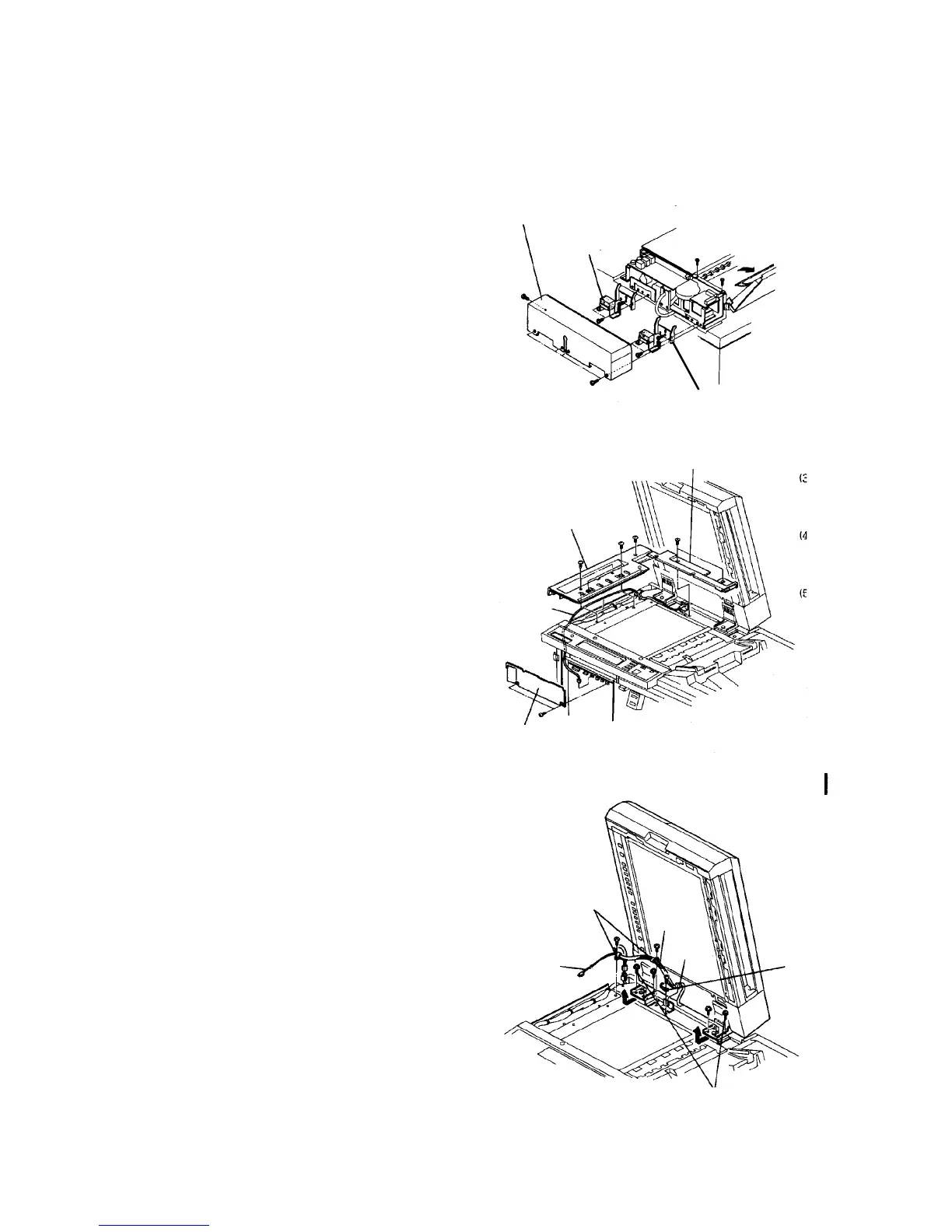
2.11.14 Removing the ADF unit
WARNING
Due to the weight of the unit, two operators are
required for this procedure.
1. Turn off the main switch, and remove the ADF rear
cover (7 plated screws).
CAUTION
The ADF rear cover is made of metal. So, the
cover may touch electric elements on the
boards shorting them out when you remove the
cover. Be sure to turn off the main switch when
you remove the ADF rear cover.
2. Remove the left and right stopper cushions (2
stepped screws each) and the left and right
stopper brackets (2 screws each).
3. Raise the ADF, remove the rear exposure glass
cover (2 screws) and the left exposure glass cover
(5 screws).
4. Open the front door, and remove two screws to
allow it to open further.
5. Remove the upper left inner cover (2 screws).
6. Disconnect the DF fiber cable (CN110) from the
main body main control board and remove it from
the lower left corner of the operation unit.
7. Remove the two DF harness clamps, ground wire
fixing screws, and the bushing that protects the
harness, then disconnect the ADF harness
connector from the DC main harness.
8. Remove the four screws each from the right and
left unit hinges to remove the DF unit.
9. Reinstall the unit in the reverse order.
CAUTION
• Check the original transport performance
on the SADF and ADF. If an original misfeed
occurs on the exposure glass, remove the
ADF front cover and check that the two
projections at the front edge of the
intermediate transport unit (just behind the
magnets) are in contact with the exposure
glass when the ADF closes. If this is not,
adjust the height of the magnets. The
priority of attraction is determined by the
right magnet.
• In the SADF mode, check the original stop
position on the exposure glass. If the
original is skewed, loosen the hinge fixing
screws and twist the ADF unit right or left.
Then, tighten the screws.
ADF rear cover
Stopper
cushion
Stopper bracket
Rear exposure glass cover
Left exposure
glass cover
Fiber cable
Inner cover
Harness clamps
Fiber
cable
ADF
harness
Bushing
Ground wire
fixing screw
8 hinge fixing screws













 To Next Page