2.14 LCT
2.14.1 Replacing the paper feed, reverse, and pick-up rollers
PM cycle: Replace every 400K
NOTE
One set of the feed, reverse and pick-up rollers can
feed up to approximately 150,000 sheets of paper.
If the paper trays are not used evenly, replace the
rollers that are worn more with the rollers that are
worn less. Do this before any rollers wear out.
1. Pull out the LCT tray, and turn off the main switch.
2. Open the top cover and upper front cover.
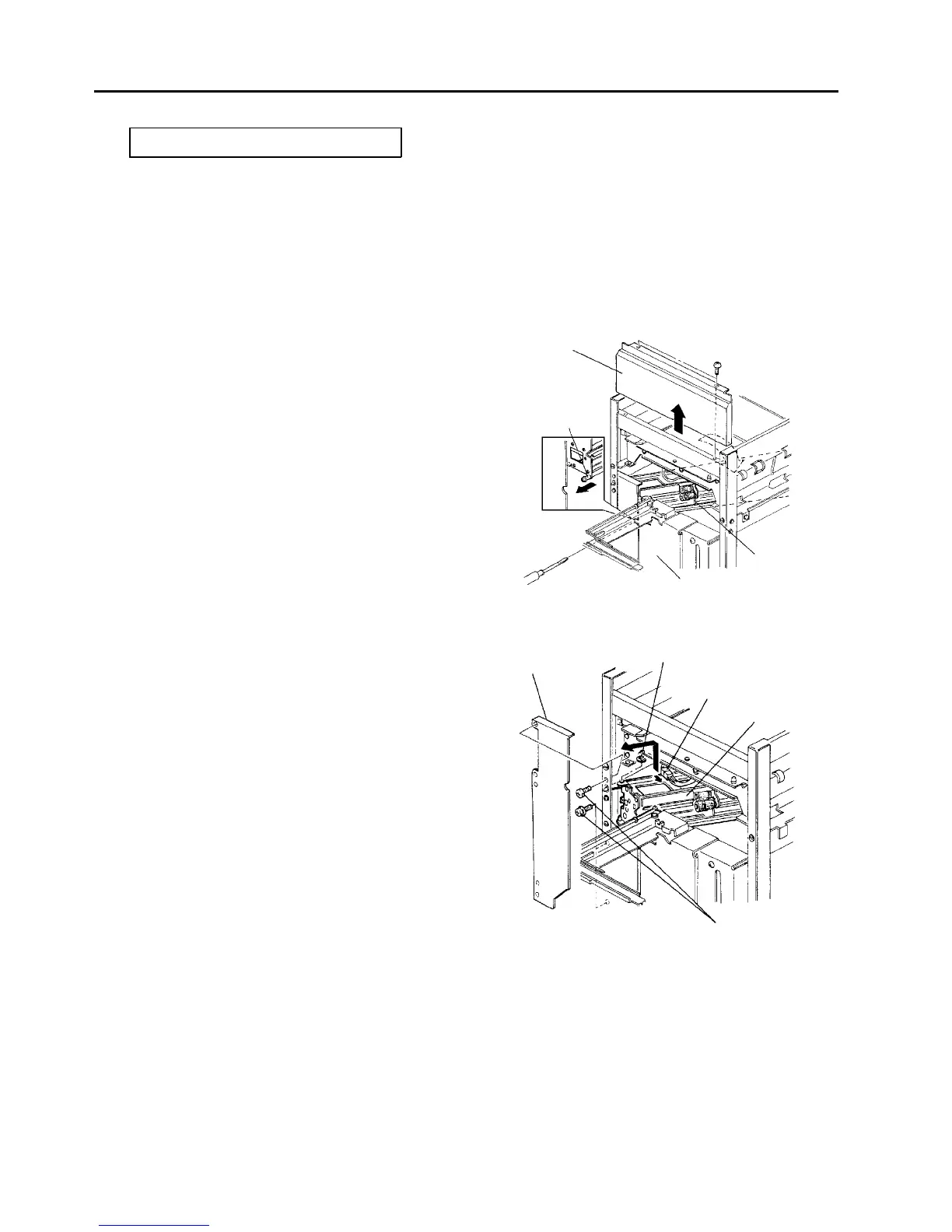
3. Loosen the minus head shaft holding the paper
feed unit and pull out the shaft about 10 mm.
4. Hold the far side of the paper feed unit and turn it
to the right.
5. Remove the stop rings from each roller and
replace the rollers.
6. Reassemble in the reverse order.
CAUTION
• Do not touch the surface of the new rollers
with bear hands.
• Be sure that the feed roller has the setting
direction.
2.14.2 Removing the paper feed unit
1. Pull out the LCT tray, and turn off the main switch.
2. open the upper and upper front covers.
3. Remove the left inner cover (a flat head screw on
the top and 2 pan head screws on the bottom).
4. Remove an E-ring from the fixing bracket that
holds the paper feed unit.
5. Disconnect the paper feed unit connector.
6. Loosen the minus head shaft and pull it out about
10 mm.
7. Hold the far side of the paper feed unit and turn it
to the right. Then, hold the front side of the unit
with the other hand and lift it up to slide the unit off
the bracket pins. Take out the unit through the
upper space.
8. Reassemble in the reverse order.
Upper front cover
Paper feed unit
fixing shaft
Paper feed unit
Tray
Left inner cover
E-ring
Paper feed connector
Paper feed unit
Cover fixing screws




 To Next Page