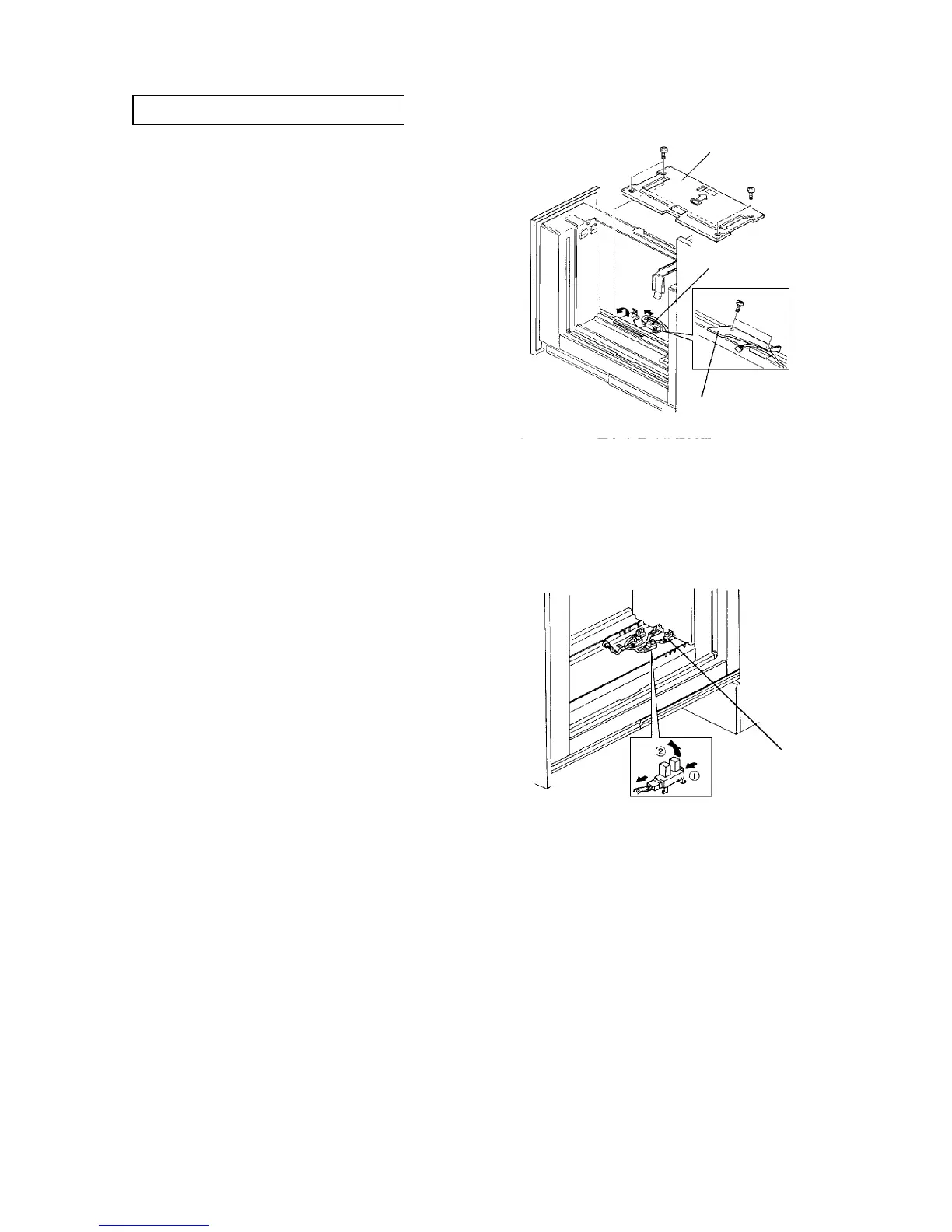
2.14.4 Replacing the paper end sensor
PM cycle: Clean every 1,000K
1. Pull out the tray, and turn off the main switch.
2. Remove the tray bottom plate (4 screws).
3. Turn the shaft holding the paper end sensor
bracket by 180
o
counterclockwise.
4. Remove the sensor bracket (2 screws).
5. Remove the sensor from the bracket (a screw) and
replace it.
6. Reassemble in the reverse order.
CAUTION
When the tray bottom plate is installed on the
fixing shaft:
• The front edge of the sensor bracket should
be put on the pin of the tray stopper.
• Before installing the tray bottom plate, be
sure that the milled surface of the center of
the right bottom plate fixing shaft faces the
inside of the tray.
2.14.5 Replacing the paper size sensors
1. Pull out the tray, and turn off the main switch.
2. Remove the tray bottom plate (4 screws).
3. Unhook the pawls of the sensors and remove them.
4. Replace the sensors, and reassemble in the
reverse order.
CAUTION
When the tray bottom plate is installed on the
fixing shaft:
• The front edge of the paper end sensor
bracket should be put on the pin of the tray
stopper.
• Before installing the tray bottom plate, be
sure that the milled surface of the center of
the right bottom plate fixing shaft faces the
inside of the tray.
Tray bottom plate
Paper end sensor
Sensor bracket
Paper size sensor (5)




 To Next Page