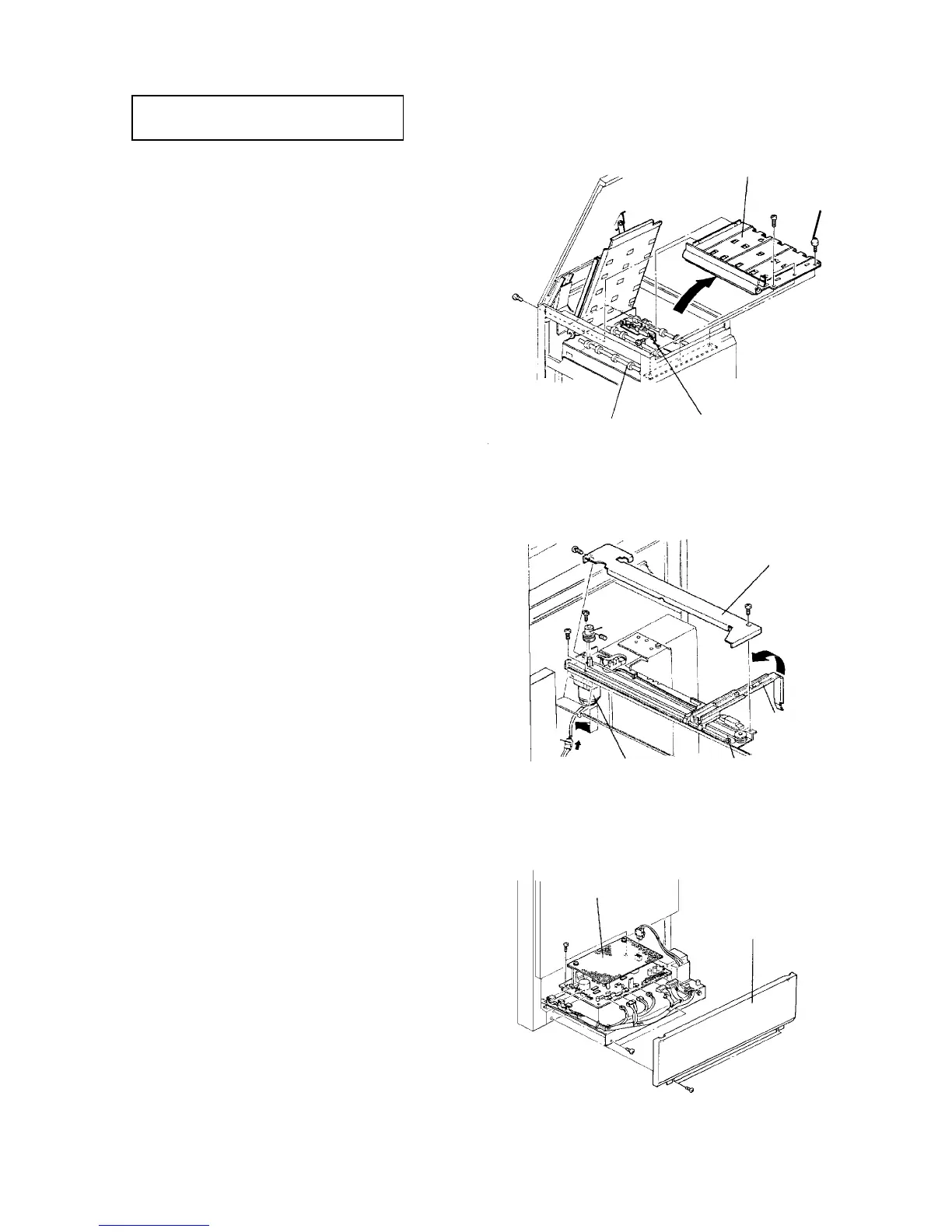
2.14.6 Replacing the transport sensor
PM cycle: Clean the sensor every 600K
and transport rollers every 1,000K.
1. Turn off the main switch, and remove the LCT rear
cover (5 screws).
2. Remove the two screws fixing the rear of the lower
transport guide.
3. Open the upper cover and remove two screws and
one stud from the front of the lower transport
guide. Then, remove the lower transport guide.
4. Remove the sensor (one screw) and replace it.
5. Reassemble in the reverse order.
2.14.7 Replacing the back fence motor
1. Pull out the tray, and turn off the main switch.
2. Open the top cover and upper front cover, and
remove the sensor cover (2 screws).
3. Remove the motor pulley (one Allen screw).
4. Remove the back fence motor (2 screws and one
connector).
5. Reassemble in the reverse order.
2.14.8 Replacing the LCT control board
1. Turn off the main switch, and remove the lower
front cover (2 screws).
2. Remove the two screws fixing the board bracket
and slide out the bracket.
3. Remove the LCT control board from the bracket
and replace it.
4. Reassemble in the reverse order.
Lower transport guide
Transport sensor
Transport roller
Stud
Sensor cover
Back fence
Drive belt
Motor
connector
Back fence
motor
Motor
pulley
LCT control board
Lower front
cover




 To Next Page