1.3 Machine Operation Check
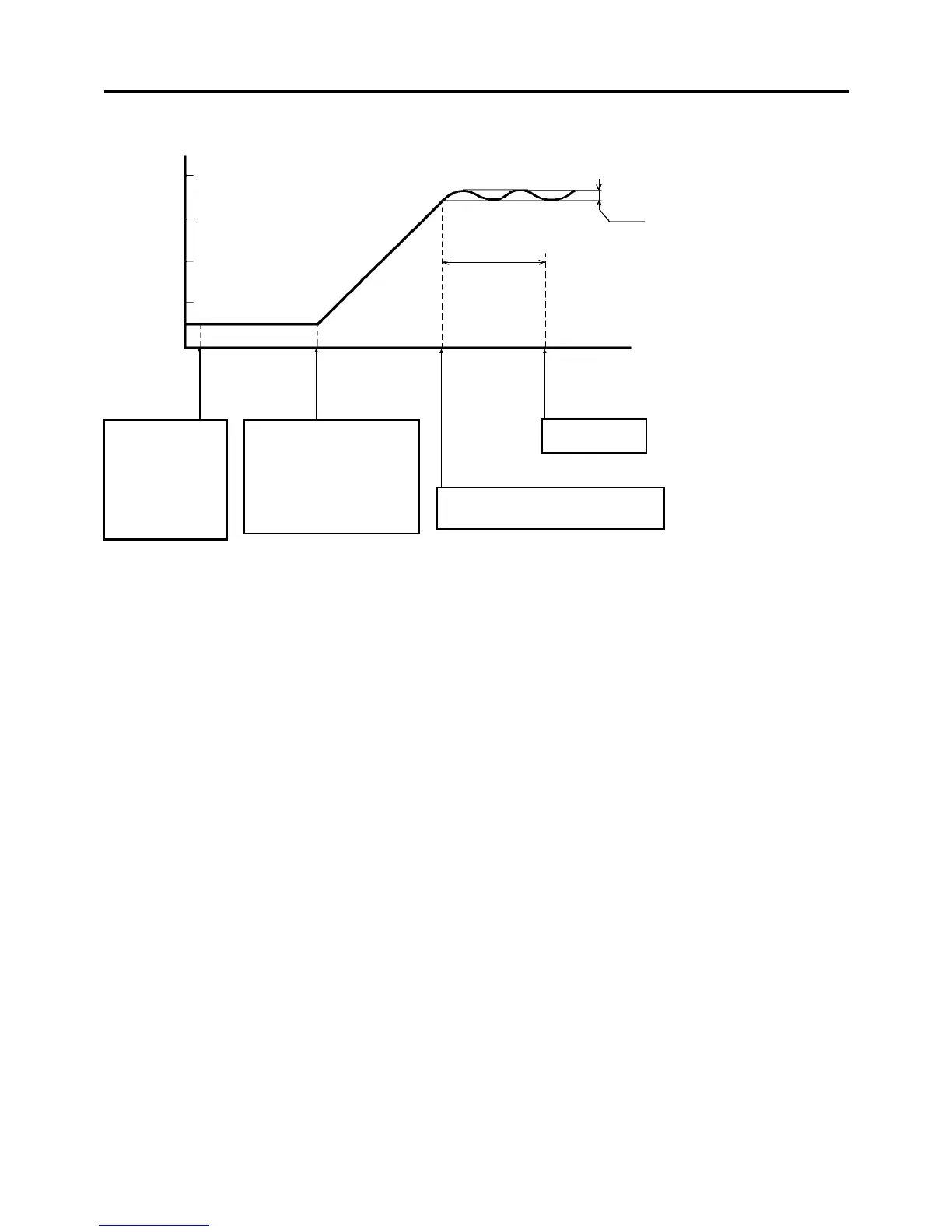
1.3.1 Stand-by operation check
1.3.2 Copier operation check
CAUTION
Before making copies, carry out forming for the developer, OPC belt, and cleaning
carrier (in this order) using service tool [3-04].
1.
Check the stand-by operation referring the above. Connect the power plug, then turn on the
main switch.
2. Access the service tool, and do all formings.
3. Check that all the keys on the operation panel and paper tray down keys work properly.
4. Check that safety switches of the center door, upper right door, and copy tray work properly.
5. Place a sheet on the original table of the ADF and check that the ADF mode is selected.
Also, insert a sheet in the SADF table and check that the SADF mode is selected.
The cleaning coil
cooling fan, two
ozone exhaust fans
(behind the rear left
cover), and
cleaning unit
cooling fan (behind
the left cover) start
turning.
1. Configuring the first and
second mirrors.
2. The fusing heater ON.
3. The OPC belt ON (2 turns).
4. The Tracking motor ON .
5. All the fans ON except for
the duplex and ADF blowers.
The idling mode starts (30 seconds).
The main motor repeats turning on and
off four times during this period.
The Start key
turns green.
200
Approx.
30 sec.
Fusing Temp.
[° C]
Power
connection
Main switch
ON
175 ° C
175 to 180 ° C
100
1 July 1994 Machine Operation Check
1-15













 To Next Page