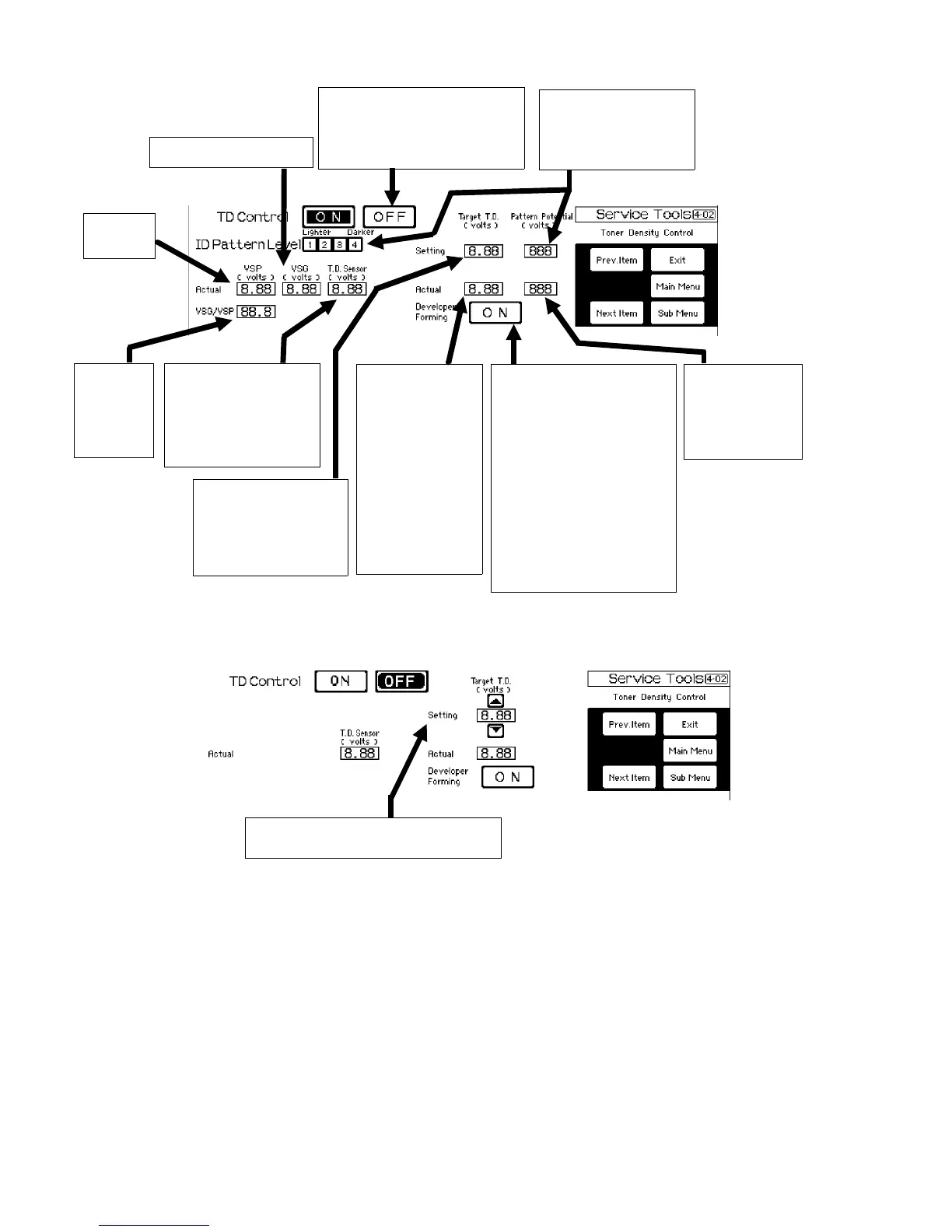
5.1.3 Toner density control ON screen [4-02]
5.1.4 Toner density control OFF screen
Shows V
SG
measured
results (usually 3.5 to 4.5).
By pressing this key, the ID sensor
control is disabled. The toner density
control is done by the toner density
sensor only. The toner density
sensor target value can be changed
on the OFF screen.
Shows the target ID
sensor pattern making
potential selected by the
ID pattern level selector
key. (630, 560, 510, or
480V is displayed.)
The actual ID
sensor pattern
making potential is
displayed. The
above setting value
±20 volts is usually
displayed.
Shows the toner density
level measured by the
toner density sensor when
the developer forming key
is pressed. The value is
not changed unless the
key is pressed again.
Shows the target
value for the toner
density sensor
control. The value is
changed by 0.12
volts when the
VSG/VSP is too low
(lower than 7) or too
high (higher than 9).
NOTE:
The value is
controlled in a range
of ± 0.74 volts from
the "Setting Target
T.D." value.
Developer Forming key. When
pressed, the toner density
sensor detects the toner density
of the developer and the result is
indicated in the " Actual T.D.
Sensor", "Setting Target T.D.",
and "Actual Target T.D."
CAUTION
Unlike the Developer Forming
key in service tool 3-04, the
developer forming "ON" key in
this screen changes the data for
the "Target T.D." Use this key
only when setting C is carried
out. For usual developer
forming, use the key in service
tool 3-04.
Shows the toner density
level measured by the
toner density sensor. The
toner density in the
development unit is
controlled to meet this
value with the actual target
value.
Shows V
SP
measured
value.
Shows the
calculated
ratio of the
measured
VSG and VSP
(VSG/VSP).
The setting target value can be changed by
the value change keys ( ▲▼) . The actual
target value is also changed accordingly.
Service Tools Display 1 July 1994
5-2













 To Next Page