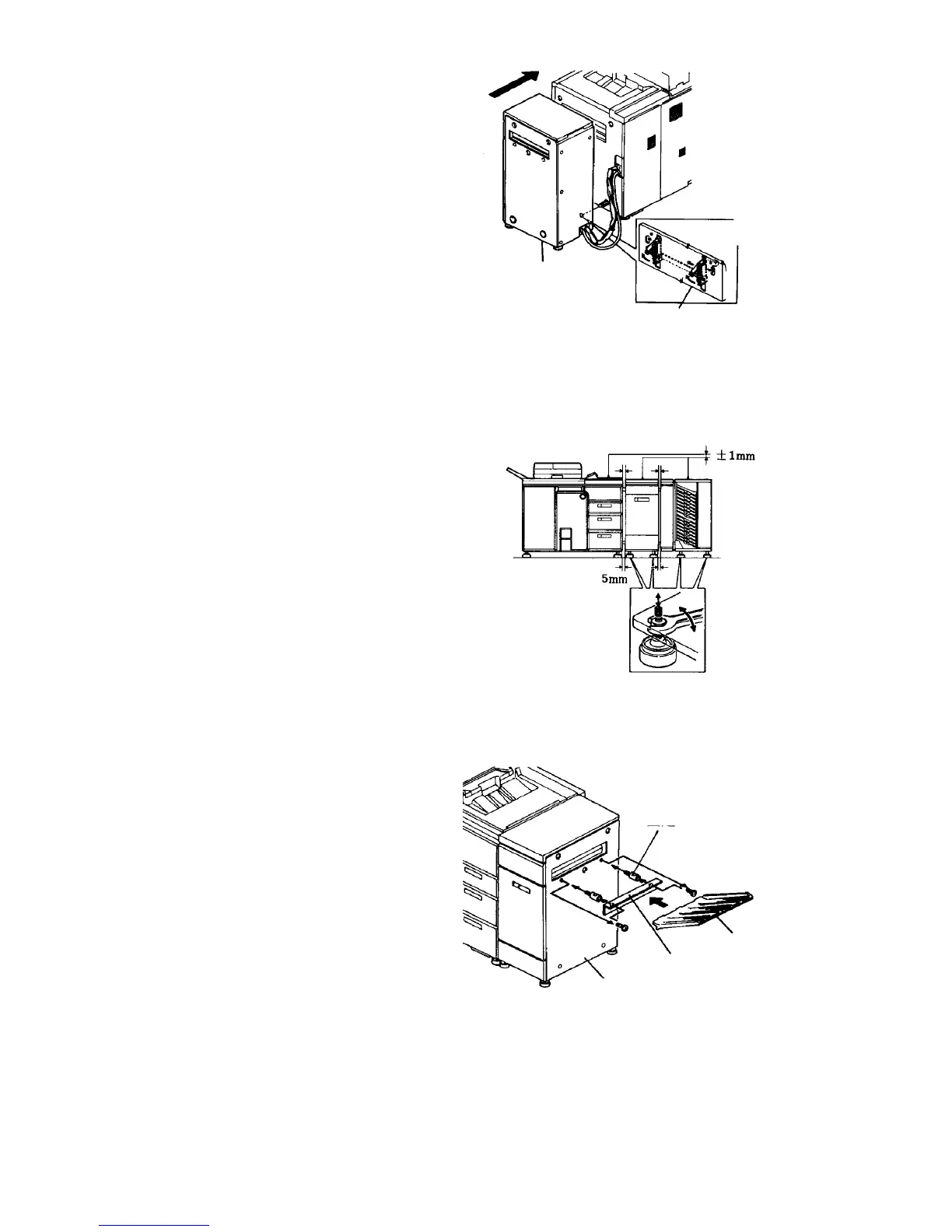
11. Be sure the linking stay of the LCT is locked. Align
the copier docking pins with the LCT linking holes,
and press the LCT until the pins click.
NOTE
If the finisher will be fitted, dock it with the copier
after the finisher’s harnesses are connected to the
copier.
12. Place the leveling shoes (accessories) under the
stands. Then, turn the stand nuts to align the
docking position.
CAUTION
Align the position of the LCT with the copier.
First, roughly adjust the LCT height on the basis
of the exterior covers position. Then, open the
LCT upper cover and check the lower paper
guide plate position using a flat plate like a
scale. Finally, align the paper transport guide
plate height between the LCT and copier. This
is to prevent paper misfeeds where the units
connect.
NOTE
If the finisher is to be installed, do the position
adjustment procedure after installing the finisher.
13. If the finisher is not used, remove the two screws
from the sub-tray auxiliary plate fitting holes. Then,
fit the sub-tray auxiliary plate with the fixing
stepped screws (both accessory), and set the
sub-tray.
NOTE
The sub-tray must be ordered separately. The part
number is A0291460.
14. Access service tool [1-08], and set the LCT
function.
LCT
Linking stay
Fixing stepped
screw
Sub-tray
Sub-tray auxiliary plate
LCT right cover













 To Next Page