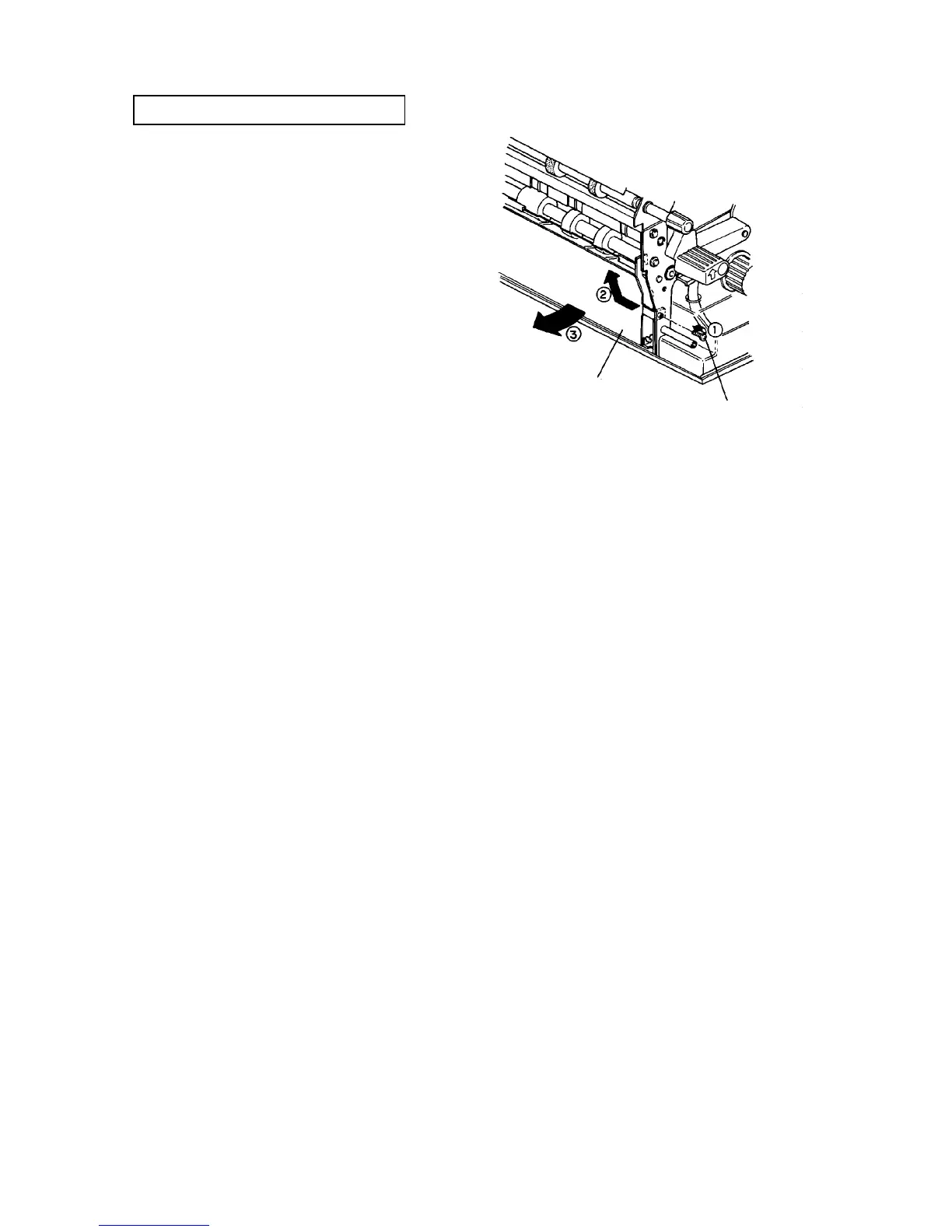
2.1.6 Cleaning the paper dust collecting vessel
PM cycle: Clean every 1,200K
1. Pull out the 3rd tray.
2. Turn off the main switch. Open the front door, and
remove two screws to allow it to open further.
3. Remove the inner cover from the lower of the
vertical transport unit (3 screws).
4. Remove the OPC unit inner cover (2 screws and a
connector).
CAUTION
Do not pull the connector of the cooling fan in
the machine.
5. Turn the lever to release the development backup
roller of the OPC unit.
6. Remove the development unit fixing plate (one
screw), and slightly pull out the unit to disengage
the joint gear at the rear of the unit.
7. Turn the development knob to collect the
developer on the development sleeve.
CAUTION
Be sure to collect the developer because it may
stick to the side plate of the OPC unit, fraying or
damaging the OPC belt.
8. Slide out the development unit and remove the unit
from the rails.
9. Remove the vessel fixing screw from the front, and
remove the paper dust collecting vessel.
10. Clean inside of the vessel using a dry cloth, and
reassemble in the reverse order.
Paper dust
collecting vessel
Fixing screw













 To Next Page