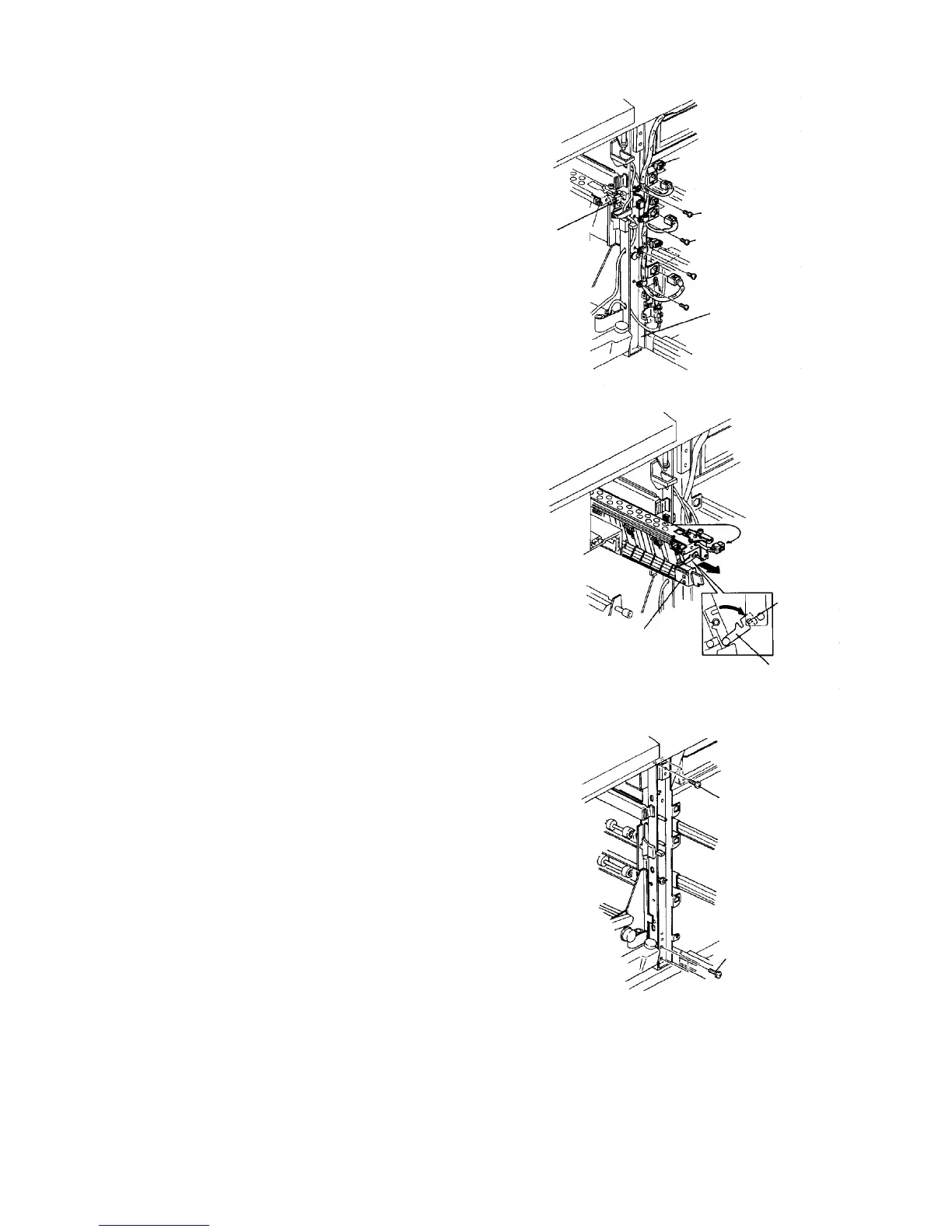
17. Remove the male and female connectors for all
paper feed units.
18. Remove the three cord clamp screws.
19. Remove the grounding screw from the ground wire
of the connector to the transport unit.
20. Remove the male and female connectors for the
transport unit from the stay.
21. Release the transport unit to the right.
22. Hang the dismounting and mounting arm of the
transport unit on the pin.
23. Remove the fixing screws from the transport unit to
remove the unit.
CAUTION
Carefully pull out the units so that the transfer
and separation corona unit casing does not
touch the rollers or pressure springs of the
vertical transport unit.
24. Turn the lever to release the development backup
roller of the OPC unit.
25. Remove the development unit fixing plate (one
screw), and slightly pull out the unit to disengage
the joint gear at the rear of the unit.
26. Turn the development knob to collect the
developer on the development sleeve.
CAUTION
Be sure to collect the developer because it may
stick to the side plate of the unit, fray or damage
the OPC belt.
27. Slide out the development unit and remove the unit
from the rails.
28. Remove five M5 screws fixing the vertical transport
stay.
Connector for paper
feed unit
Grounding screw
Cord clamp screw
Stay
Connector for
transport unit
Transport unit
Pin
Dismounting and
mounting arm
Stay fixing screw
Stay fixing screw













 To Next Page