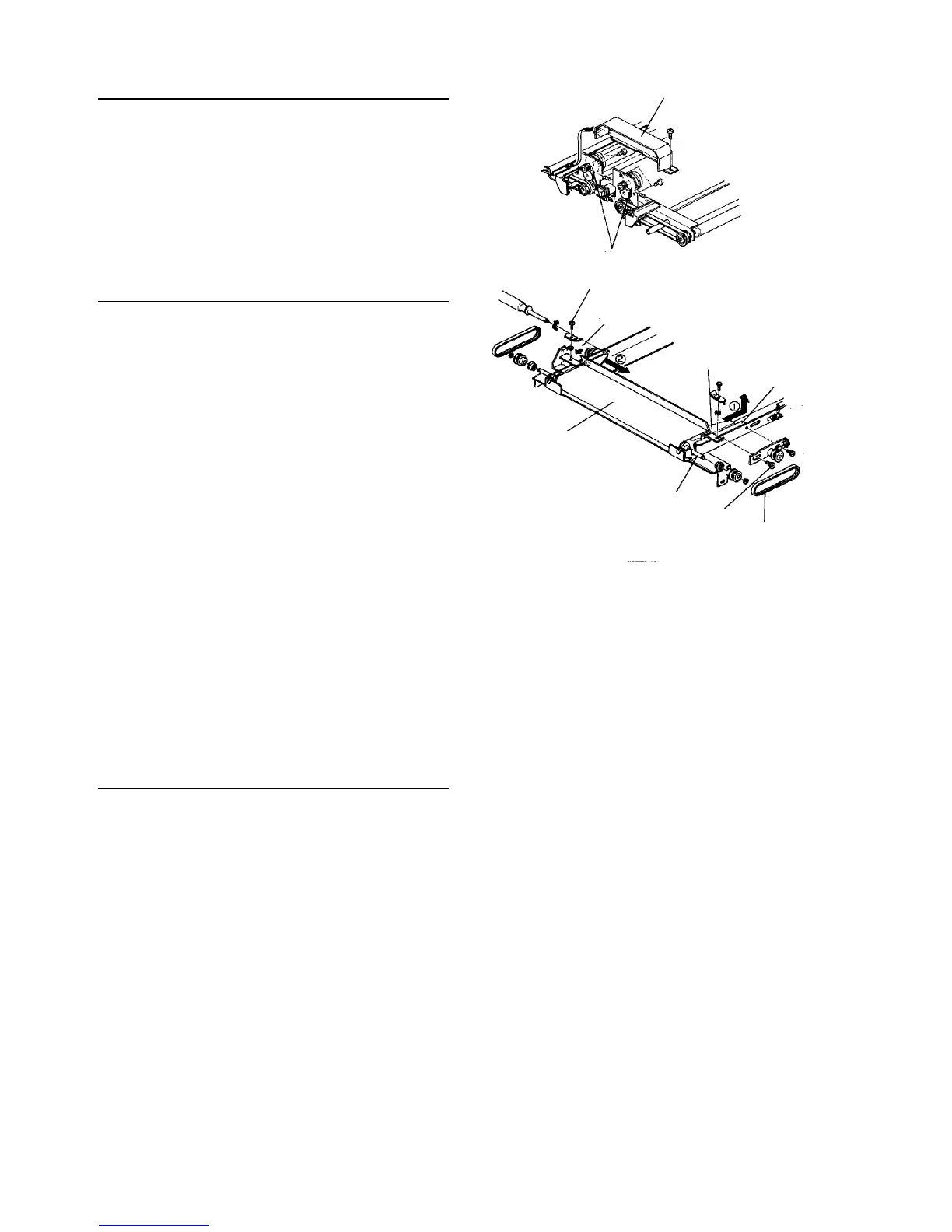
Replacing the shield motor
1. Remove the shield unit.
2. Remove the shield motor cover (one screw).
3. Remove two fixing screws from the shield motor
and replace the motor.
Replacing the shield screen
1. Remove the shield unit.
2. Remove the timing belt fixing screws, front and
back, from the shield screen unit to enable
replacement.
CAUTION
• Do not lose the spring washer under the
fixing plate.
3. Remove one stepped screw and one pan head
screw to remove the back side of the timing belt
tension. Remove the belt.
4. Loosen one tension fixing screw to remove the
front side belt.
5. Remove E-rings from the shield roller and pull out
the roller.
6. Move the shield screen slider to the center along
the rail and remove it from the back side. Clean
the rail and slider with alcohol.
7. Replace the shield screen unit and re-install it in
the reverse order.
Adjusting belt tension
1. Loosen all tension fixing screws.
2. Tighten the screws when the tension spring works.
Shield motor cover
Shield motor left and right
Timing belt fixing screw
Spring washer
Slider
Rail
Timing belt
Shield screen
Shield roller
Stepped screw
[FRONT SIDE]
[REAR SIDE]













 To Next Page