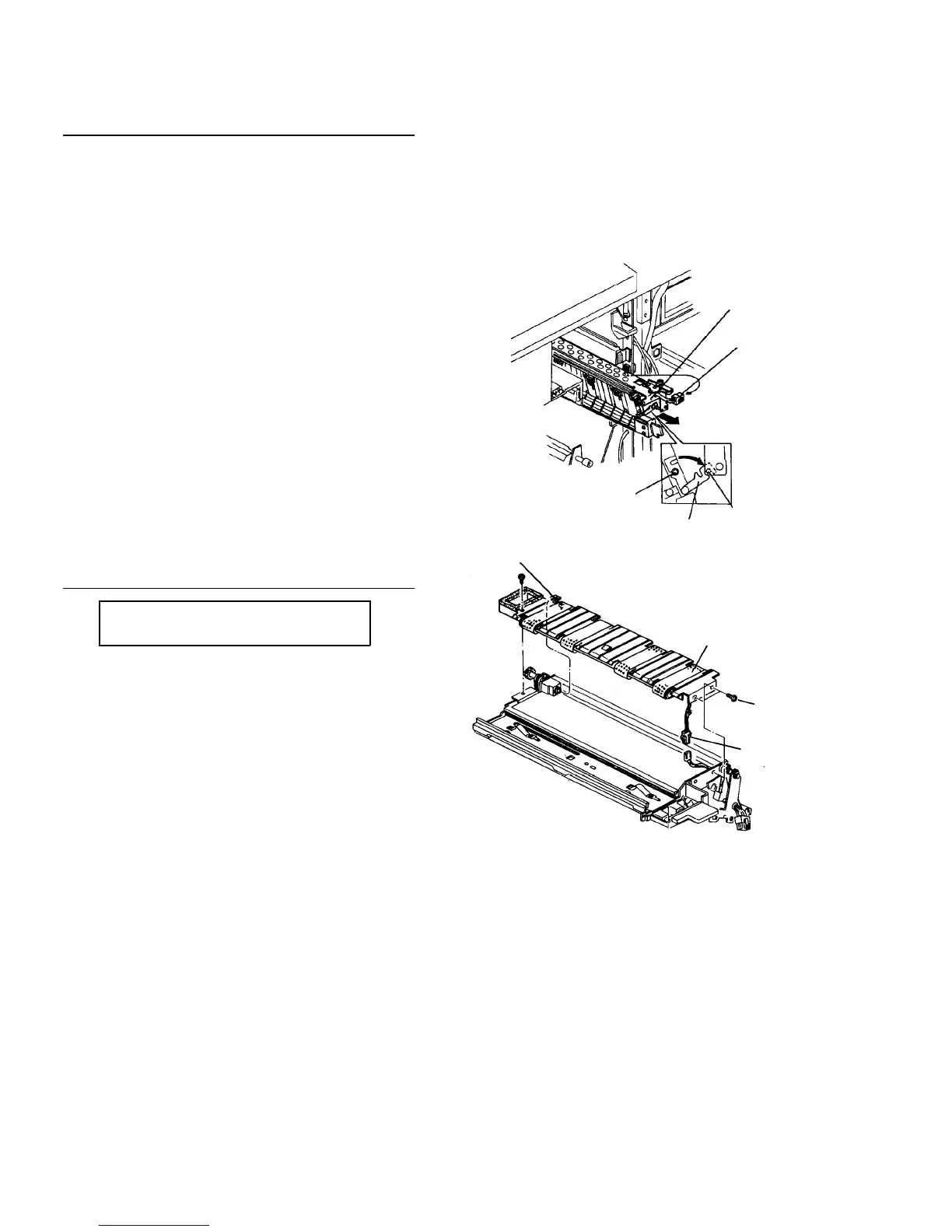
2.5.2 Replacing parts in the transport unit
Removing the transport unit
1. Pull out first paper tray.
2. Turn off the main switch, and open the front and
upper right doors.
3. Remove each inner cover from the fusing, upper
vertical transport, and transport units.
4. Pull out the connector of the transport unit.
5. Shift the transport unit to the right.
6. Loosen the fixing screw of the mounting and
dismounting arm, and hook the arm on the pin.
7. Remove one screw fixing the transport unit.
8. Draw the fusing unit and pull out the transport unit.
CAUTION
Carefully pull out the unit so that the casing of
the T/S corona unit is not brought in contact
with rollers and pressure springs of the vertical
transport unit.
Removing the vacuum unit
PM cycle: Clean the fusing entrance
guide plate every 200K
1. Remove three screws (two on the front and one on
the far side) fixing the vacuum unit.
2. Slide the vacuum unit to the front to disengage the
drive joint.
3. Disconnect the connector from the separation
sensor.
4. Remove the unit and clean the fusing entrance
guide plate on the main body side. If the unit is not
removed every 200K, remove the fusing unit and
clean it from the top.
Unit fixing screw
Connector
Pin
Mounting and
dismounting arm
Fixing screw
Drive joint
Transport belt
Fixing screw
Connector for
separation
sensor













 To Next Page