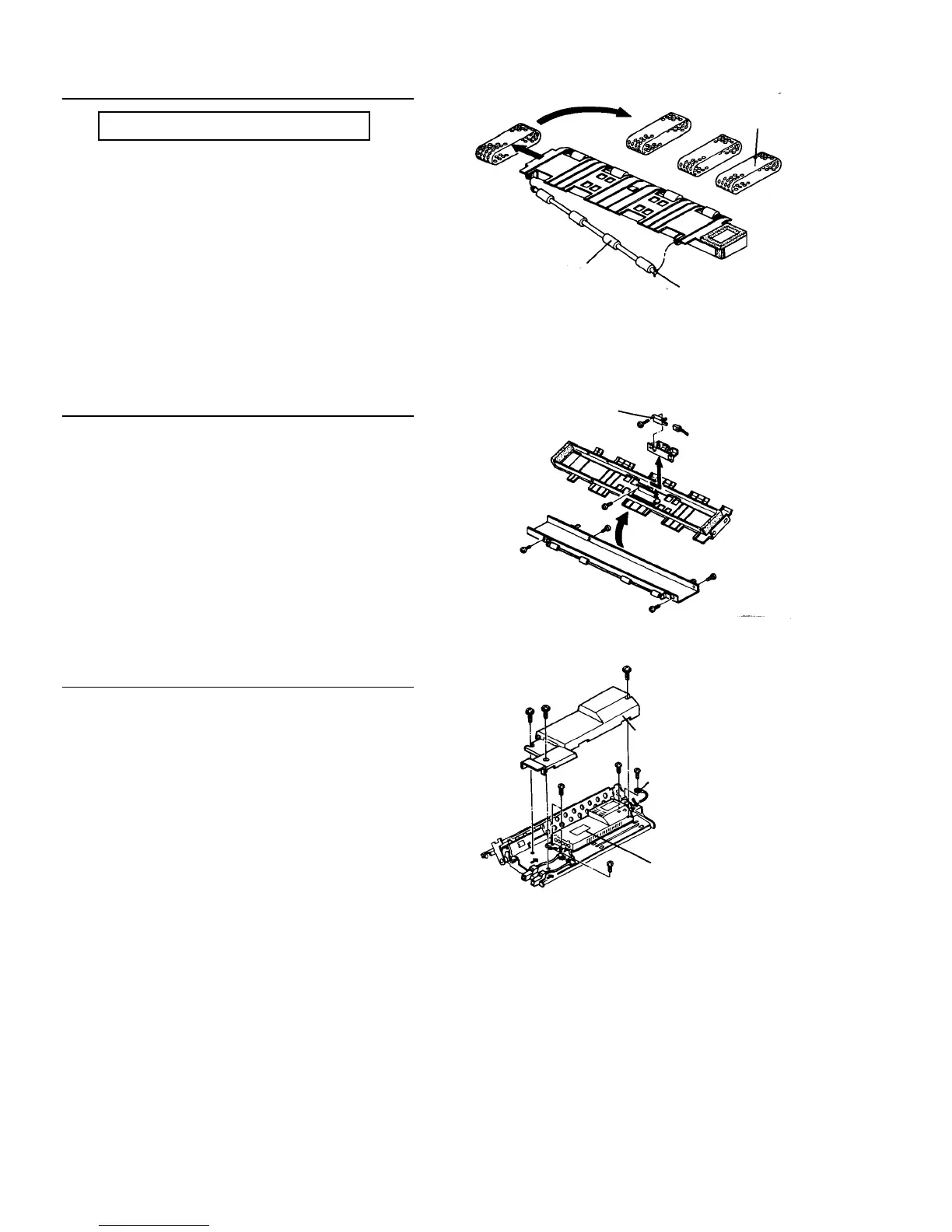
Replacing the transport belt and roller
PM cycle: Clean every 600K
1. Pull the joint side of the transport roller and slide
the roller.
2. Move the transport roller to the underside of the
guide plate.
3. Replace the transport belts and assemble them in
the reverse order.
NOTE
Drive the transport roller by hand and check that the
transport belts are not put aside and rotate
smoothly.
Replacing the separation sensor
1. Remove the transport belts.
2. Remove four screws to divide the transport guide
plate into upper and lower parts.
3. Replace the separation sensor and assemble in
the reverse order.
Replacing the transfer and separation power pack
1. Remove the transport unit and place it up side
down. Remove three screws to remove the power
pack inner cover.
2. Pull out the power pack connector.
3. Disconnect the ground wire.
4. Remove the cord clamp and disconnect the cord
terminals.
5. Remove three screws to remove the power pack
and assemble in the reverse order.
Separation sensor
Power pack inner cover
Ground wire
Power pack
Transport belt
Joint
Transport roller













 To Next Page