Configuring the Details of the Registered Information
80
7
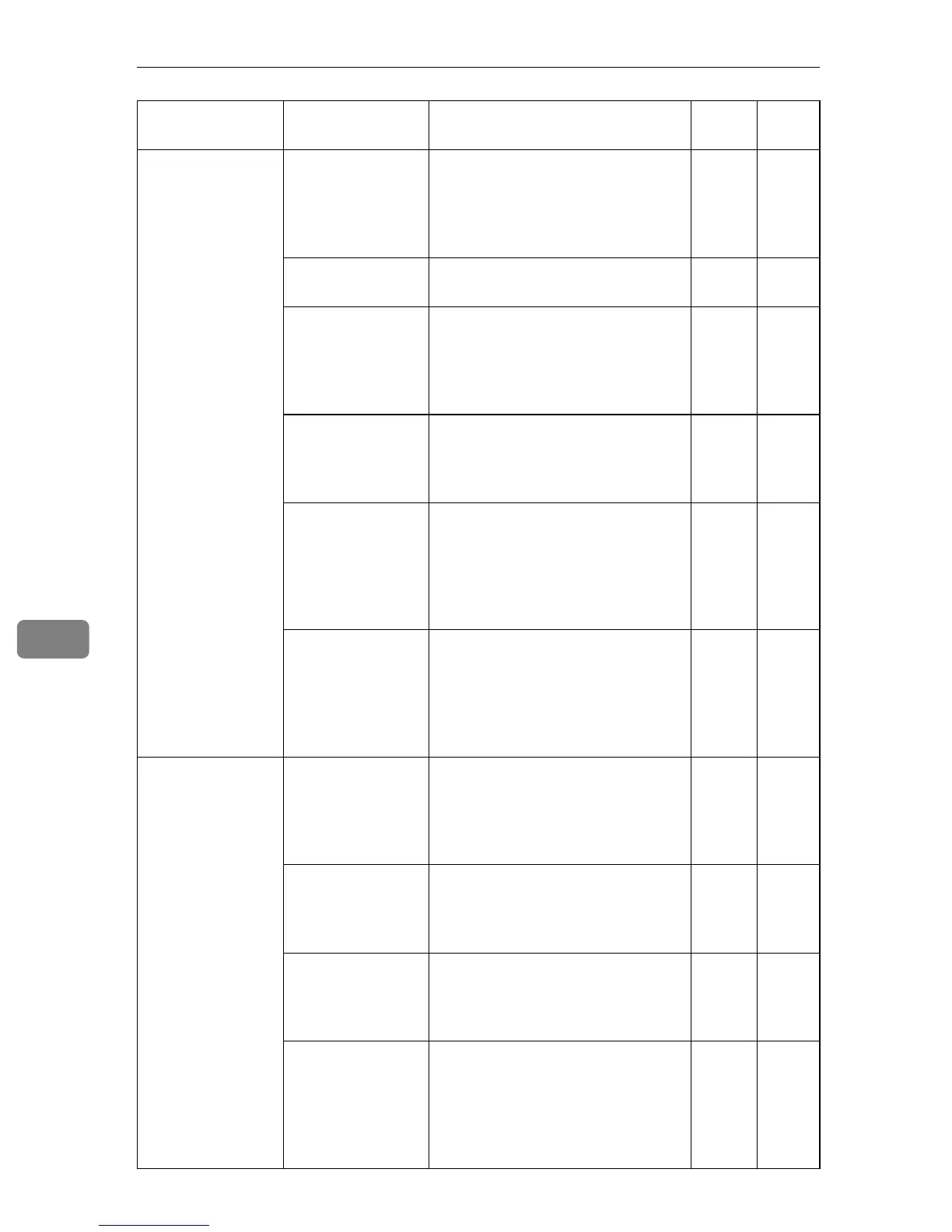
SMTP Server SMTP server ad-
dress
This is the IP address or name of
the SMTP server (a server to send
E-mails) . It is required to enter this
when using the “E-mail (SMTP)”
method.
❍❍
SMTP server port This is a port number for the SMTP
server. Usually set at 25.
❍❍
SMTP_AUTH Select “Enable” if your SMTP Serv-
er uses SMTP authentication. Select
“Disable” if your SMTP does not
use SMTP authentication or uses
POP before SMTP authentication.
❍❍
SMTP_AUTH au-
thentication meth-
od
Set this item when [SMTP_AUTH] is
set to “Enable”. Select from among
Auto, DIGEST-MD5, CRAM-MD5,
LOGIN and PLAIN.
❍❍
User name This is the user name (User ID)
used for SMTP_AUTH authentica-
tion. Usually, the same E-mail ad-
dress with [RC Gate E-mail address
(for sender)] is applied, but it may be
different for security reasons.
❍❍
Password A password for [User name] used
for SMTP_AUTH authentication.
Usually, the same password for
[RC Gate E-mail address (for sender)] is
applied, but it may be different for
security reasons.
❍❍
POP Server POP before SMTP Select “Enable” if your SMTP uses
POP before SMTP authentication.
Select “Disable” if your server does
not use SMTP authentication or
uses SMTP_AUTH authentication.
❍❍
POP server address
This is the IP address or the name
of the POP server when using
“POP before SMTP” authentica-
tion.
❍❍
POP server port This is the number of the POP serv-
er port when using “POP before
SMTP” authentication. Usually set
at 110.
❍❍
User name This is the user name (User ID)
used for POP before SMTP authen-
tication. Usually, the same E-mail
address with [RC Gate E-mail address
(for sender)] is applied, but it may be
different for security reasons.
❍❍
Groups Items Description Admin
Regis-
trant



 To Next Page