14 SteelFusion Edge Hardware and Maintenance Guide
SteelFusion Edge Overview 1U SteelFusion Edge appliances
1U SteelFusion Edge LEDs
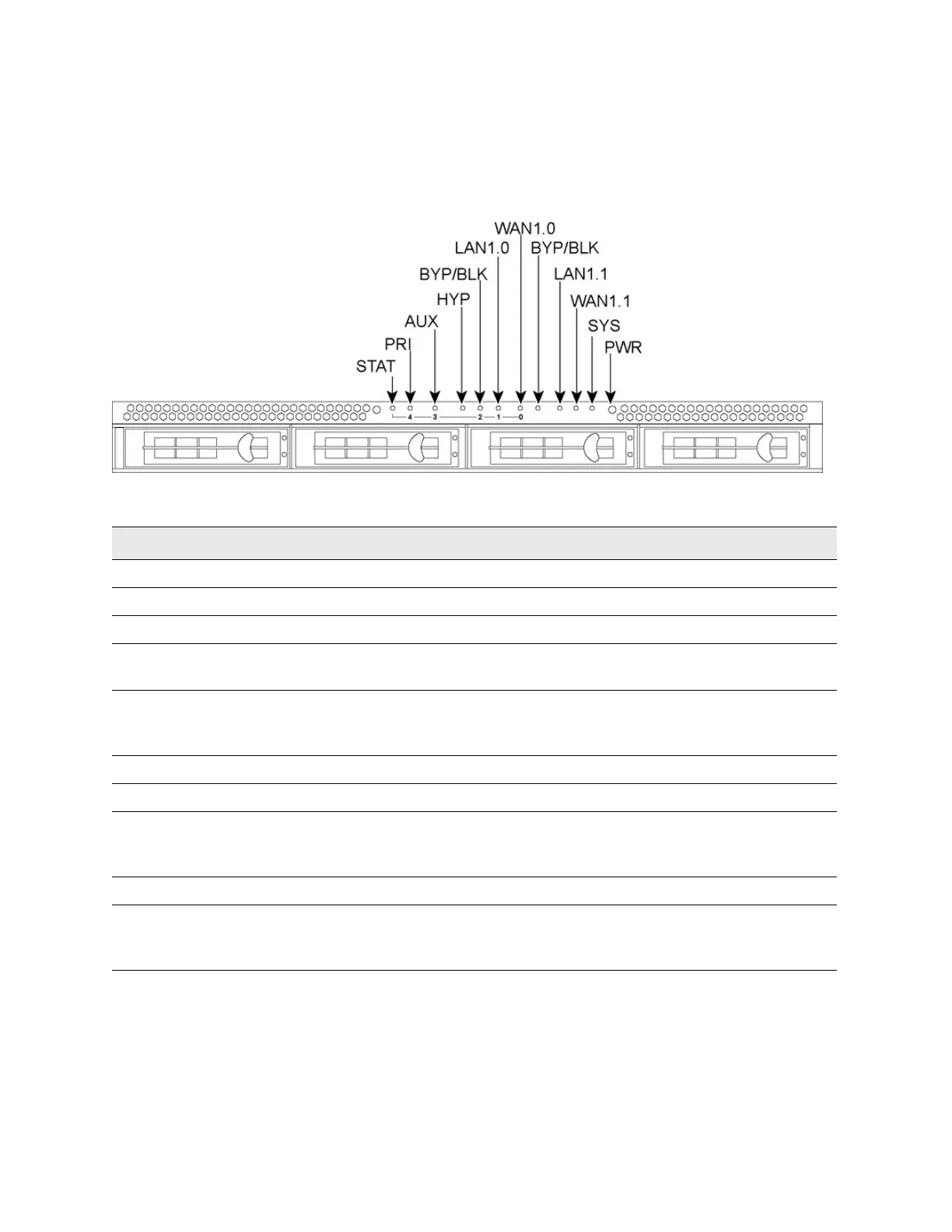
This section describes the ports and LEDs on the SteelFusion Edge 2100 and SteelFusion Edge 2200
appliances. Figure 1-4 shows the front panel LED locations.
Figure 1-4. 1U SteelFusion Edge LEDs and buttons (front view)
The following tables summarize the system LEDs for the 1U SteelFusion Edge appliances.
Front panel LEDs and buttons Status
STAT (Status) Button (not an LED)
PRI (Primary) Link and traffic = blinks blue
AUX (Auxiliary) Link and traffic = links blue
HYP (Hypervisor) Hypervisor power on = blue
Hypervisor power off = no light
BYP/BLK
BYP (Bypass)
BLK = (Block) (Disconnect)
Normal = no light
Bypass or block (disconnect) = orange
LAN1.0 LAN1.1 Link and traffic = blinks blue
WAN1.0 WAN1.1 Link and traffic = blinks blue
SYS (System) Powering up = red
BIOS POST = orange
Normal = blue
PWR (Power) Button (not an LED)
HDDs/SSDs Disk connected = blue
Read/write activity = blinks blue
Failed disk = orange



 To Next Page