52 SteelFusion Edge Hardware and Maintenance Guide
Replacing SteelFusion Edge Components Adding and replacing memory modules
Caution: Use gloves when replacing the power supply units; they can become hot to the touch.
To replace power supply units in 1U and 2U appliances
1. Locate the defective power supply unit and remove the power cord.
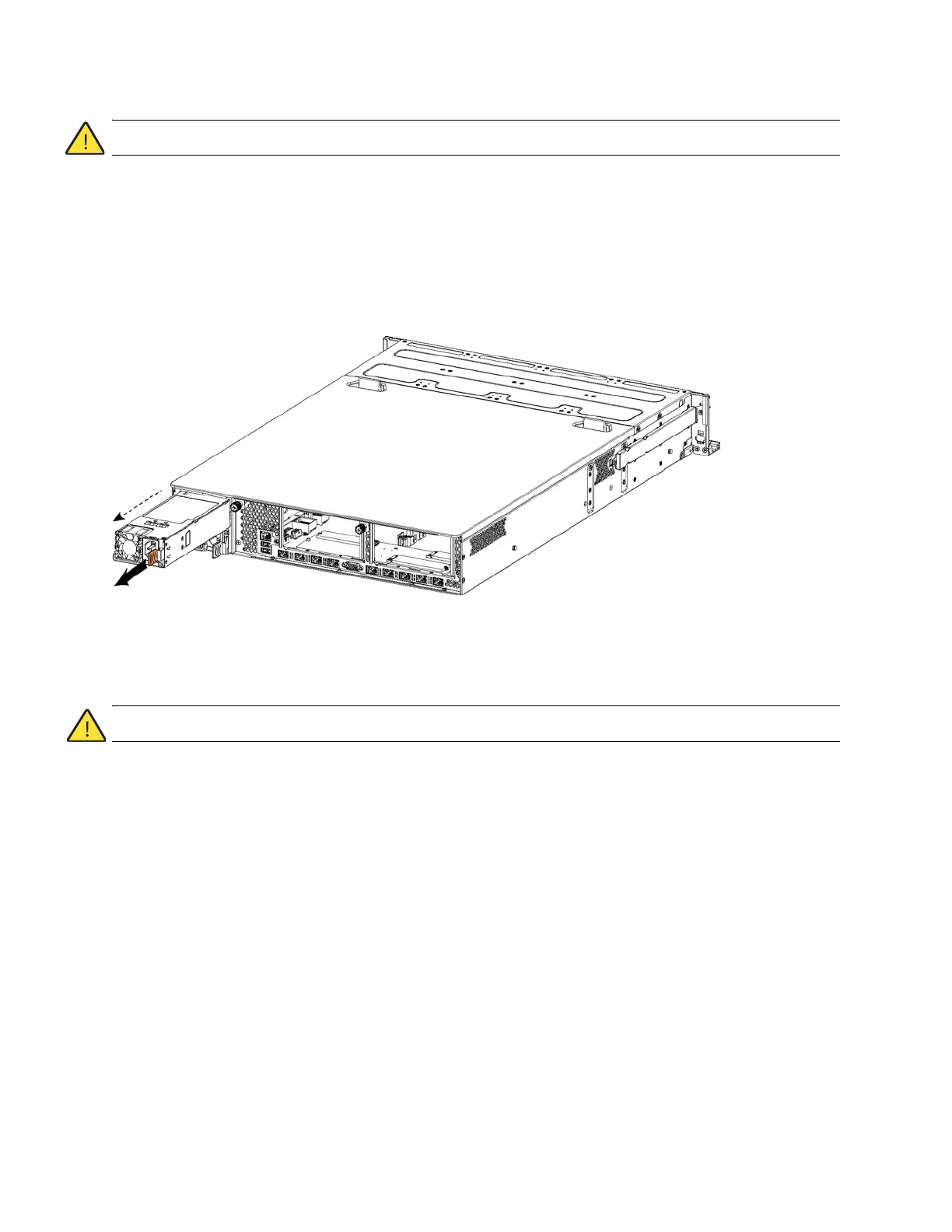
2. Press the release tab toward the black handle, and pull the power supply unit toward you.
(Figure 4-11.)
Figure 4-11. Removing the power supply unit from a SteelFusion Edge appliance
Note: Power Supply 1 (PS1) is on top, and Power Supply 2 (PS2) is on the bottom.
3. Pull the power supply unit out of the chassis.
Caution: Put the defective power supply unit aside; wait until it cools down before touching it.
4. Slide in the new power supply unit until it mates with the back connectors in the chassis.
When the power supply unit is pushed all the way in, the button clicks to the right.
5. Plug the AC power cord into the new power supply unit.
Adding and replacing memory modules
This section describes how to remove and replace existing memory modules and install additional
memory modules in the SteelFusion Edge appliances. This section includes the following procedures:
“Installing additional memory modules in SteelFusion Edge appliances” on page 53
“Replacing memory modules in 1U SteelFusion Edge appliances” on page 54
“Replacing memory modules in 2U SteelFusion Edge appliances” on page 58



 To Next Page