54 SteelFusion Edge Hardware and Maintenance Guide
Replacing SteelFusion Edge Components Adding and replacing memory modules
This table lists the memory slots and that are occupied by default (memory size indicated in black) and
available for additional memory module installation (memory size indicated in red).
To install the additional memory modules in the SteelFusion appliances, see the “Replacing memory
modules in 1U SteelFusion Edge appliances,” or the “Replacing memory modules in 2U SteelFusion
Edge appliances,” section.
Replacing memory modules in 1U SteelFusion Edge appliances
This section describes how to add and replace memory modules in SteelFusion Edge 2100 and
SteelFusion Edge 2200 appliances. When replacing memory in the appliances, install the memory in the
same slots.
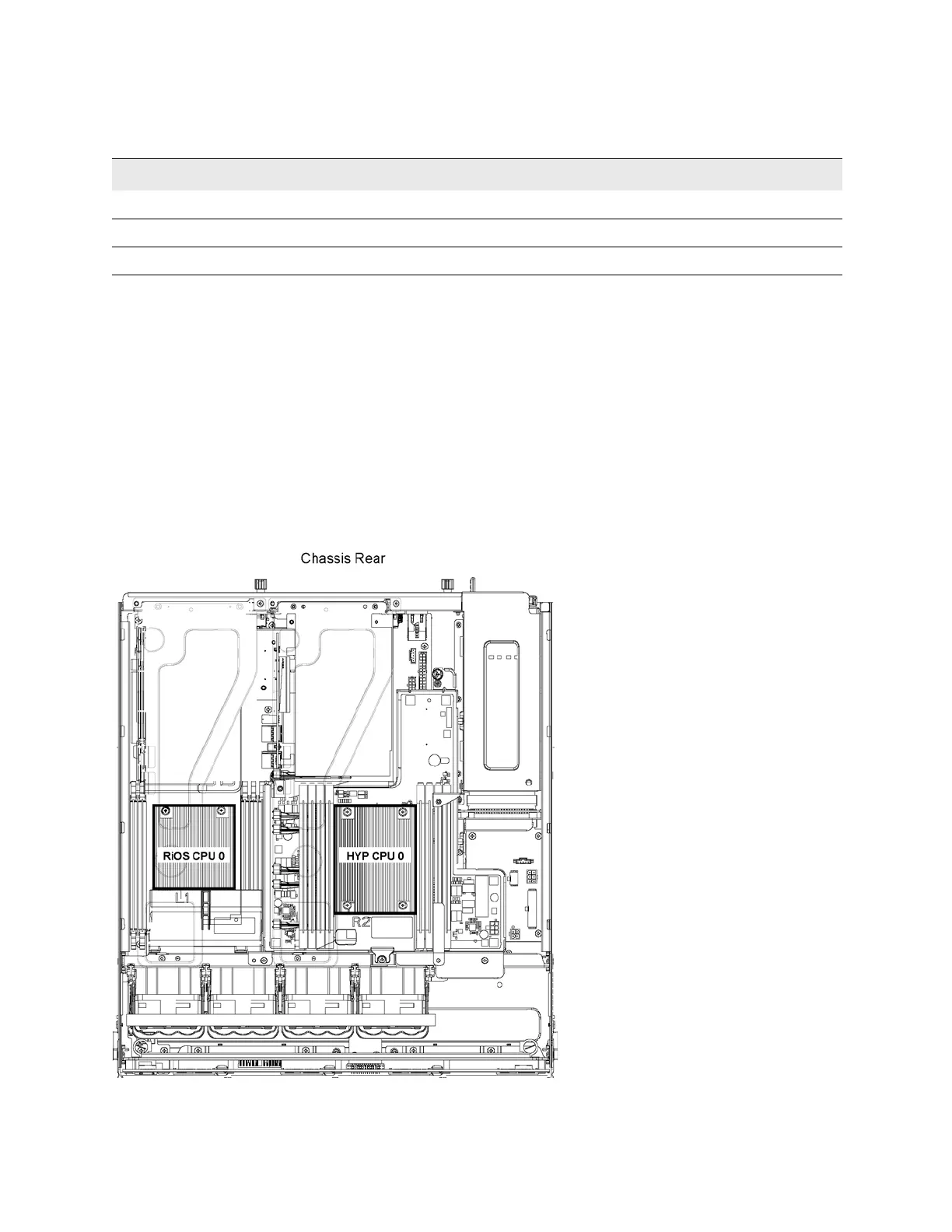
The following diagram shows memory module slot locations in these appliances. (Figure 4-13.)
Figure 4-13. Memory module slot locations in 1U SteelFusion Edge appliances
SFED DIMM C0 DIMM C1 DIMM D0 DIMM D1 CPU DIMM B1 DIMM B0 DIMM A1 DIMM A0
2100 16 GB 16 GB 16 GB 16 GB
2200 16 GB 16 GB 8 GB 8 GB 8 GB 8 GB 16 GB 16 GB
3100 16 GB 16 GB 16 GB 16 GB 16 GB 16 GB 16 GB 16 GB



 To Next Page