98 SteelFusion Edge Hardware and Maintenance Guide
Monitoring and Managing the Appliances with BMC Viewing field-replaceable unit information
To modify an entry
Select a configured entry and click Modify. Alternatively, double click the entry.
To delete an entry
Select the entry to be deleted and click Delete.
Configuring users
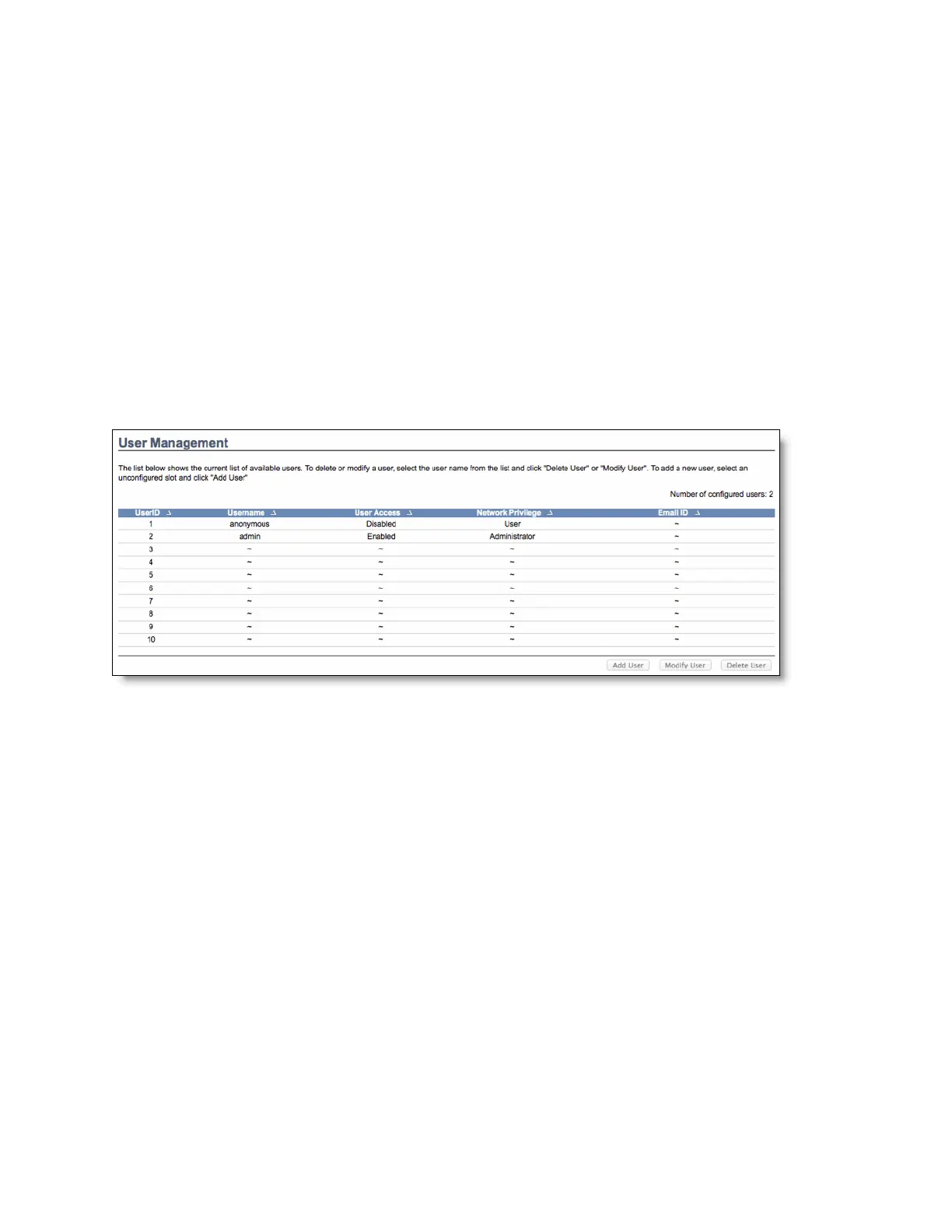
You can view and manage users with access to the BMC in the Configuration > Users page. The page
shows all configured users and available spaces. To view the page, you must have operator privileges.
You can set up 10 users, including the defaults of admin and anonymous. To modify or add a user, you
must have administrator privileges. (See Figure D-6.)
Figure D-6. User configuration
A tilde character (~) indicates a free slot.
To add a user
Select a free slot and click Add User. Alternatively, double click a free slot.
To modify a user
Select a configured user and click Modify User. Alternatively, double click the user.
To delete a user
Select the user to be deleted and click Delete User.
Configuring SSL
You can use SSL to access the BMC in a secure mode. You can upload a certificate and private key file
into the BMC or you can generate an SSL certificate based on configuration details.



 To Next Page