108
Multi-room & UNDOK
Dissolve a group
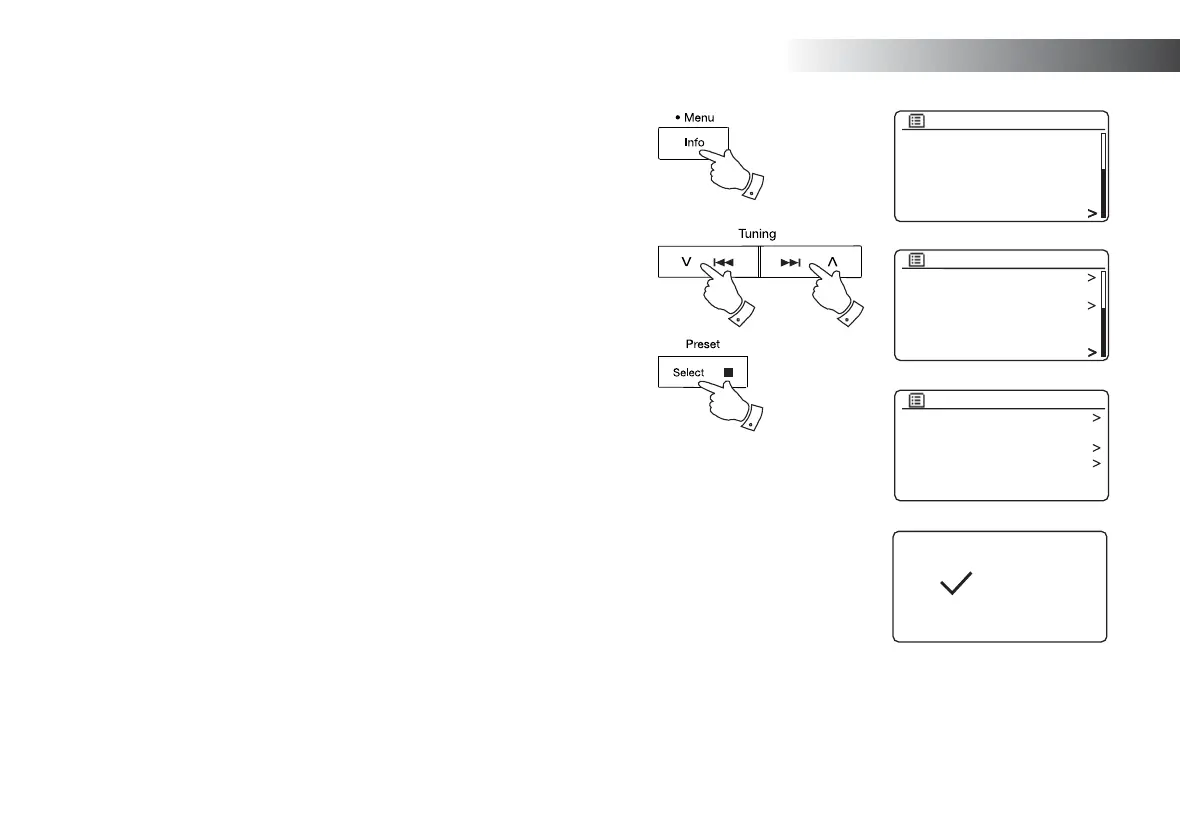
You can dissolve a current group.
1. Access the menu for the current mode, press and hold the Menu button.
2. Press the Menu Up or Down buttons until 'System settings' is highlighted
on the display.
3. Press and release the Select button to enter the settings menu.
4. Press the Menu Up or Down buttons until 'Multi-room' is highlighted on the
display. Press and release the Select button.
5. Press the Menu Up or Down buttons until 'Dissolve group' is highlighted on
the display. Press and release the Select button.
6. The current group will be dissolved.
Each of the products that were in the group can now be operated individually.
Alarms and Multi-room
If your sound system is confi gured as part of a multi-room group, then the sound
system will remove itself from that group when the sound system switches itself
on as a result of an alarm having been set. This is so that an alarm sounding
on one radio will not cause all of the other products in the group to be activated
at the same time.
If you wish to use your sound system as part of a multi-room group after using
the alarm function, you will need to add the sound system back into the group
manually. This is most easily performed using the UNDOK app as described
on page 100.
SD
Bluetooth
Aux in
Sleep
Alarms
System settings
Main menu
Rec. default dest.
Factory reset
Software update
Setup wizard
System info
Multi-room
System settings
View details
Create new group
Add to group
List current clients
Leave group
Dissolve group
Multi-room
Dissolved
2-5 2-5
1
2-5



 To Next Page