77
CD track programming
In addition to playing of complete CDs, selected tracks, or a random
selection, the CD player allows you to programme a sequence of up to
20 tracks to be played in whatever order you choose.
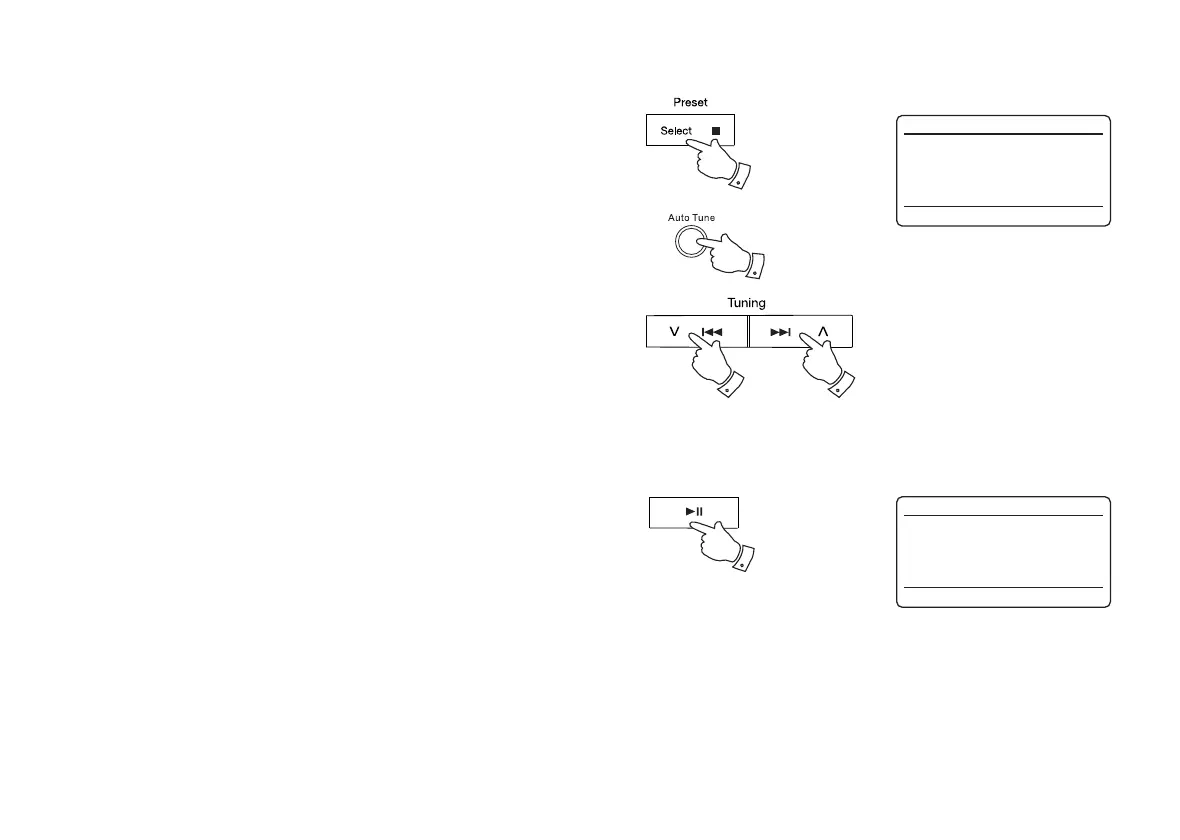
1. With the unit in CD mode and with a CD inserted, make sure that the
CD is stopped (press the Stop button).
2. To enter programming mode, press the Auto Tune button (on the
remote control).
3. Choose the fi rst track using the Next or Previous buttons.
4. Press the Auto Tune button to enter the selected track into the
programme.
5. Choose another track using the Next or Previous buttons, and enter it
into the programme using the Auto Tune button (track 10 in example
shown).
6. Repeat step 5 to store as many as 20 tracks in the programme.
7. When the programme is complete, press the Play / Pause button to
start playing. The tracks will then be played in the order that you have
just programmed.
8. Pressing the Stop button, or switching to another operating mode will
erase the programme.
Note: If you are programming the tracks using a CD with MP3 or WMA
fi les in folders (see the following pages), you can also use the Up or Down
Folder buttons to specify the folder in steps 3 and 5 above.
1,8
2-5
3,5 3,5
7
CD
12:34
T010 43:00
Stop
CD
12:34
P01 01-010
Program



 To Next Page