92
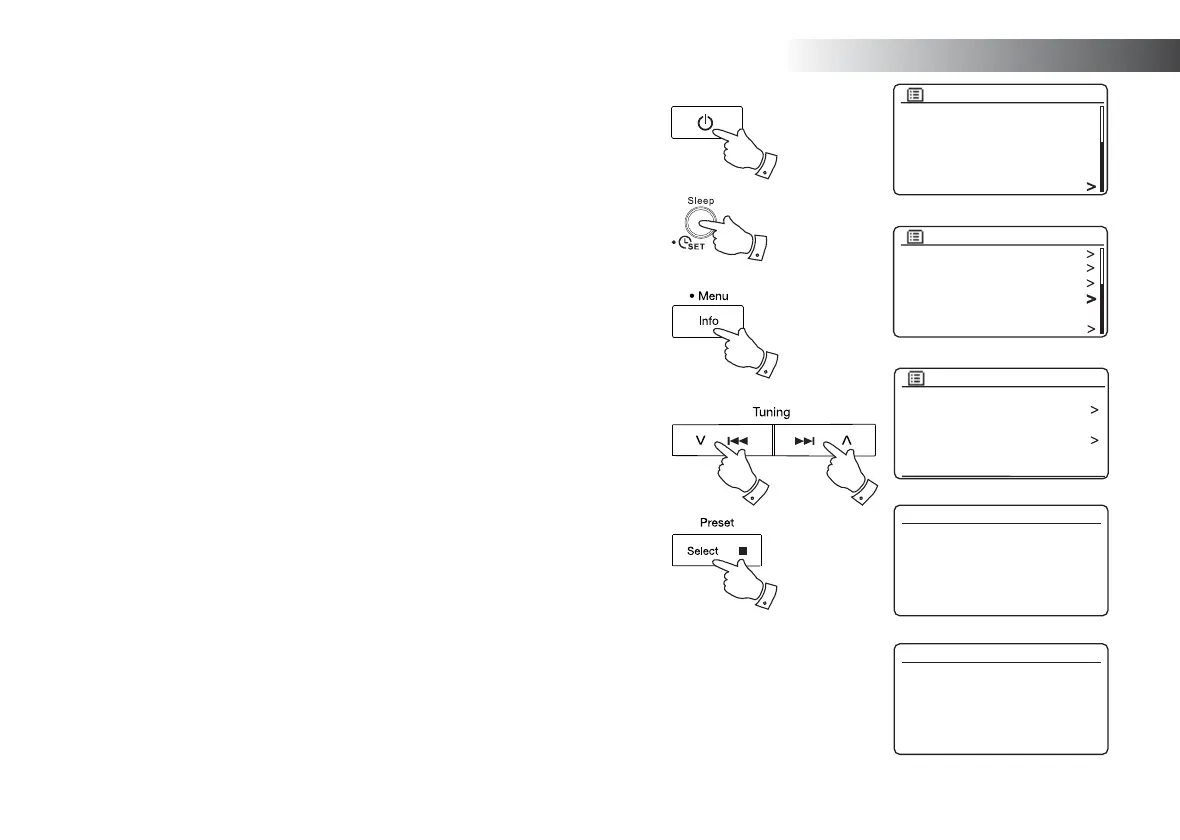
Manually setting the clock
After a connection to the Internet has been established, your radio will normally set its
clock automatically to the local time zone that was specifi ed during setup (see page
12). Should you need to set the time manually, change the time zone, or manually
switch from winter to summer time (from GMT to BST in the UK, also commonly
known outside the UK as daylight savings time), then please follow this procedure.
1. Press the On/Standby button to switch on your sound system.
2. Press and hold the Clock set button (on the remote control) and then skip to
step 5 below. Alternatively press and hold the Menu button to access the menu
for the current mode.
3. Press the Menu Up or Down buttons until 'System settings' is highlighted on
the display. Press and release the Select button to enter the System Settings
menu.
4. To change the time zone setting go to step 11. To change from winter to summer
time go to step 13.
To change the current time or date setting press the Menu Up or Down buttons
until 'Time/Date' is highlighted on the display, then press and release the Select
button to enter the time and date setting screen.
5. Press the Menu Up or Down buttons until 'Set Time/Date' is highlighted on the
display. Press and release the Select button to enter the clock setup. The day
digits will fl ash.
6. Press the Menu Up or Down buttons until the correct day is shown on the display.
Press and release the Select button to enter the selection. The month digits will
then fl ash.
7. Press the Menu Up or Down buttons to select the correct month. Press and
release the Select button to enter the selection. The year digits will then fl ash.
1
3-7 3-7
2
3-7
SD
Bluetooth
Aux in
Sleep
Alarms
System settings
Main menu
Backlight
Equaliser
Network
Time/Date
Inactive Standby
Language
System settings
06 - 04 - 2016
13 : 53
Set Time/Date
06 - 04 - 2016
13 : 53
Set Time/Date
Set Time/Date
Auto update
Set format
Set timezone
Daylight savings
Time/Date
Clock and Alarms
2



 To Next Page