47
Scan setting
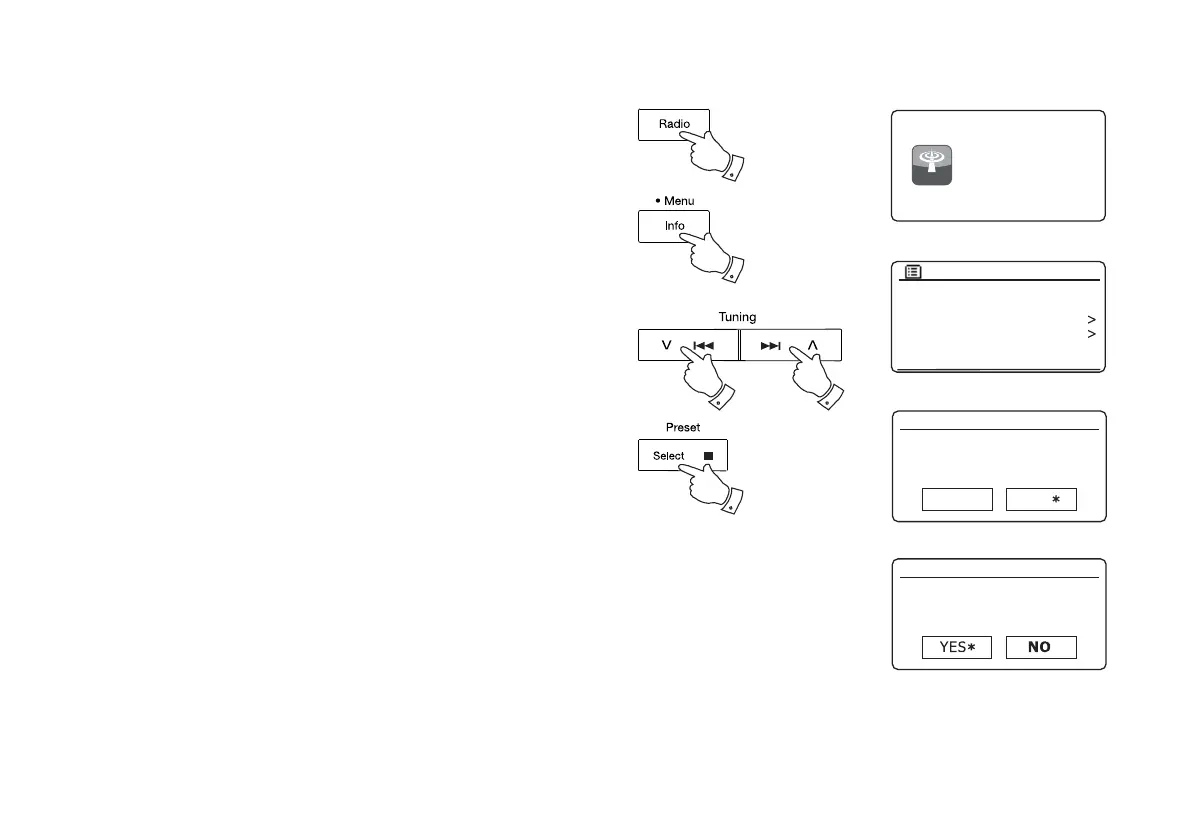
When using the FM mode your sound system can be set to either scan
local stations or to scan all stations including distant radio stations.
1. Press the Radio button as needed to select FM Radio mode.
2. Press and hold the Menu button to enter the FM menu.
3. Press the Menu Up or Down buttons until 'Scan setting' is highlighted
and then press and release the Select button to enter the scan
adjustment mode.
The current scan setting is indicated with an asterisk.
4. To set your radio so that only the stations with the strongest signals
are found during scanning press the Menu Up or Down buttons until
'YES' is highlighted. Press and release the Select button to confi rm
the setting. (Normally this will restrict scanning to local transmissions.)
Alternatively, to set your radio so that all available stations are found
during scanning (local and distant transmissions) press the Menu
Up or Down buttons until 'NO' is highlighted. Press and release the
Select button to confi rm the setting.
5. Press the Back button to return to the normal FM mode display.
FM R adio
FM
radio
1
3,4 3,4
2
3,4
Scan setting
Audio setting
System settings
Main menu
FM
FM station scan
Strong stations only?
FM station scan
Strong stations only?
YES NO



 To Next Page