19
Setup new audio system - Apple iOS device
If your device uses Android, please see page 20.
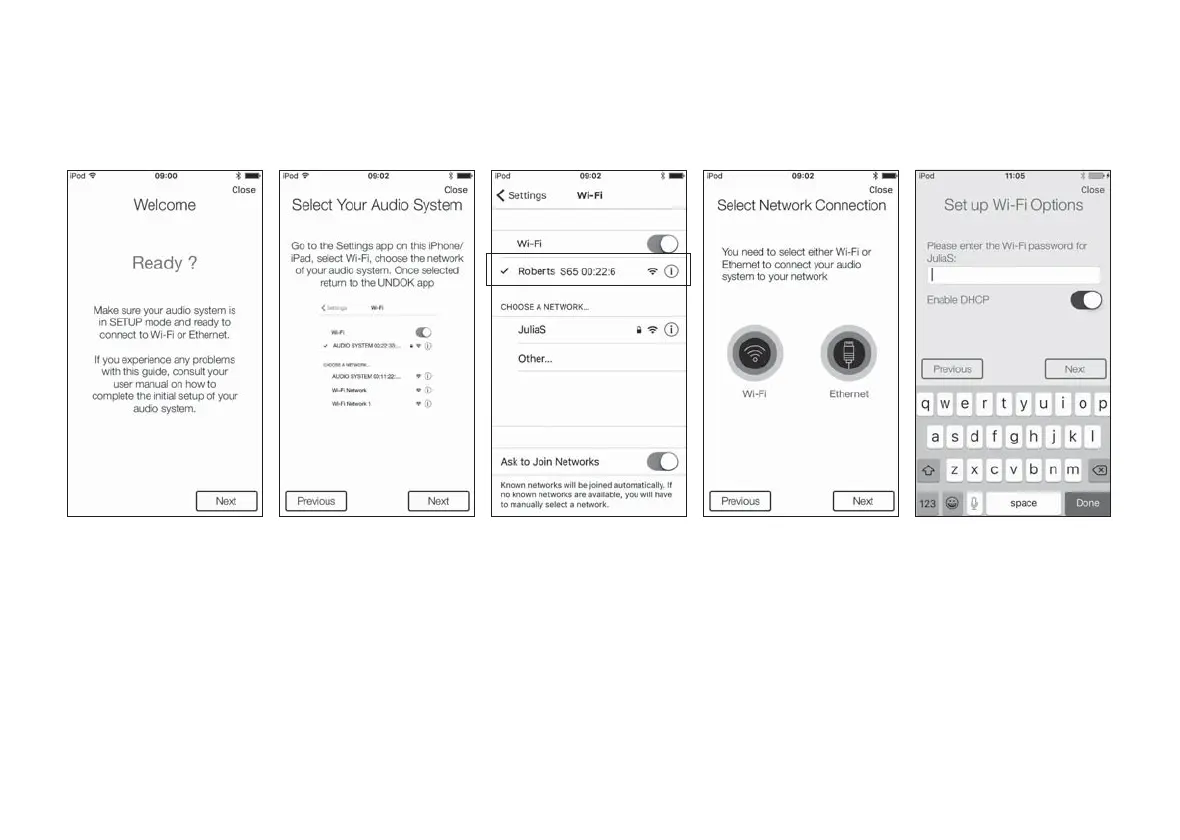
The UNDOK app has a setup wizard to help confi gure suitable audio devices to connect to your home WiFi network.
1. Open the UNDOK
app.
2. Setup a New Audio
system.
3. The app will prompt you
to use your device’s
WiFi settings to connect
to your sound system.
4. Select your Roberts
S65 sound system.
Once your device
has connected to the
sound system, return to
the UNDOK app.
5. Use the app to complete
the setup,including
giving the sound system
a name (living room, etc),
whether it is connected
via WiFi or Ethernet.
If you wish to connect
using an Ethernet cable
please (see page 115).
6. For a WiFi connection
the app will ask you to
choose a WiFi network
and enter the appropriate
password.
7. Your sound system will
connect to your network.



 To Next Page