66
Spotify Connect
4
Note: On some devices the layout of controls within the Spotify app may
be different from that shown and may also change with different versions
of the app. Refer to spotify.com/connect if needed.
Playing music using Spotify Connect
Spotify Connect lets you push a button to control the music between your
Spotify Connect enabled devices. While playing a song, you can switch
playback from your smart-phone, tablet, Desktop or even to a Connect
enabled radio.
1. Ensure your sound system is plugged in and connected to your network.
2. Make sure that both your radio and Apple iOS / Android device are
connected to the same network and that you have downloaded the
latest Spotify app on your device.
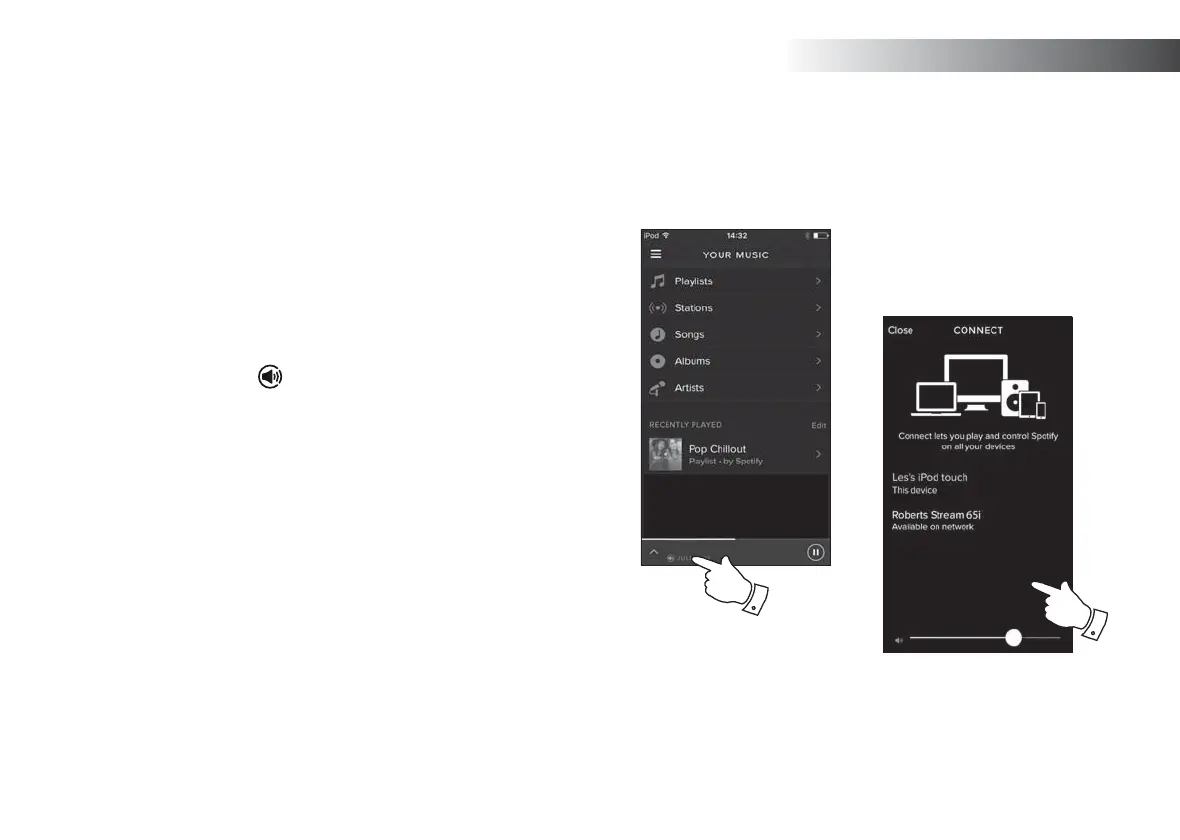
3. Simply open Spotify on your Apple iOS / Android device and tap the
Spotify Connect icon
on the play screen. When the Spotify app
has identifi ed other devices that are compatible with Connect, the
Connect icon will be shown with a circle. When another device is
playing, the Spotify Connect icon will be become green. Tapping the
Connect icon will show a list of Connect enabled devices and allow
remote control of the volume.
4. To select your sound system choose Stream 65i on the Spotify Connect
devices screen. You are now ready to play music through your sound
system using Spotify Connect.
The next time you open Spotify, it will continue playing from the previously
selected device.
3



 To Next Page