88
Delete this file
Delete all
System settings
Main menu
USB
2,4 2,4
1
3,4
Delete File
Delete this file?
Deleting fi les
After having recorded fi les to SD or USB media, you may later wish to
delete them in order to reclaim the space used. The Stream 65i can be used
to delete individual fi les, or to delete all of the media fi les on the media.
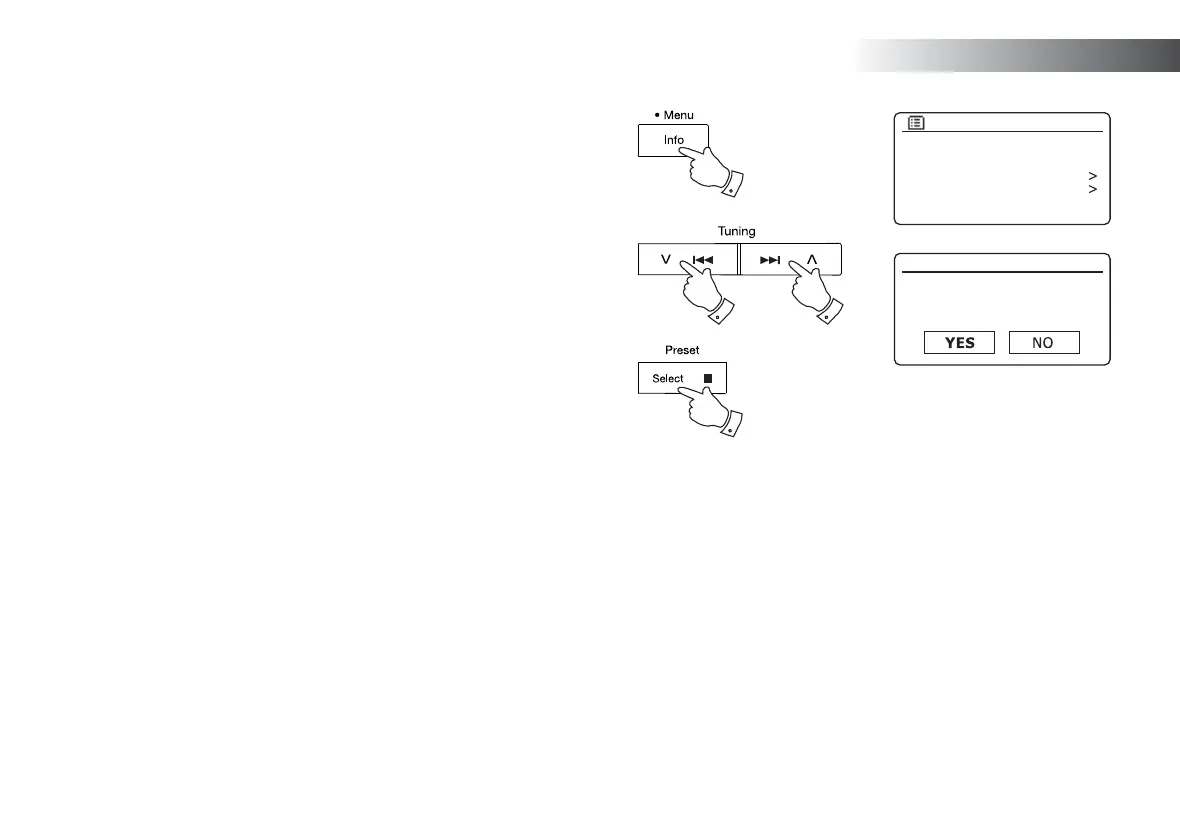
Deleting a single fi le
1. With the sound system in USB or SD mode, and with the media inserted
and the fi le you wish to delete is currently playing, press and hold
the Menu button.
2. Press the Menu Up or Down buttons until 'Delete this fi le' is highlighted
on the display.
3. Press and release the Select button. The display will ask you if you
wish to 'Delete this fi le?'
4. If you do not wish to delete the fi le, use the Menu Up or Down button
to highlight 'NO' and press and release the Select button to confi rm.
Alternatively, to delete the fi le use the Menu Up or Down button to
highlight 'YES' and press and release the Select button to confi rm
deletion.
The fi le will be deleted and playback will resume from the beginning
of the current folder. If there are no more fi les left on the media, then
the display will show 'No Music File'.
Note: Once a fi le has been deleted, it is not possible to recover the fi le.
SD / USB



 To Next Page