71
Connecting and reconnecting a Bluetooth device
You can only have one Bluetooth device connected to the sound system at
any one time although it may be paired with several devices. Once you have a
Bluetooth enabled device connected to your sound system it cannot be interrupted
by another Bluetooth device unless you choose to break the connection.
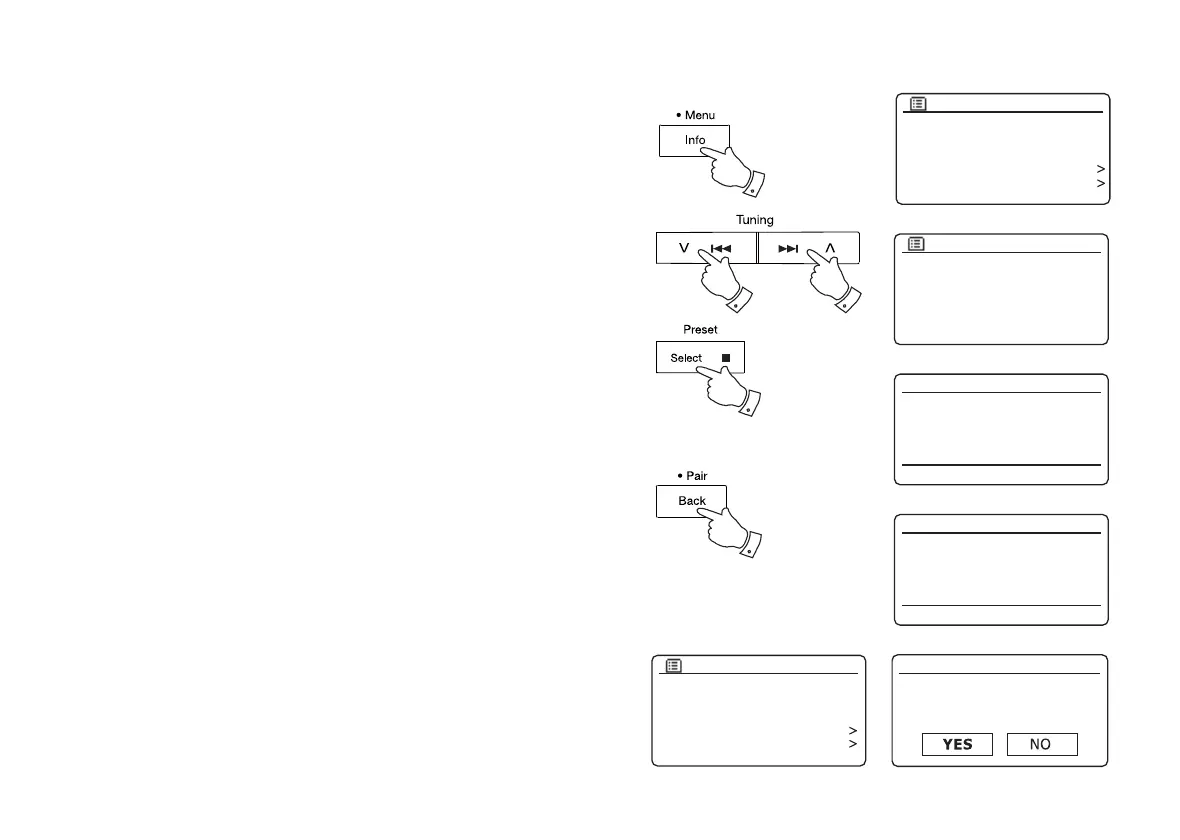
1. To connect to a different device, press and hold the Menu button on the
sound system to access the menu options.
Press the Menu Up or Down buttons until 'Paired devices' is highlighted.
Press and release the Select button.
2. The sound system will then display a list of previously connected devices.
Press the Menu Up or Down buttons to step through the list.
To connect to a previously paired device, press and release the Select button
when the device's name is highlighted. In some cases you may also need to
re-enable the connection from your device's Bluetooth settings. The sound
system will then connect to the device.
3. To connect to a new device, press and hold the Bluetooth Pair button or
select 'Connect device' from the menu. 'Pairing' will show on the display. The
sound system will become discoverable by other devices.
4. You can now pair the sound system with the new device using its Bluetooth
settings (the sound system will be listed as 'Stream-65i'). The name of the
newly connected device will be briefl y shown on the sound system's display.
You may then play music from the new device through the sound system.
5. If you no longer want your Bluetooth device to be paired with your sound
system you will need to delete the 'Stream 65i' pairing on the device. Please
refer to the device's Bluetooth documentation.
6. If you wish to forget all paired bluetooth devices, press and hold the Menu
button. Press the Menu Up or Down buttons until 'Forget devices' is highlighted.
Press and release the Select button and all currently paired devices will be
deleted.
1
1-6
1-6 1-6
3
1: Julia’s iPod touch
2: Jenny’s iPhone 5
3: Galaxy S5
4: Dad’s iPhone 6
Paired Devices
12:34
Julia’s iPod touch
Pairing
Bluetooth
12:34
Jenny’s iPhone 5
Playing
Bluetooth
Connect device
Paired Devices
Forget devices
System settings
Main menu
Bluetooth
Connect device
Paired Devices
Forget devices
System settings
Main menu
Bluetooth
Forget devices
Forget all devices?



 To Next Page