85
Recording to SD / USB
Your Stream 65i sound system has been designed to allow you to make
recordings to SD / SDHC cards or to USB connected memory devices.
Recordings are made in MP3 format at 128k bits per second.
SD / SDHC or USB memory media must use the FAT16 or FAT32 fi le
system in order to operate with the Stream 65i. Such media is usually
supplied already formatted or can be formatted using a PC with a suitable
card reader (for SD / SDHC cards) or USB connection (for USB memory).
It is possible to record onto media which already contains fi les written by
the sound system or your computer. The recorded fi les will be added to
those already present on the media.
Note: The recording feature is not available when using Spotify
Connect or when the sound system is acting as a client in a multi-
room group, please see page 102.
Making a recording
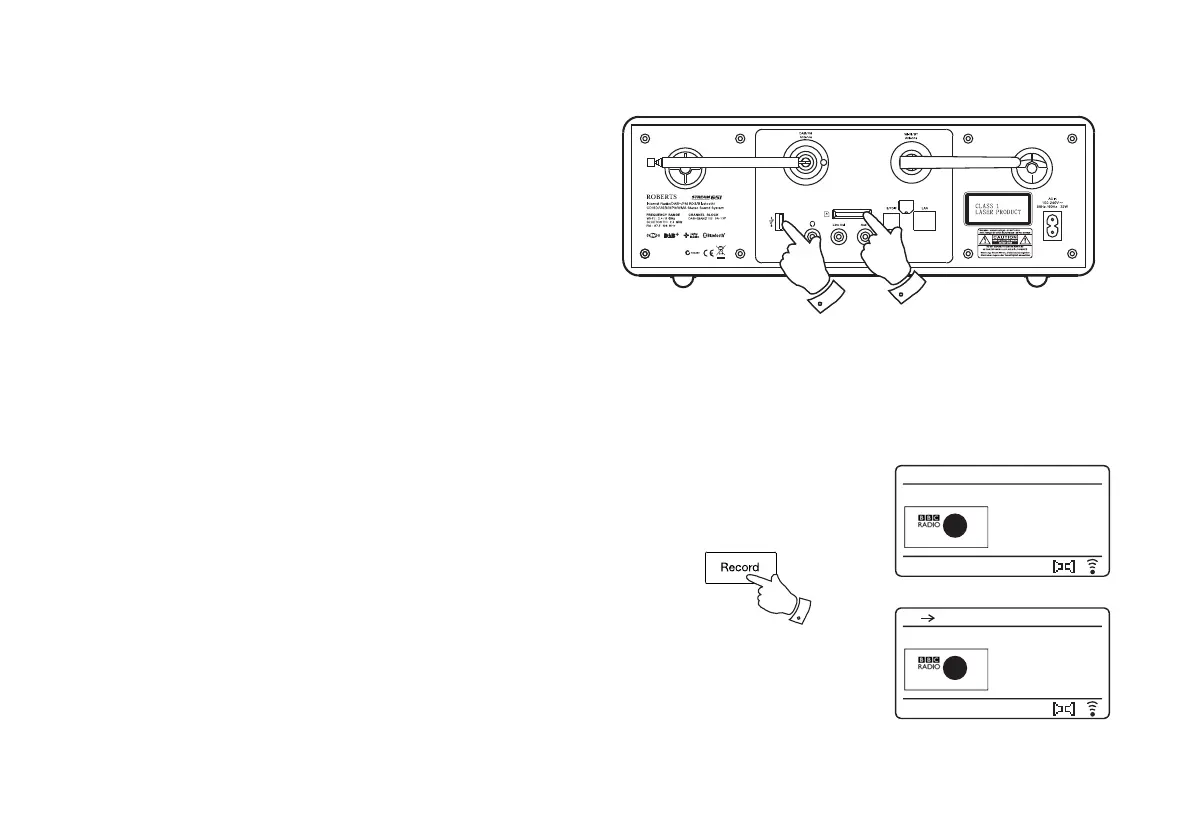
1. Select the desired source for the recording (Internet Radio, DAB, FM,
CD, etc.). Internet Radio is shown in the illustration. Set the volume
to the required listening level (the volume of the recording will not be
affected by this).
2. Insert the media on to which the recording is to be made.
3. Press the Record button. The display will show "Record initial...".
Recording will then start with the recording source shown on the
display.
If only one media type is present, then after a short while recording will
start. If both SD and USB media are detected, then the sound system
will default to the option previously set. The default media option is
accessed through the 'System settings' menu then by selecting 'Rec
default dest.'. Select 'SD card' or 'USB' memory as needed.
3
Description
The best new
music and
entertainment
Record initial...
12:34
BBC Radio 2
2
Description
The best new
music and
entertainment
IR USB
12:34
BBC Radio 2
2



 To Next Page