35
Selecting your Favourite stations or My Added stations
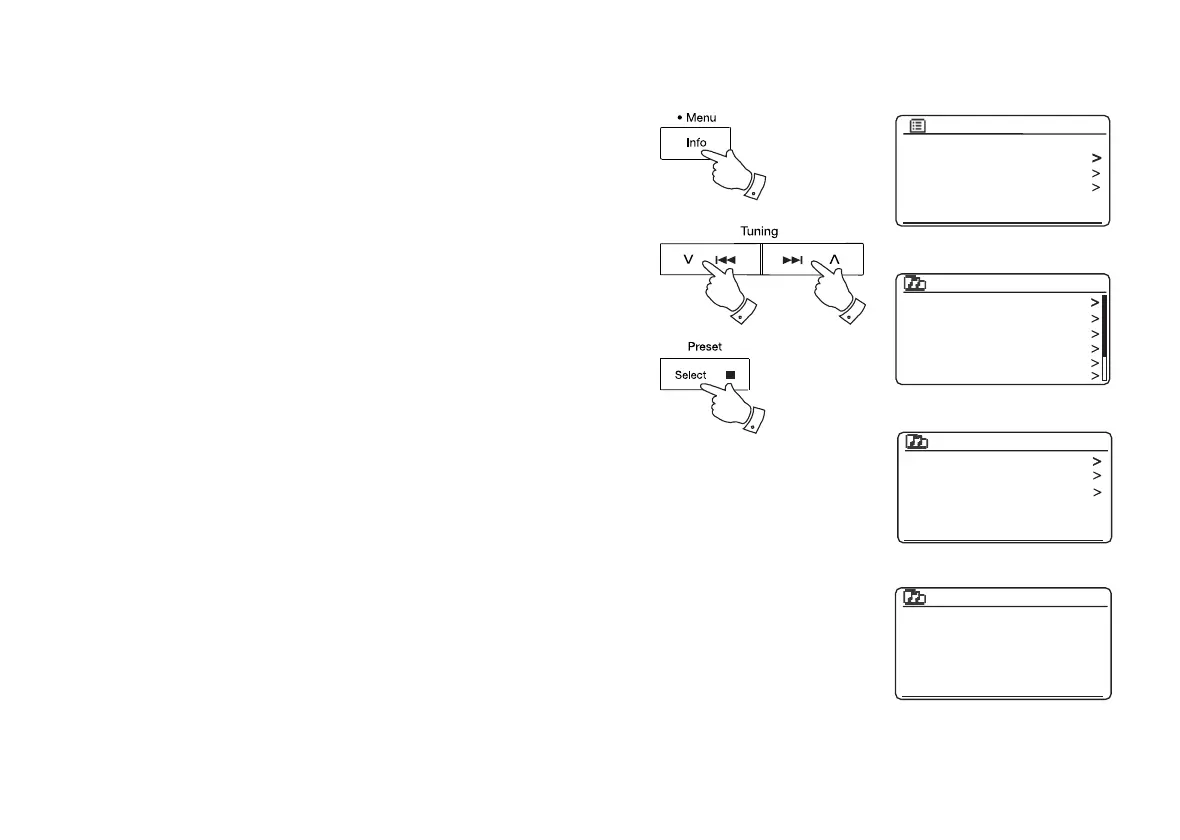
1. Press and hold the Menu button to enter the main Internet Radio menu.
2. Press the Menu Up or Down buttons until 'Station list' is highlighted on the
display. Press and release the Select button to enter the menu.
3. Press the Menu Up or Down buttons until 'My Favourites' or 'My Added
Stations' is highlighted on the display. Press and release the Select button
and your favourite stations list or your added stations list will appear on the
display (set up as described on page 33).
4. Press the Menu Up or Down buttons to highlight the required station and
then press and release the Select button to confi rm your selection.
The display will show 'Connecting...' while it fi nds the new station.
If the station has on-demand content such as Podcasts, please see page 28,
'Selecting a Podcast'.
Should you be unable to connect to a particular station, please note that some
radio stations do not broadcast 24 hours per day, and some stations are not
always on-line.
In addition, as mentioned on page 33, it is possible to specify audio streams for
'My added stations' which are not compatible with your sound system. In this
event the station will not be playable. The Roberts Stream 65i can only play MP3,
WMA and AAC internet radio streams.
Note that the audio coding formats listed are generic terms. There are many
variations of each format, as well a variety of streaming protocols in use by
different radio broadcasters. Your sound system has been designed to play the
vast majority of coding and streaming formats in current use by broadcasters.
1
2-4
2-4 2-4
Last listened
Station list
System settings
Main menu
Internet radio
My Favourites
Local United Kingdom
BBC
Stations
Podcasts
My Added Stations
Internet radio
BBC Radio 2
BBC Radio 7
Bluegrass radio
Heart
Smith fav
Smith fav
Podcasts
Stations
My Favourites



 To Next Page